Searching Algorithms: Linear vs Binary Search (OCR A-Level CS 2.3.1)
OCR A-Level CS 2.3.1: how linear search and binary search work, their complexity, when to use each, and worked traces you can follow step by step.

Free Searching Linear Binary revision resources (OCR A-Level Computer Science, 2.3.1)
We’ve made exam-style practice for this exact topic, free to download: Searching Linear Binary question sheet, mark scheme and cheat sheet. Grab them, have a go, then read the full guide below.
Finding an item in a list is one of the most common things a program does — and how you search makes a huge difference. Spec point 2.3.1(f) includes the two standard search algorithms: linear search and binary search. Paper 2 reliably asks you to trace them, give their complexity, and say which suits a given situation — so you need to know both inside out.
Linear search
A linear search checks each item in the list one at a time, from the start, until it finds the target or reaches the end.
Works on any list — sorted or not. That's its big advantage.
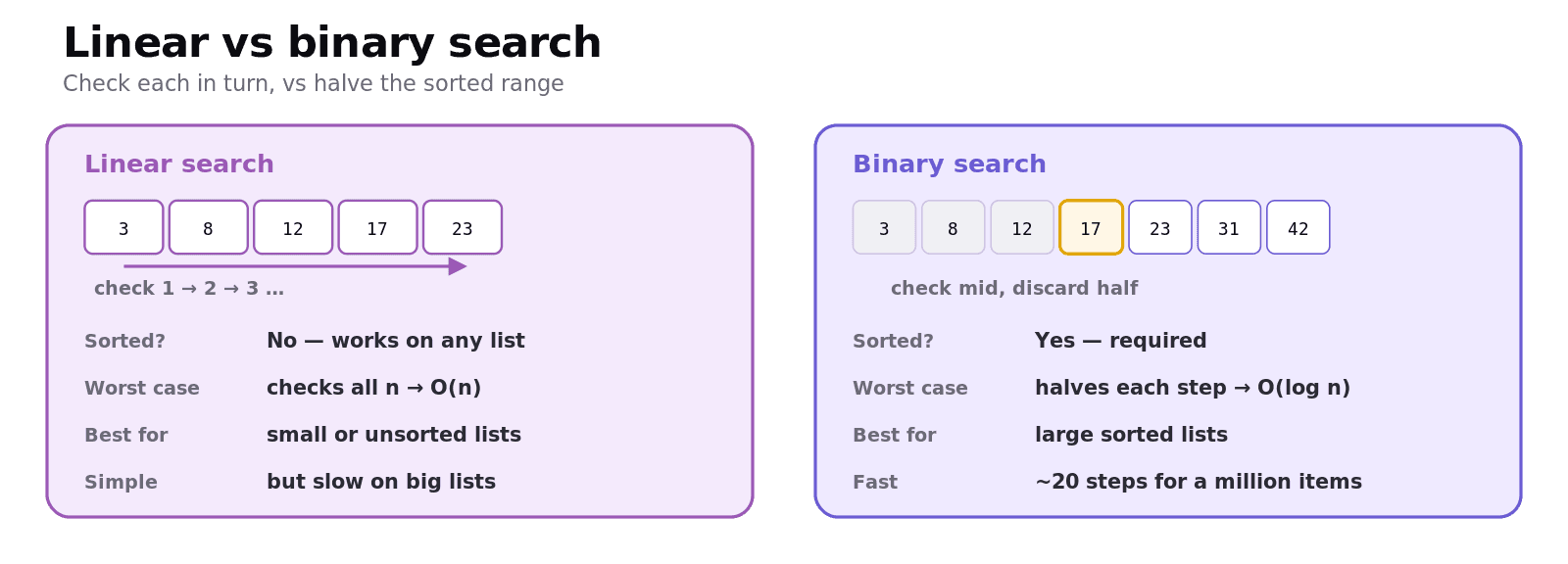
Worst case = the target is last or missing, so it checks all n items → O(n) (linear time).
Simple to write, but slow on large lists.
Binary search
A binary search is far faster, but has a precondition: the list must already be sorted. It works by repeatedly halving the part of the list still being searched, using three pointers — low, high and mid:
Look at the middle item (
mid).If it's the target → found.
If the target is bigger, discard the left half (
low = mid + 1).If the target is smaller, discard the right half (
high = mid - 1).Repeat until found, or
low > high(not present).
Because each step throws away half the remaining items, binary search is O(log n) — it finds an item in a million-record list in about 20 steps.
Worked example: binary search for 42
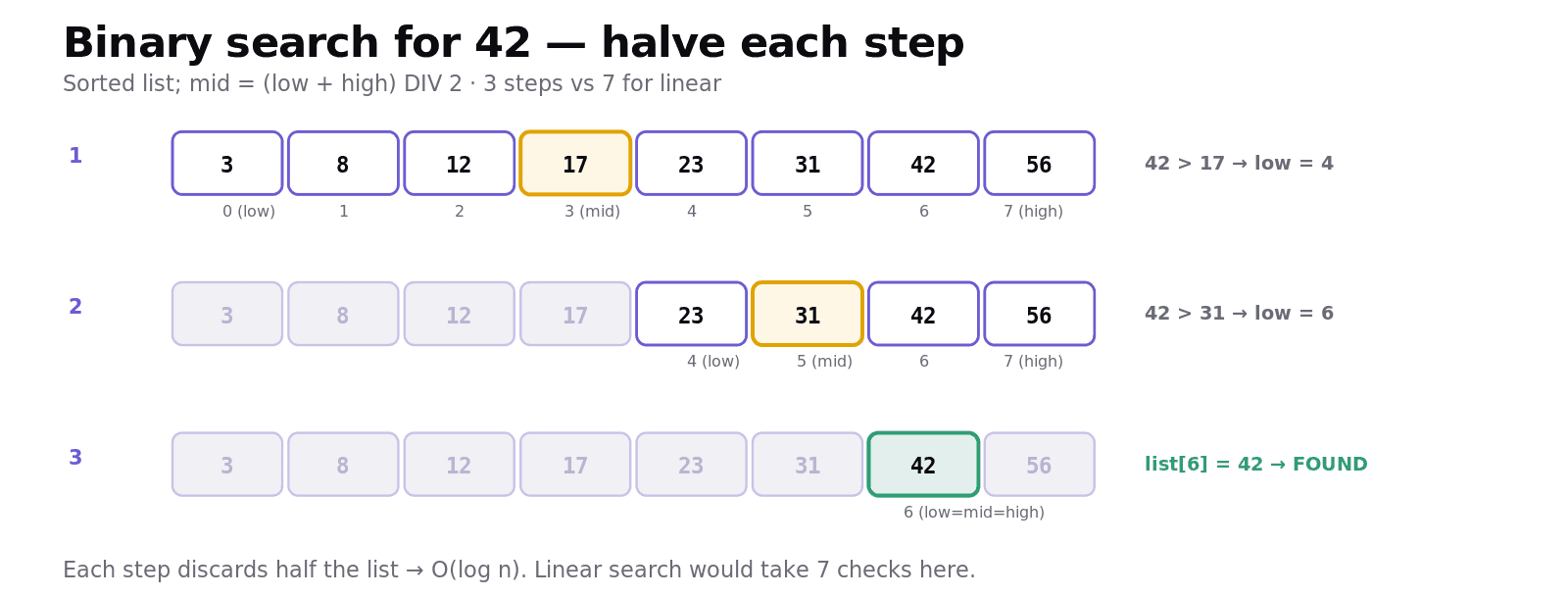
Search this sorted list for 42 (indexes 0–7): [3, 8, 12, 17, 23, 31, 42, 56].
Step | low | high | mid | list[mid] | Action |
|---|---|---|---|---|---|
1 | 0 | 7 | 3 | 17 | 42 > 17 → low = 4 |
2 | 4 | 7 | 5 | 31 | 42 > 31 → low = 6 |
3 | 6 | 7 | 6 | 42 | found at index 6 |
Three steps. A linear search for the same target would check indexes 0,1,2,…,6 — seven checks. On this tiny list the gap is small; on a list of millions it's enormous. (mid is (low + high) DIV 2, rounding down.)
Comparing the two
Linear search | Binary search | |
|---|---|---|
Data must be sorted? | No | Yes |
How it works | Check each item in turn | Halve the search range each step |
Worst-case complexity | O(n) | O(log n) |
Best for | Small or unsorted lists | Large sorted lists |
The choice depends on the data: if the list is unsorted or small, linear search is simplest; if it's large and sorted (or searched many times), binary search wins easily. If a list is unsorted but searched often, it can be worth sorting it once so binary search can be used repeatedly.
Common exam mistakes
Using binary search on unsorted data. Its precondition is a sorted list — say so.
Getting the pointer update wrong. Target bigger →
low = mid + 1; smaller →high = mid - 1.Wrong complexity. Linear = O(n); binary = O(log n) — don't swap them.
Trace tables without the columns. Show low, high, mid and list[mid] at each step.
Forgetting the "not found" case. Binary search stops when
low > high; linear search when it reaches the end.
Quick recap
Linear search: check each item from the start; works on any list; O(n); simple but slow on large lists.
Binary search: halve the range each step using low/mid/high; needs a sorted list; O(log n); very fast on large lists.
Binary search: target bigger →
low = mid+1; smaller →high = mid-1; stop when found orlow > high.Choose by the data: small/unsorted → linear; large/sorted → binary.
Trace with columns for low, high, mid, list[mid].
Frequently asked questions
How does a linear search work? A linear search checks each item in a list one at a time, starting from the first, until it finds the target or reaches the end. It works on any list whether sorted or not, but in the worst case it must check all n items, giving it a time complexity of O(n).
How does a binary search work? A binary search works on a sorted list by repeatedly looking at the middle item and halving the search range. If the middle item is the target it stops; if the target is larger it discards the left half; if smaller it discards the right half. It repeats until the item is found or the range is empty.
Why must a list be sorted for a binary search? Binary search decides which half of the list to discard by comparing the target with the middle item. This only works if the list is in order, because the algorithm assumes everything to the left of the middle is smaller and everything to the right is larger. On an unsorted list it would discard the wrong half and give incorrect results.
What are the time complexities of linear and binary search? Linear search has a worst-case time complexity of O(n), because it may need to check every item. Binary search has a worst-case complexity of O(log n), because it halves the remaining items at each step, so even a list of a million items is searched in about twenty steps.
When should you use linear search instead of binary search? Use linear search when the list is unsorted, or when it is small enough that speed does not matter, because it is simpler and needs no sorting. Use binary search when the list is large and already sorted, or is searched many times, because its O(log n) speed is far better for big data.
How do you trace a binary search? Draw a table with columns for low, high, mid and list[mid]. At each step calculate mid as (low + high) DIV 2, compare list[mid] with the target, and upda