Thinking Ahead: Inputs, Outputs, Caching & Reusable Components (OCR A-Level CS 2.1.2)
OCR A-Level CS 2.1.2: identify inputs and outputs, work out preconditions, understand caching, and see why reusable components save time — with worked examples.

Free Thinking Ahead revision resources (OCR A-Level Computer Science, 2.1.2)
We’ve made exam-style practice for this exact topic, free to download: Thinking Ahead question sheet, mark scheme and cheat sheet. Grab them, have a go, then read the full guide below.
Good problem-solvers plan before they code. Spec point 2.1.2, "thinking ahead", covers four planning skills: identifying inputs and outputs, working out preconditions, understanding caching, and knowing why reusable components are worth it. These come up reliably in Paper 2 — often as a quick "identify the inputs" question and a longer "evaluate caching" essay.
Let's take the four in turn.
Identifying inputs and outputs
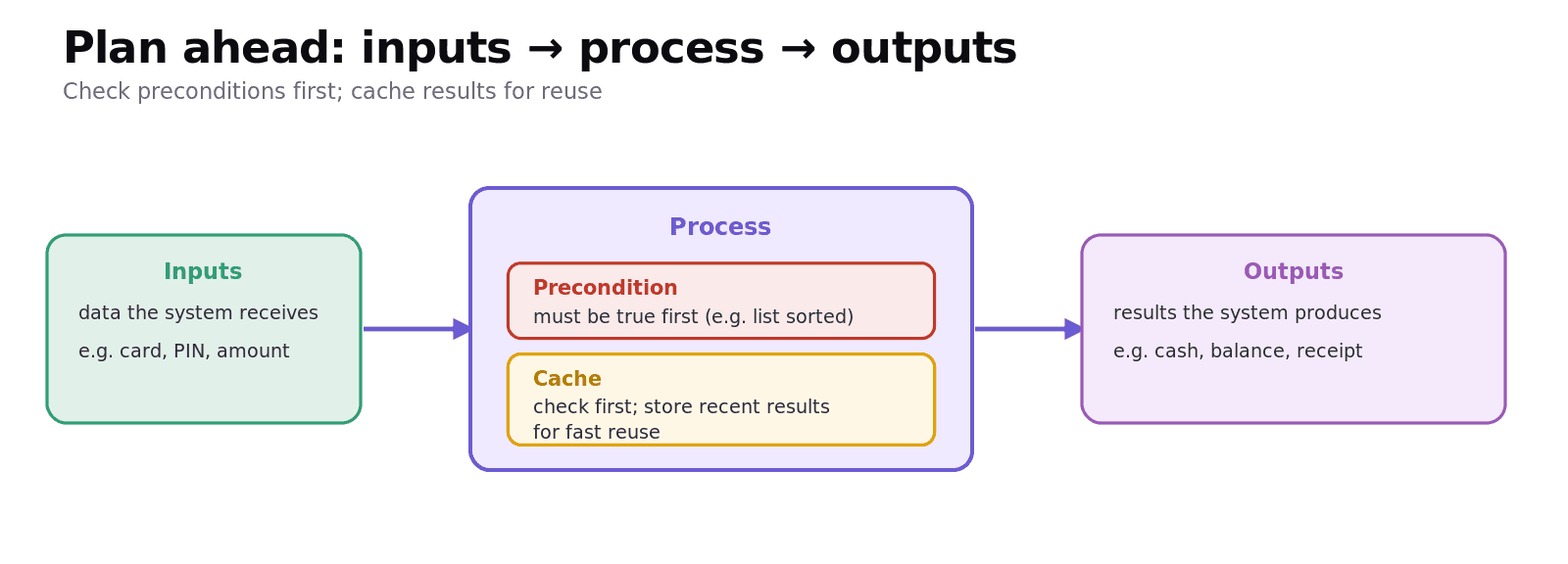
Before designing a solution you must be clear on what goes in and what comes out. Inputs are the data the system needs to receive; outputs are the results it must produce.
For a cash machine (ATM) withdrawal, for example:
Inputs: card details, PIN, amount requested.
Outputs: cash dispensed, updated balance, printed receipt (and an error message if something's wrong).
Getting this right early stops you building the wrong thing. A common exam task gives a scenario and a table to complete with the inputs and outputs — so practise spotting "data coming in" versus "results going out".
Determining preconditions
A precondition is something that must be true before a solution (or subroutine) can run correctly. Stating preconditions lets you assume them inside your code instead of constantly re-checking.
Examples:
A binary search has the precondition that the list is already sorted — it gives wrong answers otherwise.
A "withdraw money" routine has the precondition that the balance is sufficient.
A "divide" function has the precondition that the divisor is not zero.
In the exam: "identify a precondition for this solution" or "state why a precondition is needed" — answer with the condition that must hold for the solution to work.
Caching: the nature, benefits and drawbacks
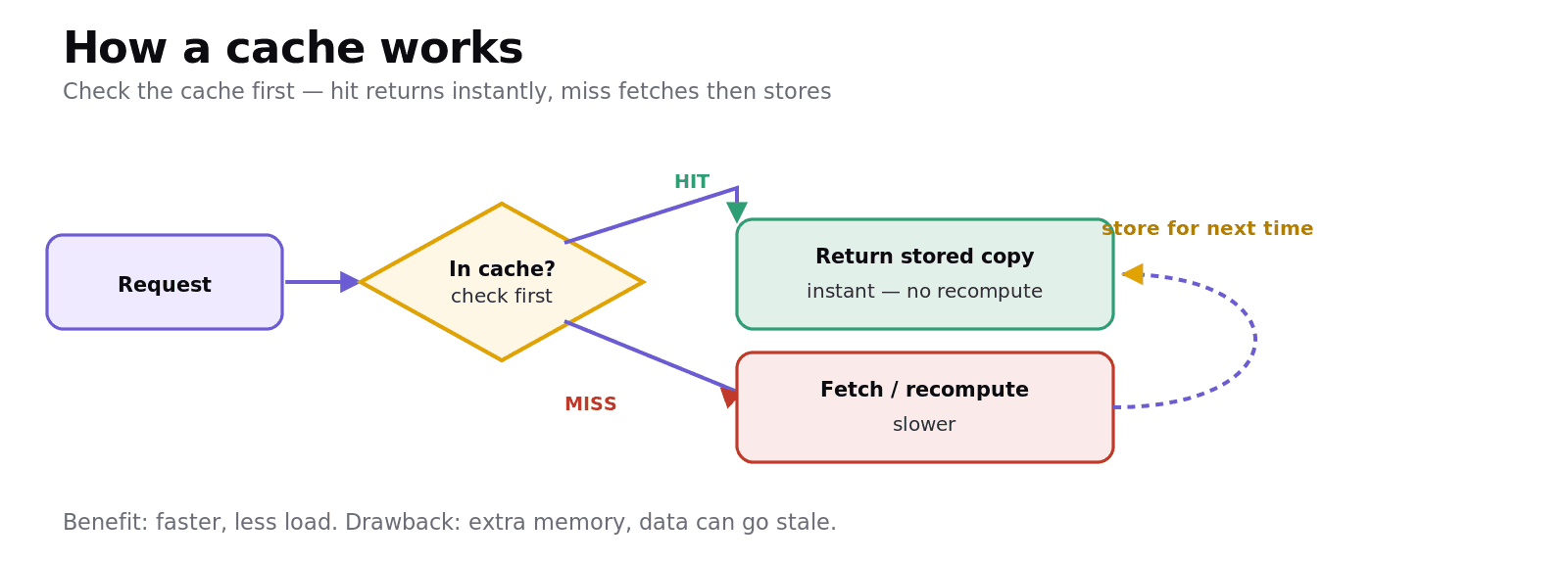
Caching means storing the results of recent work (or recently used data) so they can be reused quickly instead of fetching or recalculating them. A web browser caches pages and images; a CPU caches recently used instructions; a server caches frequent database results.
How it works: when something is needed, the system checks the cache first. A cache hit returns the stored copy immediately; a cache miss means it must be fetched/recomputed, then stored for next time.
Benefits: much faster (avoids slow recalculation or re-fetching), and reduces load on the network, CPU or database.
Drawbacks: the cache uses extra memory, and cached data can become out of date (stale) — you may serve an old version unless the cache is refreshed/invalidated.
The classic exam item is "evaluate the use of caching" — so be ready to give both the speed benefit and the staleness/memory cost.
The need for reusable program components
A reusable component is a piece of code — typically a subroutine, function, module or library — written so it can be used again in other programs or other parts of the same program.
Why programmers value them:
Saves time — you write and test it once, then reuse it instead of rewriting.
More reliable — a component that's already been tested has fewer bugs than fresh code.
Easier maintenance — fix or improve it in one place and every user benefits.
Teamwork & consistency — different programmers can share the same tested building blocks.
Examples include a sort() function from a standard library, a date-formatting module, or a login component reused across an organisation's apps. In the exam: "give examples of reusable components" or "explain advantages of reusable components" — the points above answer both.
Worked example: planning a "calculate delivery cost" feature
Inputs: parcel weight, destination, delivery speed chosen.
Outputs: the delivery price (and an error if the destination isn't served).
Precondition: the weight is a positive number and the destination is valid.
Caching: prices for common weight/destination combinations can be cached, so repeated lookups are instant — but the cache must be refreshed if the price list changes.
Reusable component: the cost-calculation routine is written as a function so the website, the app and the warehouse system can all call it.
One small feature, and all four "thinking ahead" skills appear — which is exactly why examiners like this topic.
Common exam mistakes
Mixing up inputs and outputs. Inputs come in (data the system receives); outputs go out (results it produces).
Vague preconditions. State the specific condition (list is sorted; divisor ≠ 0), not "the data must be correct".
Only giving caching's upside. "Evaluate" needs the drawbacks too — extra memory and stale data.
Confusing a cache with normal storage. A cache holds copies for fast reuse; it's checked first and can be cleared.
Listing reuse benefits without the "why". Say because it's already tested → more reliable; written once → saves time.
Quick recap
Inputs/outputs: identify the data going in and the results coming out before designing.
Precondition: something that must be true before a solution runs (e.g. list sorted for binary search).
Caching: store recent results/data for fast reuse — faster & less load, but costs memory and can go stale.
Reusable components: subroutines/modules/libraries used again — save time, more reliable, easier to maintain.
These are planning skills: think ahead so the solution is efficient and correct.
Frequently asked questions
How do you identify the inputs and outputs of a system? Inputs are the data the system needs to receive, and outputs are the results it must produce. For an ATM withdrawal the inputs are the card details, PIN and amount, and the outputs are the cash, updated balance and a receipt. Identifying these before designing stops you building the wrong thing.
What is a precondition? A precondition is something that must be true before a solution or subroutine can run correctly. For example, a binary search has the precondition that the list is already sorted, and a divide function has the precondition that the divisor is not zero. Stating preconditions lets you assume them inside the code.
What is caching and what are its benefits and drawbacks? Caching stores the results of recent work or recently used data so they can be reused quickly instead of being recalculated or re-fetched. The benefits are greater speed and reduced load on the CPU, network or database. The drawbacks are that it uses extra memory and the cached data can become out of date (stale) if not refreshed.
How does a cache work? When data is needed, the system checks the cache first. If the data is there it is a cache hit and the stored copy is returned immediately. If it is not, it is a cache miss, so the data is fetched or recomputed, returned, and then stored in the cache so it can be reused next time.
Why are reusable program components useful? Reusable components such as subroutines, modules and libraries save time because they are written and tested once and then reused, are more reliable because tested code has fewer bugs, and are easier to maintain because a fix in one place benefits every program that uses the component. They also let teams share consistent building blocks.
What is an example of a reusable component? Examples include a sort function from a standard library, a date-formatting module, or a login component reused across an organisation's applications. Each is written and tested once and then called wherever it is needed, rather than being rewritten for each program.