Stacks & Queues: Push, Pop, Enqueue & Dequeue (OCR A-Level CS 1.4.2)
OCR A-Level CS 1.4.2: stacks (LIFO) and queues (FIFO): push, pop and peek, linear vs circular queues, the pointers used, and pseudocode for each operation.

Free Stacks Queues revision resources (OCR A-Level Computer Science, 1.4.2)
We’ve made exam-style practice for this exact topic, free to download: Stacks Queues question sheet, mark scheme and cheat sheet. Grab them, have a go, then read the full guide below.
Here is some good news for once: stacks and queues are two of the most predictable topics on Paper 1. OCR tests them constantly with trace tables and pseudocode, and the questions barely change from year to year. Spec points 1.4.2(b) and (c) cover the stack and the queue, and how to create, add to and remove from them. So if you do one thing here, get the LIFO versus FIFO rule and the pointers rock solid. Do that and these become some of the easiest marks you will pick up all paper.
Let's take each in turn, with the operations and the pointers that drive them.
The stack: last in, first out (LIFO)
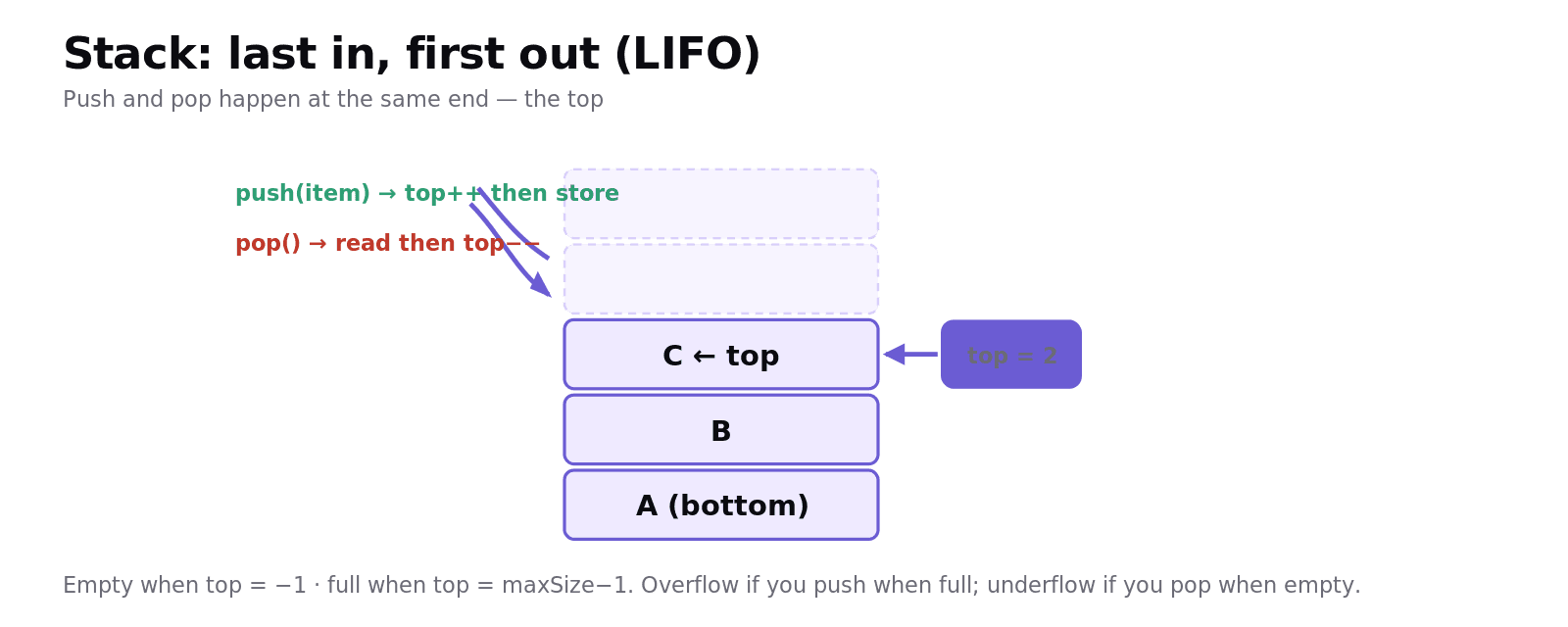
A stack is a structure where items are added and removed at the same end: the top. The last item pushed on is the first one popped off, which is LIFO (Last In, First Out), like a stack of plates. A single top pointer tracks the top item (often starting at −1 for an empty stack).
The operations:
push(item): add an item to the top: increase
top, then store the item atstack[top].pop(): remove and return the top item: read
stack[top], then decreasetop.peek() (or
top()): return the top item without removing it.isEmpty(): true when
top = −1; isFull(): true whentop = maxSize − 1.
Pushing onto a full stack causes stack overflow; popping from an empty stack causes stack underflow. Stacks are "limited access": you can only reach the top item, which makes them perfect for undo functions, the call stack, and reversing things, but unsuitable when you need to search the middle.
The queue: first in, first out (FIFO)
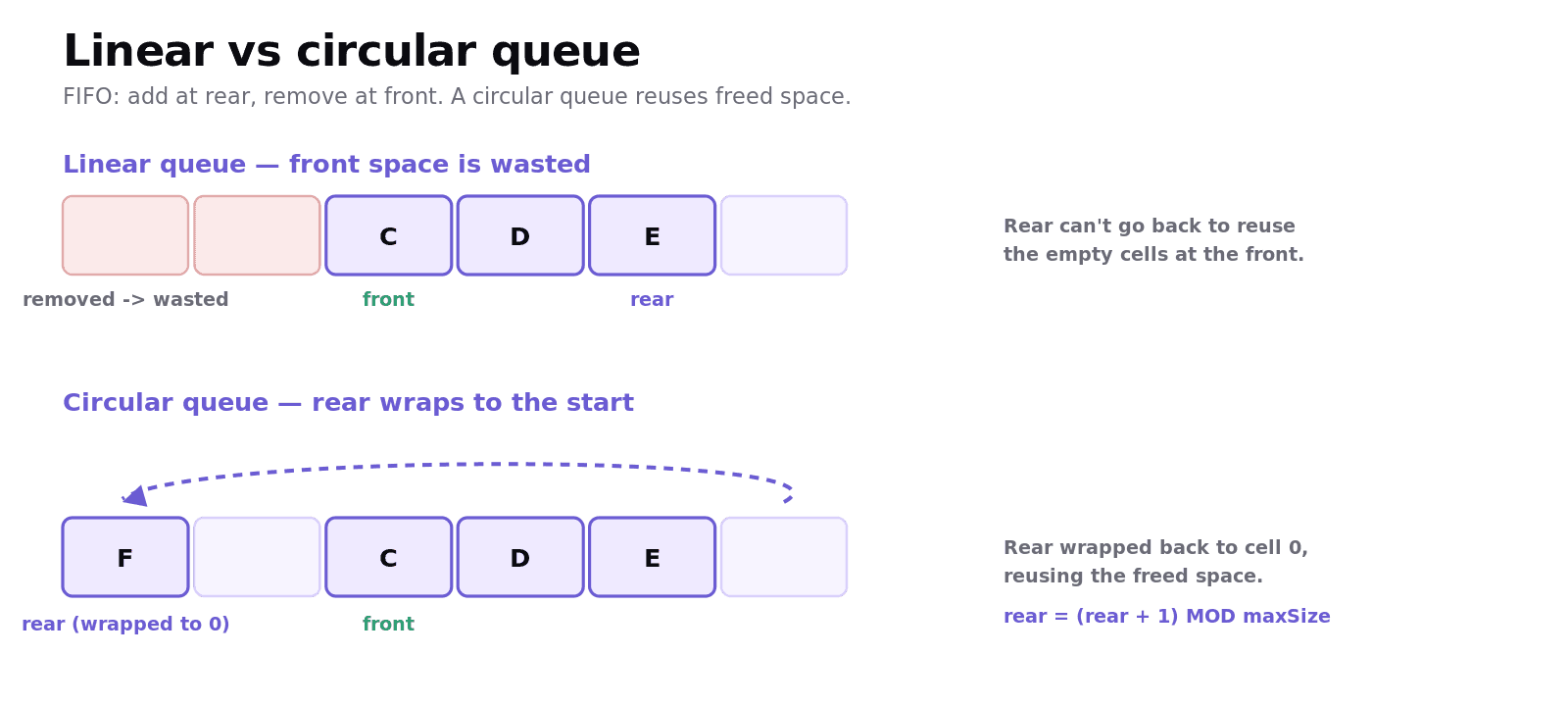
A queue adds at one end (the rear) and removes from the other (the front), which is FIFO (First In, First Out), like a queue of people. It uses a front pointer and a rear pointer (and often a size counter).
enQueue(item): add to the rear.
deQueue(): remove and return the item at the front.
isEmpty() / isFull(): using
size.
Linear vs circular queues
In a simple linear queue, once items have been removed from the front, that space at the start of the array is wasted: the rear keeps marching towards the end even though there are empty cells behind the front. A circular queue fixes this: when the rear (or front) reaches the end of the array, it wraps around to the start, reusing the freed space. This is done with MOD arithmetic:
deQueue mirrors this: take queue[front], then front = (front + 1) MOD maxSize and decrease size. The MOD maxSize is what makes the pointer wrap around to 0 when it runs off the end. Circular queues are ideal for buffers such as a keyboard buffer or a print queue, because they reuse memory efficiently.
Worked example: tracing a stack
Start with an empty stack (top = −1, max size 4). Apply push(A), push(B), push(C), pop(), push(D):
Operation | Stack (bottom → top) | top |
|---|---|---|
push(A) | A | 0 |
push(B) | A, B | 1 |
push(C) | A, B, C | 2 |
pop() → returns C | A, B | 1 |
push(D) | A, B, D | 2 |
Notice that pop() returned C, the last item pushed, and D then took its place. That is LIFO in action, and tracing it by hand like this is exactly how you earn the trace-table marks.
Common exam mistakes
These are the slips I see again and again, and every one of them is avoidable.
Mixing up LIFO and FIFO. Stack = LIFO (add/remove at the top); queue = FIFO (add at rear, remove at front).
Forgetting the MOD in a circular queue.
(rear + 1) MOD maxSizeis what wraps the pointer back to 0.Wrong pointer order in push/pop. push:
top = top + 1then store; pop: read thentop = top − 1.Ignoring overflow/underflow. Always check
isFullbefore pushing/enqueuing andisEmptybefore popping/dequeuing.Saying a linear queue reuses space. It does not, and that is exactly the problem a circular queue solves.
Quick recap
Stack = LIFO: push and pop at the top (one
toppointer).peeklooks without removing. Overflow/underflow if full/empty.Queue = FIFO: enQueue at the rear, deQueue from the front (front, rear, size pointers).
A linear queue wastes the space freed at the front; a circular queue wraps around using
MOD maxSizeto reuse it.Both are limited-access structures: you cannot reach the middle.
Always handle full/empty before adding/removing.
Honestly, the best thing you can do with stacks and queues is stop reading and start tracing. Take five items, push and pop them, enqueue and dequeue them, and watch the pointers move. Do that a couple of times and the pseudocode stops being scary and starts being obvious. You have got this.
Frequently asked questions
What is the difference between a stack and a queue? A stack is a last in, first out (LIFO) structure where items are added and removed at the same end, called the top. A queue is a first in, first out (FIFO) structure where items are added at the rear and removed from the front, so items leave in the order they arrived.
What do push and pop do on a stack? Push adds an item to the top of the stack by increasing the top pointer and storing the item there. Pop removes and returns the item at the top by reading it and then decreasing the top pointer. A peek operation returns the top item without removing it.
What is a circular queue and why is it used? A circular queue is a queue implemented in an array where the front and rear pointers wrap around to the start of the array when they reach the end, using MOD arithmetic. It is used because it reuses the space freed when items are removed, which a linear queue wastes, making it efficient for buffers.
What pointers does a queue use? A queue typically uses a front pointer to the first item, a rear pointer to the last item, and often a size counter. enQueue adds at the rear and increases size, while deQueue removes from the front and decreases size; in a circular queue both pointers move using MOD maxSize.
What is stack overflow and underflow? Stack overflow occurs when a program tries to push an item onto a stack that is already full, and stack underflow occurs when it tries to pop from an empty stack. Operations should check isFull before pushing and isEmpty before popping to avoid these errors.
Why are stacks and queues called limited-access data structures? They are called limited access because items can only be added or removed at specific ends (the top of a stack, or the rear and front of a queue), so you cannot directly read or change items in the middle as you could with an array or list.