Hash Tables: Hashing, Collisions & Load Factor (OCR A-Level CS 1.4.2)
OCR A-Level CS 1.4.2: how a hash table stores data using a hash function, what collisions are and how to handle them, the load factor, and fast lookup.

Free Hash Tables revision resources (OCR A-Level Computer Science, 1.4.2)
We’ve made exam-style practice for this exact topic, free to download: Hash Tables question sheet, mark scheme and cheat sheet. Grab them, have a go, then read the full guide below.
A hash table is the structure behind near-instant lookups — and OCR loves testing the hash function, collisions and the load factor. Spec points 1.4.2(b) and (c) cover the hash table and how to create, add to and search it, often with a "show where these keys are stored" question and a 12-mark "discuss whether a hash table is suitable."
Let's see how hashing turns a key into an address, what happens when two keys clash, and why the load factor matters.
What is a hash table?
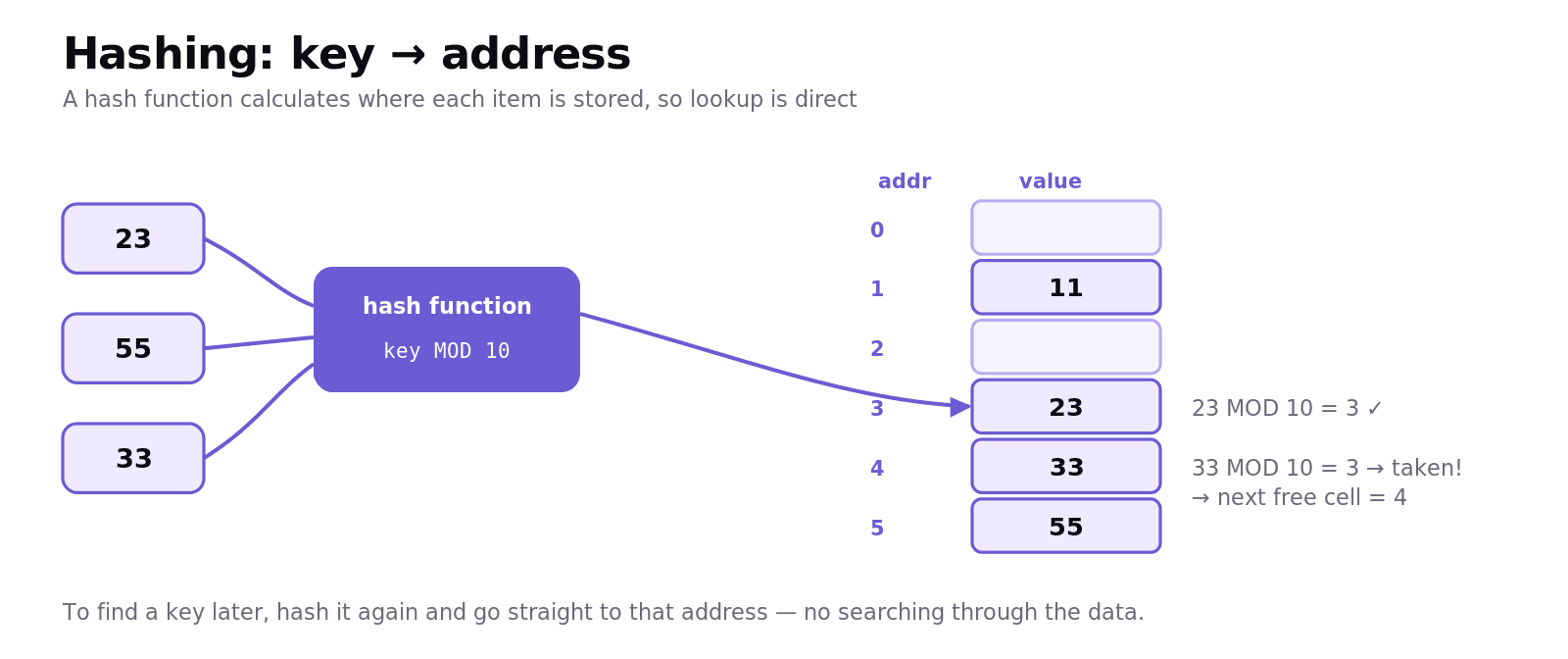
A hash table stores key–value pairs in an array, using a hash function to decide where each item goes. Instead of searching through the data, you run the key through the hash function to calculate its address directly — so adding and finding items is, on average, very fast (close to constant time).
A common, exam-friendly hash function is:
For a table of size 10 and the key 23, 23 MOD 10 = 3, so the item is stored at address 3. To find it later, you hash the key again and go straight to address 3 — no searching required. This direct calculation is the hash table's superpower.
Collisions
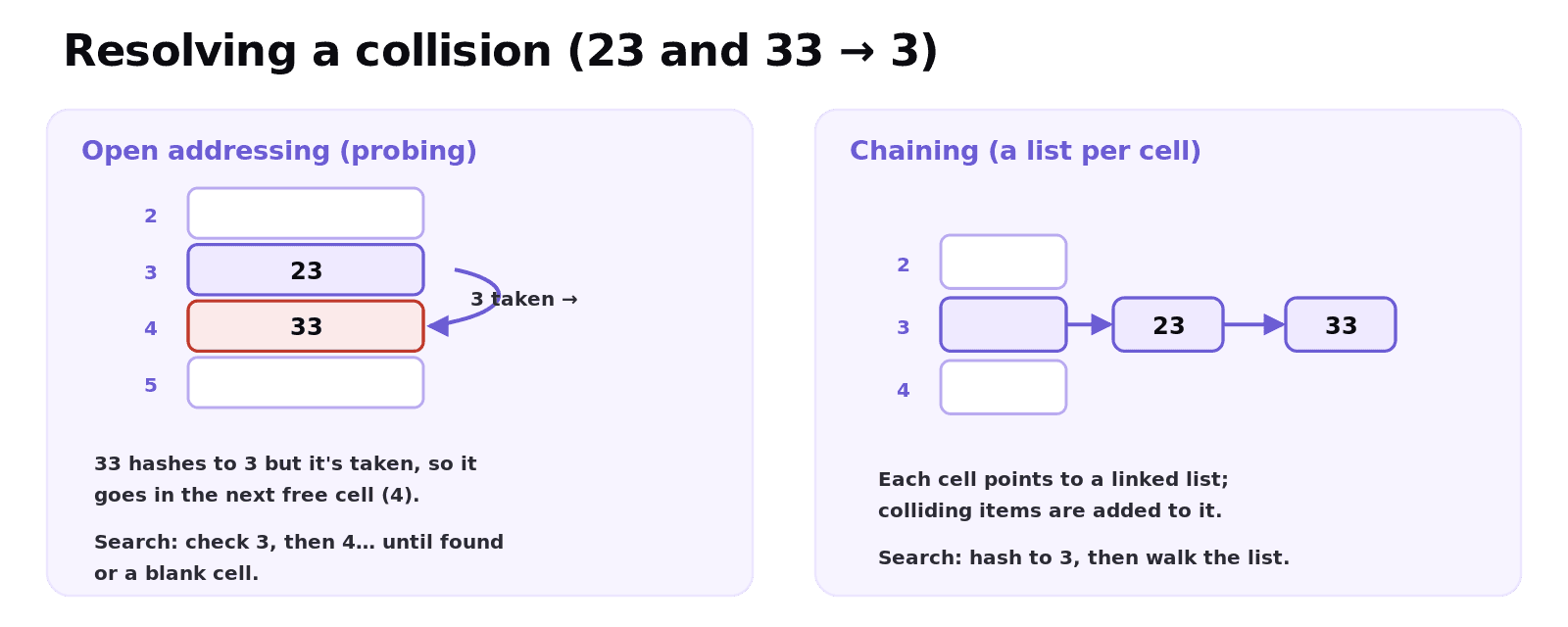
A collision happens when two different keys hash to the same address. With key MOD 10, both 23 and 33 hash to address 3 — but only one item can sit there. Collisions are unavoidable once a table fills up, so a hash table needs a strategy to resolve them. The two you should know:
Open addressing (probing): if the calculated cell is taken, move to the next free cell (linear probing) and store the item there. To find an item later, you hash the key, and if that cell holds a different key you check successive cells until you find it — or hit a blank cell, which means it isn't there.
Chaining: each table cell holds a list (a linked list), and colliding items are simply added to the list at that address.
So with probing, inserting 33 (which collides at 3) places it at the next free cell, address 4.
Searching, and the deletion trap
To search, you hash the key and look at that address. With open addressing, if the cell holds a different key you check the following cells until you find the key or reach a blank cell (meaning "not present").
This creates a subtle bug: if you delete an item by simply blanking its cell, a later search might hit that blank and wrongly conclude an item isn't there — because the search stops at blanks. The fix is to mark a deleted cell with a special "deleted" marker (a tombstone), so searches keep going past it instead of stopping.
Load factor
The load factor is how full the table is — the fraction (or percentage) of cells that are occupied:
A table of size 100 holding 65 items has a load factor of 0.65 (65%). As the load factor rises, collisions become more frequent, and probing has to check more cells — so performance drops. That's why hash tables are kept comfortably below full (and resized/rehashed into a bigger table when the load factor gets too high). Keeping the load factor low keeps lookups fast.
Worked example: building a hash table
Table size 10, hash function key MOD 10. Insert the keys 23, 11, 47, 55, 33 in order:
Key | key MOD 10 | Stored at | Note |
|---|---|---|---|
23 | 3 | 3 | direct |
11 | 1 | 1 | direct |
47 | 7 | 7 | direct |
55 | 5 | 5 | direct |
33 | 3 | 4 | collision with 23 → next free cell |
The first four keys land in their calculated cells. 33 hashes to 3, which is already taken by 23, so with linear probing it goes to the next free cell, address 4. To find 33 later: hash it to 3, see a different key, check 4 — found.
Common exam mistakes
Forgetting to show the collision. When two keys hash the same, say it's a collision and show how it's resolved (next free cell, or added to the list).
Searching by scanning the whole table. The point of a hash table is you calculate the address and go straight there.
Blanking a deleted cell. Use a deleted marker so searches don't stop early and miss later items.
Saying lookups are always instant. They're fast on average, but a high load factor and many collisions slow them down.
Confusing load factor with table size. Load factor is items ÷ size — how full the table is.
Quick recap
A hash table stores items in an array; a hash function (e.g.
key MOD tableSize) calculates each item's address for fast, direct lookup.A collision is when two keys hash to the same address; resolve with probing (next free cell) or chaining (a list per cell).
Search: hash the key, check that cell, then successive cells (probing) until found or a blank.
Deletion needs a marker so searches don't stop early.
Load factor = items ÷ size; a high load factor means more collisions and slower lookups.
Frequently asked questions
What is a hash table? A hash table is a data structure that stores key–value pairs in an array, using a hash function to calculate the address where each item is stored. Because the address is calculated directly from the key, adding and finding items is very fast on average.
What is a hash function? A hash function takes a key and calculates an address (an index) in the table where the item should be stored. A simple example is address = key MOD table size, which for a key of 23 in a table of size 10 gives address 3.
What is a collision in a hash table? A collision occurs when two different keys produce the same address from the hash function. Since only one item can occupy a cell, the table must resolve the collision, for example by placing the second item in the next free cell (open addressing) or in a list at that address (chaining).
How are collisions handled in a hash table? Collisions are commonly handled by open addressing, where the item is placed in the next free cell and searched for by checking successive cells, or by chaining, where each cell holds a linked list and colliding items are added to that list.
What is the load factor of a hash table? The load factor is the proportion of the table that is occupied, calculated as the number of items stored divided by the table size. A higher load factor means more collisions occur, which slows down adding and searching, so tables are kept below full and resized when needed.
How do you search for an item in a hash table? You apply the hash function to the key to calculate its address, then look at that cell. With open addressing, if the cell holds a different key you check the following cells until you find the item or reach a blank cell, which means the item is not in the table.