Primitive Data Types, Binary & Hexadecimal (OCR A-Level CS 1.4.1)
OCR A-Level CS 1.4.1: the primitive data types, representing positive integers in binary and hexadecimal, and converting between binary, denary and hex.

Free Primitive Types Binary Hexadecimal revision resources (OCR A-Level Computer Science, 1.4.1)
We’ve made exam-style practice for this exact topic, free to download: Primitive Types Binary Hexadecimal question sheet, mark scheme and cheat sheet. Grab them, have a go, then read the full guide below.
Computers only really store one thing: bits — 1s and 0s. Spec point 1.4.1 starts with the primitive data types and how to represent positive integers in binary and hexadecimal, and convert between binary, denary and hex. These conversions are guaranteed marks on Paper 1 every year, so getting fast and accurate at them is one of the best-value things you can revise.
Let's lock down the data types, then the conversions, with a reliable method for each.
The primitive data types
A primitive data type is a basic built-in type from which more complex structures are built. The five you must know:
Integer — a whole number, e.g.
42or-7.Real / floating point — a number with a fractional part, e.g.
3.14.Character — a single symbol, e.g.
'A'or'?'.String — a sequence of characters, e.g.
"hello".Boolean — one of two values, True or False.
Exam questions often give a scenario and ask for the most suitable data type: a price → real; a quantity in stock → integer; "is the user a member?" → Boolean; a name → string. Watch the result of operations too: dividing two integers (/) usually gives a real.
Why binary?
Computers use binary (base 2) because the underlying electronics has two reliable states — a voltage that's either high or low, on or off. Two states are easy to tell apart even when the signal is noisy, which makes binary robust. With n bits you can represent 2ⁿ different values — so 8 bits gives 2⁸ = 256 values (0 to 255).
Converting binary to denary
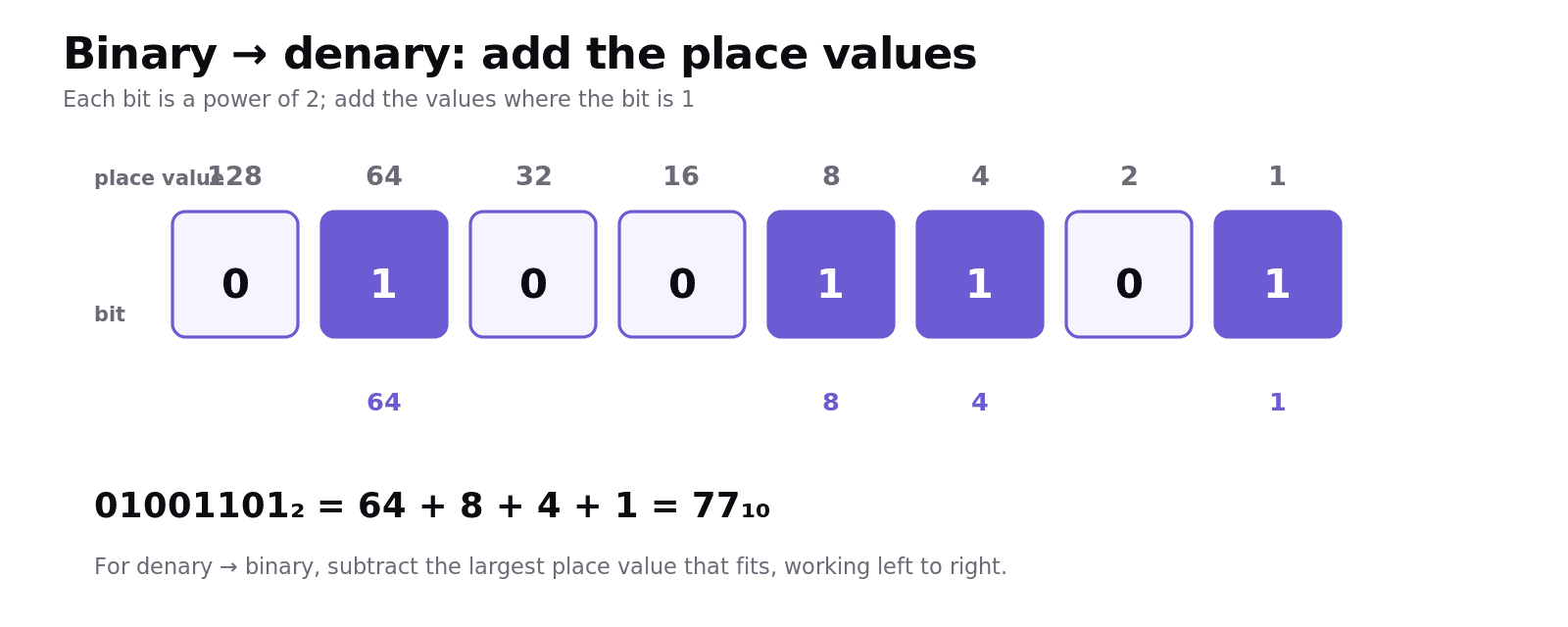
Each bit has a place value that is a power of 2. For 8 bits, the place values are:
To convert binary → denary, add up the place values wherever there's a 1. For example 01001101:
So 01001101₂ = 77₁₀.
Converting denary to binary
Work from the largest place value down, subtracting whenever it fits. Convert 149:
128 fits (149 − 128 = 21) → bit = 1
64 doesn't fit → 0; 32 doesn't fit → 0
16 fits (21 − 16 = 5) → 1
8 doesn't fit → 0
4 fits (5 − 4 = 1) → 1
2 doesn't fit → 0; 1 fits (1 − 1 = 0) → 1
Reading the bits: 10010101₂ = 149₁₀. (Check: 128 + 16 + 4 + 1 = 149.)
Hexadecimal: shorthand for binary
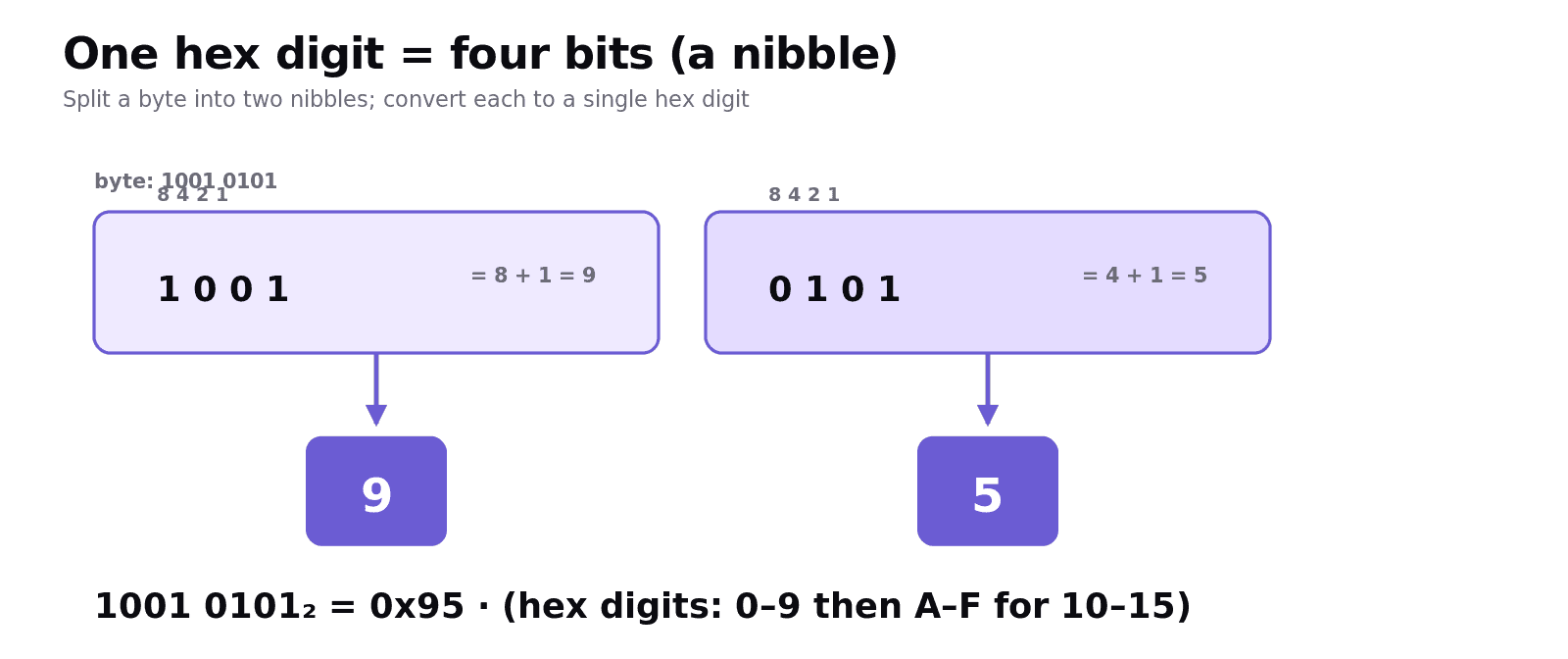
Hexadecimal is base 16, using digits 0–9 then A–F for 10–15. Its superpower: one hex digit represents exactly four bits (a nibble), so a byte (8 bits) is just two hex digits. That's why memory addresses, colour codes and MAC addresses are written in hex — it's far easier to read, type and remember than long strings of binary.
Binary → hex: split into nibbles of 4 and convert each:
Hex → binary: expand each digit to 4 bits. F18C:
Hex ↔ denary: the place values are 16 and 1 for two digits. 5A = (5 × 16) + (10 × 1) = 80 + 10 = 90. Going the other way, convert denary → hex either via binary, or by dividing by 16 (the quotient is the first digit, the remainder the second).
Worked example: denary 188 to hex
188 in binary (largest-first): 128 fits (60 left), 32 fits (28), 16 fits (12), 8 fits (4), 4 fits (0) → 10111100. Split into nibbles 1011 1100 → B C. So 188₁₀ = BC₁₆ (and 0xBC). You could also do it directly: 188 ÷ 16 = 11 remainder 12 → 11 is B, 12 is C → BC.
Common exam mistakes
Place values out of order. Left-most bit of a byte is 128, right-most is 1. Line them up before adding.
Forgetting A–F. Hex digits go 0–9 then A(10) B(11) C(12) D(13) E(14) F(15) — not 10, 11…
Mis-grouping nibbles. Group binary into fours from the right; pad with leading zeros if needed.
Mixing bases in working. Label your numbers (subscript ₂, ₁₀, ₁₆ or
0x) so you don't confuse them.Wrong data type for a result. Integer ÷ integer is usually a real; a yes/no value is Boolean, not a string.
Quick recap
Primitive types: integer, real/floating point, character, string, Boolean.
n bits → 2ⁿ values (8 bits = 256, i.e. 0–255). Binary is used because electronics has two reliable states.
Binary → denary: add place values (128…1) where the bit is 1.
Denary → binary: subtract largest place values that fit, top down.
Hex: base 16 (0–9, A–F); 1 hex digit = 4 bits; easier to read than binary. Convert via nibbles.
Frequently asked questions
What are the primitive data types? The primitive data types in OCR A-Level Computer Science are integer (whole numbers), real or floating point (numbers with a fractional part), character (a single symbol), string (a sequence of characters) and Boolean (True or False). More complex data structures are built from these.
Why do computers use binary? Computers use binary because the underlying electronics has two reliable states, such as a high or low voltage. Two states are easy to distinguish even when a signal is noisy, which makes binary robust, and with n bits you can represent 2 to the power n different values.
How do you convert a binary number to denary? Write the place values, which are powers of two (128, 64, 32, 16, 8, 4, 2, 1 for a byte), above each bit, then add up the place values wherever there is a 1. For example 01001101 is 64 + 8 + 4 + 1 = 77.
Why is hexadecimal used instead of binary? Hexadecimal is used because one hex digit represents exactly four bits, so a byte is just two hex digits. This makes long binary values much easier for humans to read, type accurately and remember, which is why it is used for memory addresses, colour codes and MAC addresses.
How do you convert between binary and hexadecimal? Split the binary number into groups of four bits (nibbles) from the right and convert each nibble to one hex digit, for example 1001 0101 becomes 95. To go from hex to binary, expand each hex digit into its four-bit pattern, for example F becomes 1111.
How many values can n bits represent? With n bits you can represent 2 to the power n different values. For example, 8 bits can represent 2 to the power 8, which is 256 values, ranging from 0 to 255 for unsigned integers.