Floating Point Numbers: Representation, Normalisation & Arithmetic (OCR A-Level CS 1.4.1)
OCR A-Level CS 1.4.1: how floating point binary works, converting to and from denary, normalising for maximum precision, and adding floating point numbers.

Free Floating Point revision resources (OCR A-Level Computer Science, 1.4.1)
We’ve made exam-style practice for this exact topic, free to download: Floating Point question sheet, mark scheme and cheat sheet. Grab them, have a go, then read the full guide below.
Floating point is the topic students worry about most — but it's really just scientific notation in binary, and the marks are very gettable once the method clicks. Spec points 1.4.1(g) and (h) — A-Level only — cover representing and normalising floating point numbers, and adding and subtracting them. Examiners ask you to convert both ways, normalise, and calculate, almost every year.
This guide builds it up step by step, with worked examples checked digit by digit. (Exam conventions vary slightly between papers — always read the mantissa and exponent sizes the question gives you.)
What is floating point?
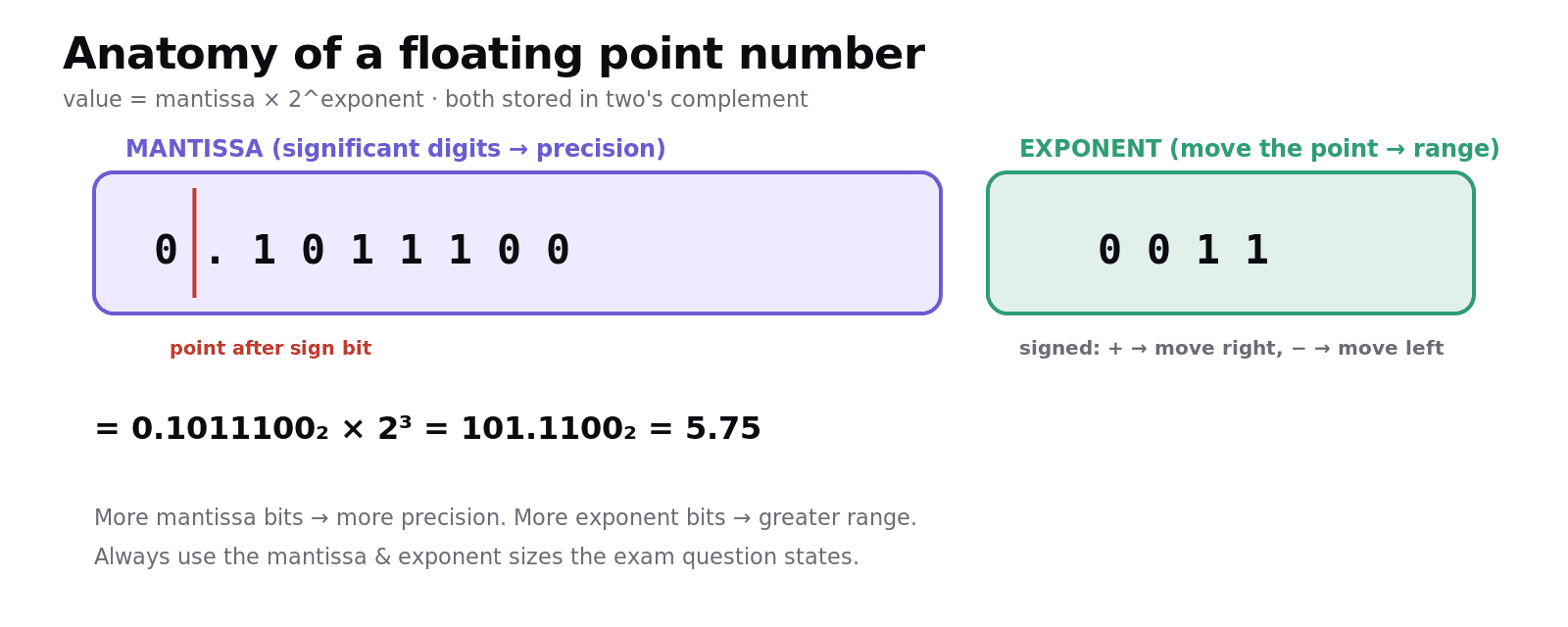
In denary scientific notation we write a big number as something like 5.75 × 10³. Floating point binary does the same in base 2: a number is stored as a mantissa (the digits) and an exponent (how far to move the binary point):
value = mantissa × 2^(exponent)
A floating point number is split into two parts, both stored in two's complement:
The mantissa holds the significant digits, with the binary point taken to be just after the first (sign) bit. So a mantissa like
0.1011100is a fraction between −1 and +1.The exponent is a signed integer saying how many places to move the binary point — right for a positive exponent, left for a negative one.
More mantissa bits → more precision; more exponent bits → larger range.
Converting floating point to denary
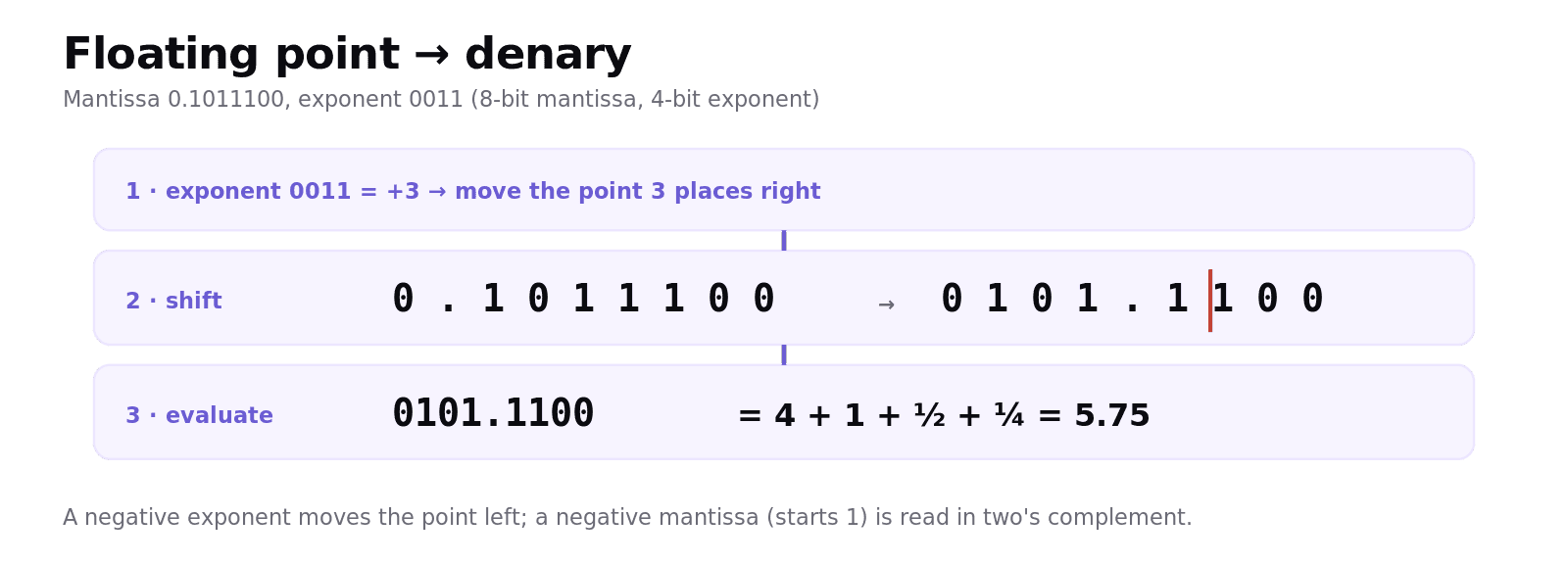
Take an 8-bit mantissa and 4-bit exponent: mantissa 0.1011100, exponent 0011.
Read the exponent (two's complement):
0011= +3.Move the binary point 3 places right in the mantissa:
0.1011100→0101.1100.Read the result:
0101.1100= 4 + 1 + ½ + ¼ = 5.75.
For a negative number the mantissa starts with a 1 and is in two's complement. Mantissa 1.0101101, exponent 0101 (= +5): move the point 5 right → 101011.01, then evaluate as a two's complement value = −20.75.
Normalisation
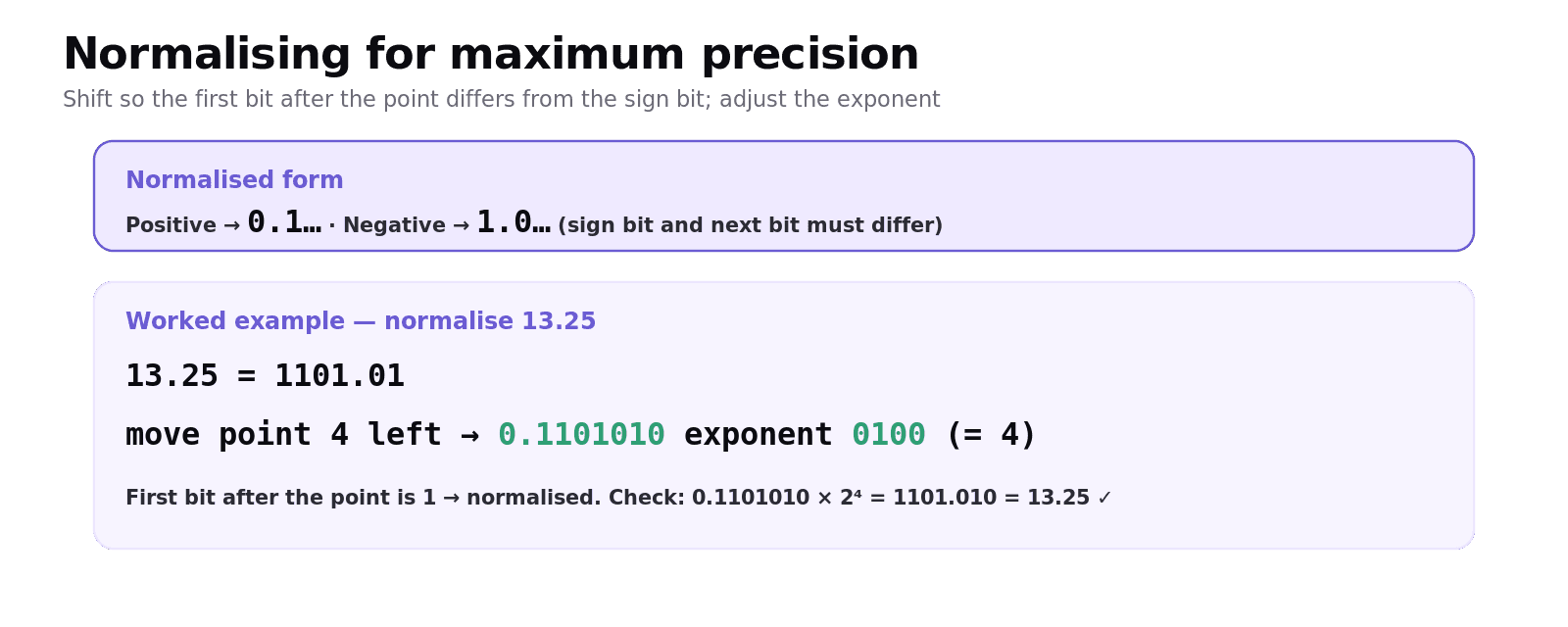
Normalising packs the mantissa with as many significant bits as possible, giving the maximum precision for the available bits. The rule:
A positive number is normalised when the mantissa starts
0.1…— the first bit after the point is a 1.A negative number is normalised when the mantissa starts
1.0…— the first bit after the point is a 0.
In both cases the first two bits (sign bit and the next bit) must differ. You shift the mantissa left until that's true and adjust the exponent to keep the value the same (each left shift of the point means subtracting 1 from the exponent).
Worked example — normalise 13.25. In binary, 13.25 is 1101.01. Write it as a fraction of the form 0.1…: move the point 4 places left → mantissa 0.1101010, exponent 4 = 0100. So 13.25 = 0.1101010 exp 0100. (Check: 0.1101010 × 2⁴ = 1101.010 = 13.25.) ✓
The purpose, in one line examiners want: normalisation gives the greatest precision possible for a fixed number of mantissa bits.
Adding floating point numbers
To add two floating point numbers you can't just add the mantissas — the binary points must line up first. The method:
Make the exponents equal (shift the mantissa of the smaller-exponent number right, increasing its exponent to match).
Add the mantissas using two's complement addition.
Renormalise the result (and watch for overflow of the mantissa).
For example, to add 1.5 (0.1100000 exp 0001) and 0.75 (0.1100000 exp 0000): raise the second to exponent 0001 giving 0.0110000, add the mantissas → 1.0010000, which would be wrong as it overflowed the sign — so you renormalise to get 0.1001000 exp 0010 = 2.25. The key exam skill is align, add, renormalise.
Common exam mistakes
Reading the exponent as unsigned. The exponent is two's complement — a leading 1 means a negative exponent (move the point left).
Normalising to the wrong pattern. Positive →
0.1…; negative →1.0…. The sign bit and the next bit must differ.Forgetting to adjust the exponent when normalising. Every place you shift the mantissa changes the exponent to keep the value unchanged.
Adding mantissas without aligning exponents. Make the exponents equal first, then add.
Confusing precision and range. More mantissa bits = more precision; more exponent bits = more range.
Quick recap
value = mantissa × 2^exponent; both parts stored in two's complement, point after the mantissa's sign bit.
FP → denary: move the binary point by the (signed) exponent, then evaluate.
Normalise so positives start
0.1…and negatives1.0…(first two bits differ) → maximum precision; adjust the exponent to keep the value.Add: make exponents equal → add mantissas → renormalise.
More mantissa bits = precision; more exponent bits = range.
Frequently asked questions
How is a floating point number represented in binary? A floating point number is stored as a mantissa and an exponent, both in two's complement, where the value equals the mantissa multiplied by two to the power of the exponent. The binary point is taken to be just after the mantissa's sign bit, and the exponent says how many places to move it.
How do you convert a floating point binary number to denary? Read the exponent as a signed two's complement value, move the binary point in the mantissa that many places (right for a positive exponent, left for a negative one), then evaluate the resulting binary number. For example, mantissa 0.1011100 with exponent 0011 becomes 0101.1100 = 5.75.
What does it mean to normalise a floating point number? Normalising shifts the mantissa so it holds as many significant bits as possible, giving the maximum precision for the available bits. A positive number is normalised when the mantissa starts 0.1, and a negative number when it starts 1.0, with the exponent adjusted so the value stays the same.
Why are floating point numbers normalised? Normalisation ensures the maximum possible precision for a fixed number of mantissa bits, by removing leading bits that carry no information and using the space for significant digits instead. It also gives each value a single standard representation.
How do you add two floating point numbers? First make the two exponents equal by shifting the mantissa of the number with the smaller exponent, then add the mantissas using two's complement addition, and finally renormalise the result and adjust the exponent. The points must be aligned before the mantissas are added.
What is the difference between the mantissa and the exponent? The mantissa holds the significant digits of the number and determines its precision, while the exponent says how far to move the binary point and determines the range of numbers that can be represented. More mantissa bits give more precision; more exponent bits give a greater range.