Bitwise Manipulation & Masks: Shifts, AND, OR, XOR (OCR A-Level CS 1.4.1)
OCR A-Level CS 1.4.1: binary shifts and how they multiply or divide, plus using AND, OR and XOR masks to set, clear, check and toggle individual bits.

Free Bitwise Masks revision resources (OCR A-Level Computer Science, 1.4.1)
We’ve made exam-style practice for this exact topic, free to download: Bitwise Masks question sheet, mark scheme and cheat sheet. Grab them, have a go, then read the full guide below.
Sometimes a program needs to work on individual bits — flip one, check another, or multiply by sliding the whole pattern along. That's bitwise manipulation. Spec point 1.4.1(i) — A-Level only — covers binary shifts and combining bit patterns with AND, OR and XOR masks. OCR sets short, precise "show the result" questions on this almost every year, and they're easy marks once you know what each operation does.
Let's cover shifts (and the neat multiply/divide trick), then the three masking operations.
Binary shifts
A logical shift slides every bit a number of places left or right, filling the empty positions with 0s:
A left shift by 1 moves every bit one place left and adds a 0 on the right. This multiplies the number by 2 (each shift = ×2).
A right shift by 1 moves every bit one place right and adds a 0 on the left. This divides by 2 (each shift = ÷2, discarding any remainder).
For example, 00010110 (22) shifted left by 1 becomes 00101100 (44) — exactly ×2. Shifted right by 1 it becomes 00001011 (11) — ÷2. Each place you shift multiplies or divides by another factor of 2, so a shift of n places means ×2ⁿ or ÷2ⁿ. Bits that "fall off the end" are lost, which can cause inaccuracy when dividing odd numbers.
You can even multiply by non-powers of 2 by combining shifts and addition — e.g. ×7 = (×4) + (×2) + (×1) = shift left 2, plus shift left 1, plus the original.
Masks: working on chosen bits
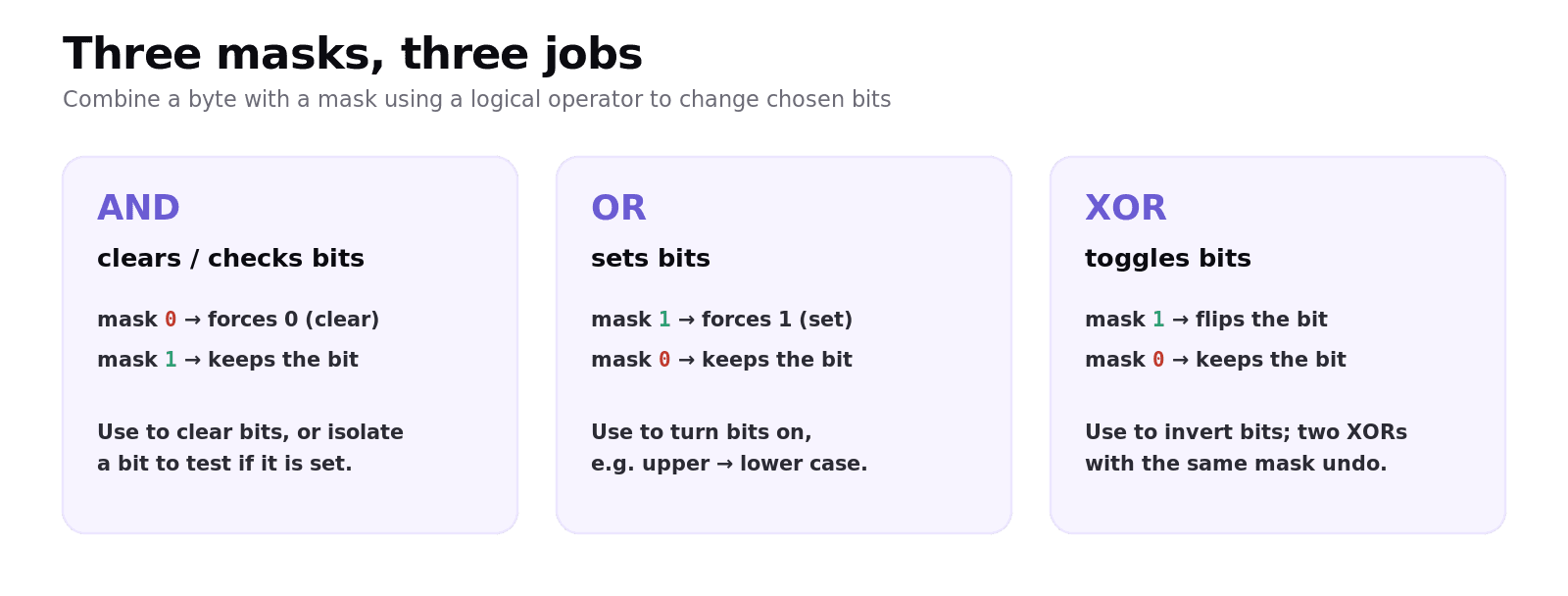
A mask is a binary pattern you combine with your data using a logical operator to change or check specific bits while leaving others alone. The operator you choose decides what happens.
AND mask — clear or check bits
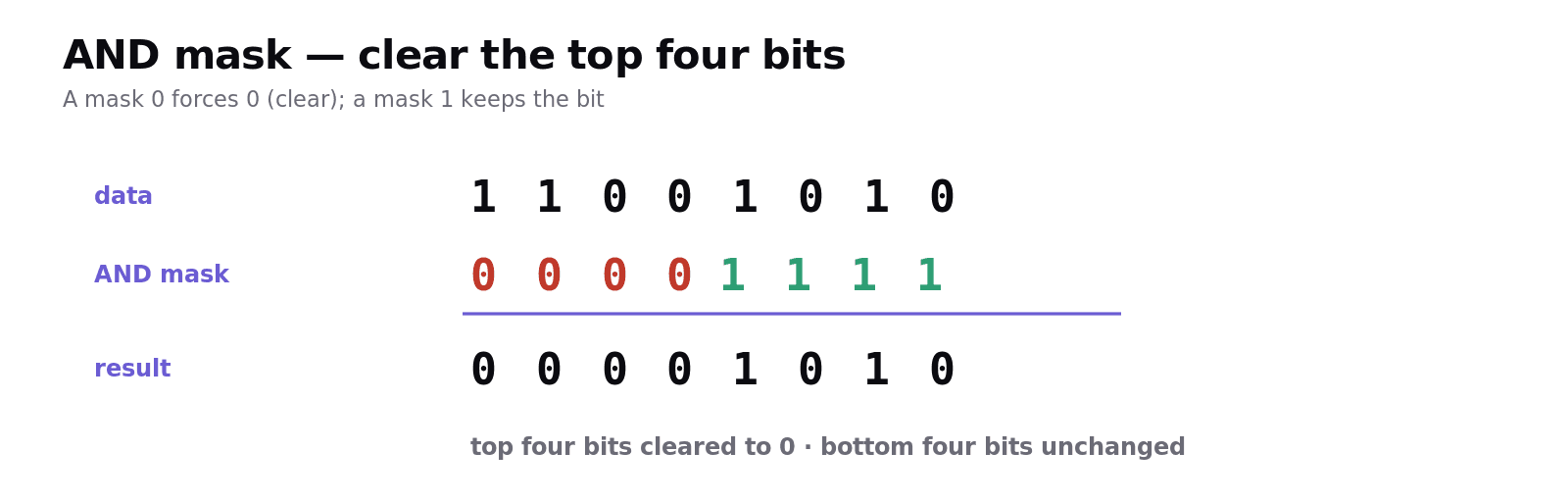
AND gives 1 only when both bits are 1. So with an AND mask:
A mask bit of 0 forces that position to 0 (clears it).
A mask bit of 1 keeps the original bit unchanged.
This lets you clear chosen bits, or check/isolate a bit (AND with a mask that has a single 1; if the result is non-zero, that bit was set). Example — clear the top four bits of 11001010:
OR mask — set bits
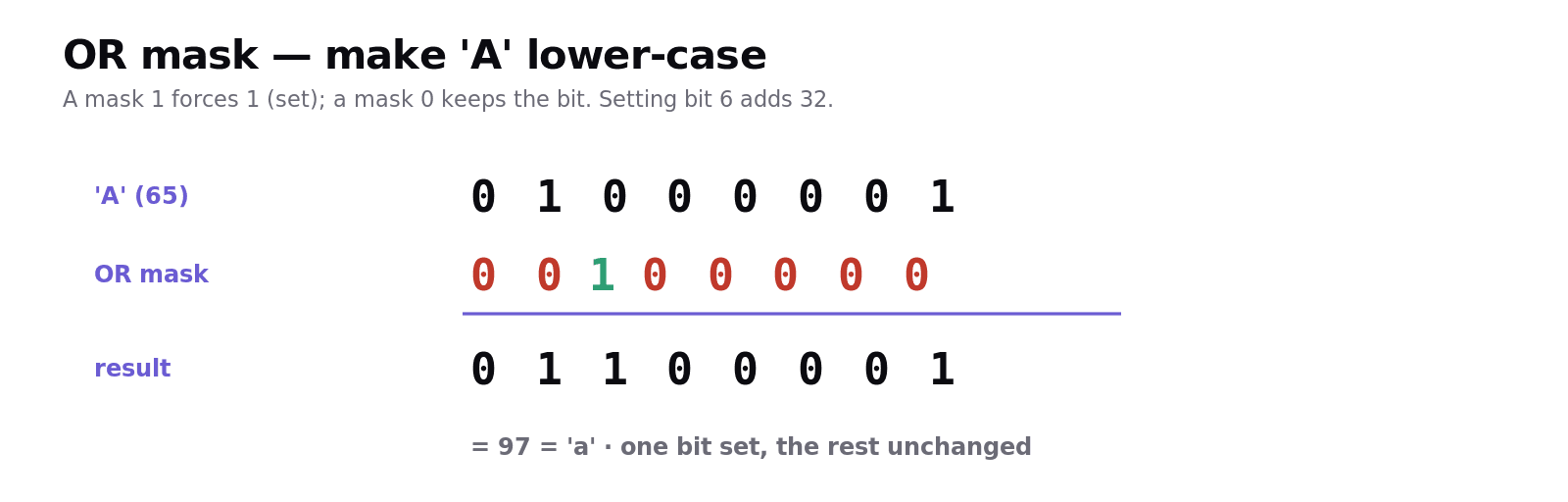
OR gives 1 when either bit is 1. So with an OR mask:
A mask bit of 1 forces that position to 1 (sets it).
A mask bit of 0 keeps the original bit unchanged.
This lets you turn bits on. A classic use: ASCII upper-case letters become lower-case by setting bit 6 (adding 32). OR 01000001 ('A') with the mask 00100000 gives 01100001 ('a').
XOR mask — toggle bits
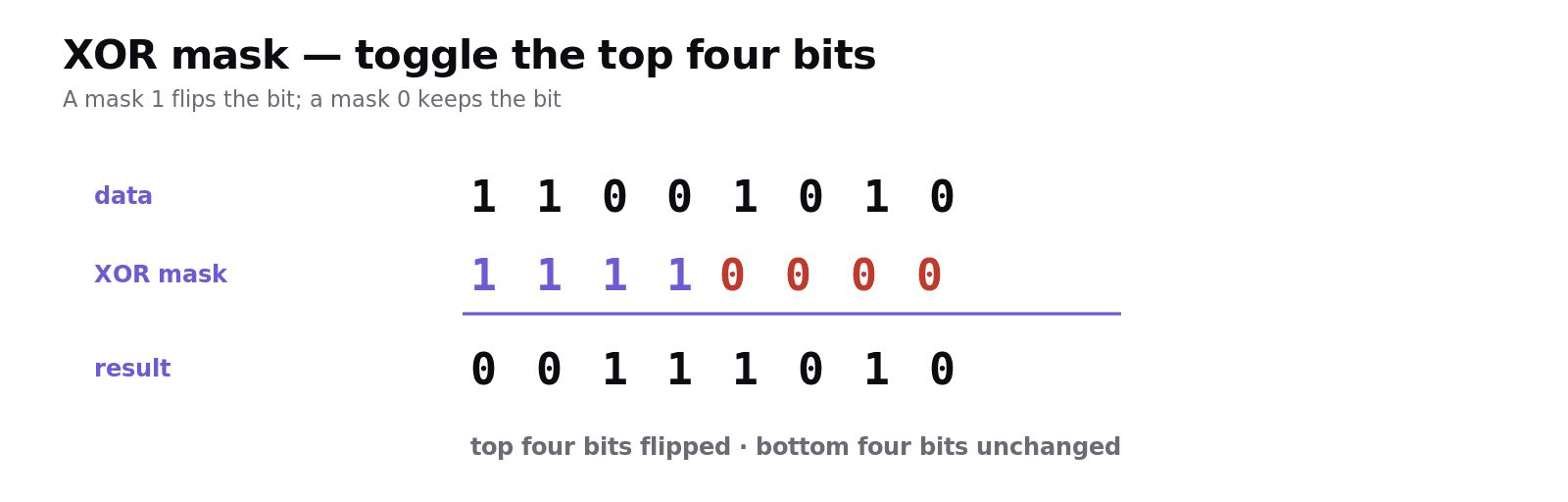
XOR gives 1 only when the bits are different. So with an XOR mask:
A mask bit of 1 flips (toggles) that position.
A mask bit of 0 keeps the original bit unchanged.
This lets you invert chosen bits. Example — toggle the top four bits of 11001010:
Worked example: controlling switches
Imagine a byte where each bit controls one of 8 lights. To turn lights 1–4 off without touching the rest, AND with 00001111 (the four 0s clear lights 1–4, the four 1s keep lights 5–8). To then turn lights 1–4 on, OR with 11110000. To toggle a light's state each time a button is pressed, XOR with a mask that has a 1 in that light's position. Pick the operator by what you need: AND to clear/check, OR to set, XOR to toggle.
Common exam mistakes
Picking the wrong operator. AND = clear/check, OR = set, XOR = toggle. Learn the trio.
Forgetting which bit is unchanged. For AND, a mask 1 keeps; for OR/XOR, a mask 0 keeps.
Shift direction confusion. Left shift = ×2 per place; right shift = ÷2 per place.
Ignoring lost bits. Right-shifting an odd number loses the bit that falls off — the result is rounded down.
Mixing up XOR and OR. OR sets bits to 1; XOR only flips where the mask is 1 (so two XORs with the same mask return the original).
Quick recap
Left shift = ×2 per place; right shift = ÷2 per place (bits falling off are lost).
A mask + a logical operator changes or checks chosen bits.
AND mask: 0 clears, 1 keeps → clear or check/isolate bits.
OR mask: 1 sets, 0 keeps → turn bits on.
XOR mask: 1 toggles, 0 keeps → flip bits.
Frequently asked questions
What does a binary shift do? A logical binary shift moves every bit a number of places left or right, filling the empty positions with zeros. A left shift by one place multiplies the number by two, and a right shift by one place divides it by two, with any bits that fall off the end being lost.
How can shifts be used to multiply and divide? Shifting left by n places multiplies a number by 2 to the power n, and shifting right by n places divides it by 2 to the power n. Numbers can even be multiplied by values that are not powers of two by combining several shifts with addition, for example multiplying by seven using shifts of two and one places plus the original.
What is a mask in bitwise manipulation? A mask is a binary pattern combined with data using a logical operator (AND, OR or XOR) to change or check specific bits while leaving the others unchanged. The choice of operator determines whether the selected bits are cleared, set, toggled or tested.
How do you clear or check a bit using a mask? Use an AND mask: a mask bit of 0 forces that position to 0 (clearing it) while a mask bit of 1 leaves the original bit unchanged. ANDing with a mask that has a single 1 isolates that bit, so a non-zero result shows the bit was set.
How do you set or toggle a bit using a mask? To set bits, use an OR mask: a mask bit of 1 forces that position to 1, while a 0 leaves it unchanged. To toggle bits, use an XOR mask: a mask bit of 1 flips that position, while a 0 leaves it unchanged.
What is the difference between AND, OR and XOR masks? An AND mask clears or checks bits (0 clears, 1 keeps), an OR mask sets bits (1 sets, 0 keeps), and an XOR mask toggles bits (1 flips, 0 keeps). Choosing the right operator lets a program control individual bits without affecting the rest of the byte.