Search Engine Indexing, PageRank & Server-Side Processing (OCR A-Level CS 1.3.4)
OCR A-Level CS 1.3.4: how search engines crawl and index the web, how the PageRank algorithm ranks pages (including the damping factor), and server-side vs client-side processing.

Free Search PageRank Server Client revision resources (OCR A-Level Computer Science, 1.3.4)
We’ve made exam-style practice for this exact topic, free to download: Search PageRank Server Client question sheet, mark scheme and cheat sheet. Grab them, have a go, then read the full guide below.
How does Google find the right page out of billions in a fraction of a second? OCR's spec points 1.3.4(b), (c) and (d) cover exactly that: search engine indexing, the PageRank algorithm, and the split between server-side and client-side processing. These appear regularly — from short "what is the damping factor?" questions to a 12-mark "discuss why indexing and page ranking are important."
Let's break down how a search engine works, how it decides what to show first, and where web processing actually happens.
How does a search engine index the web?
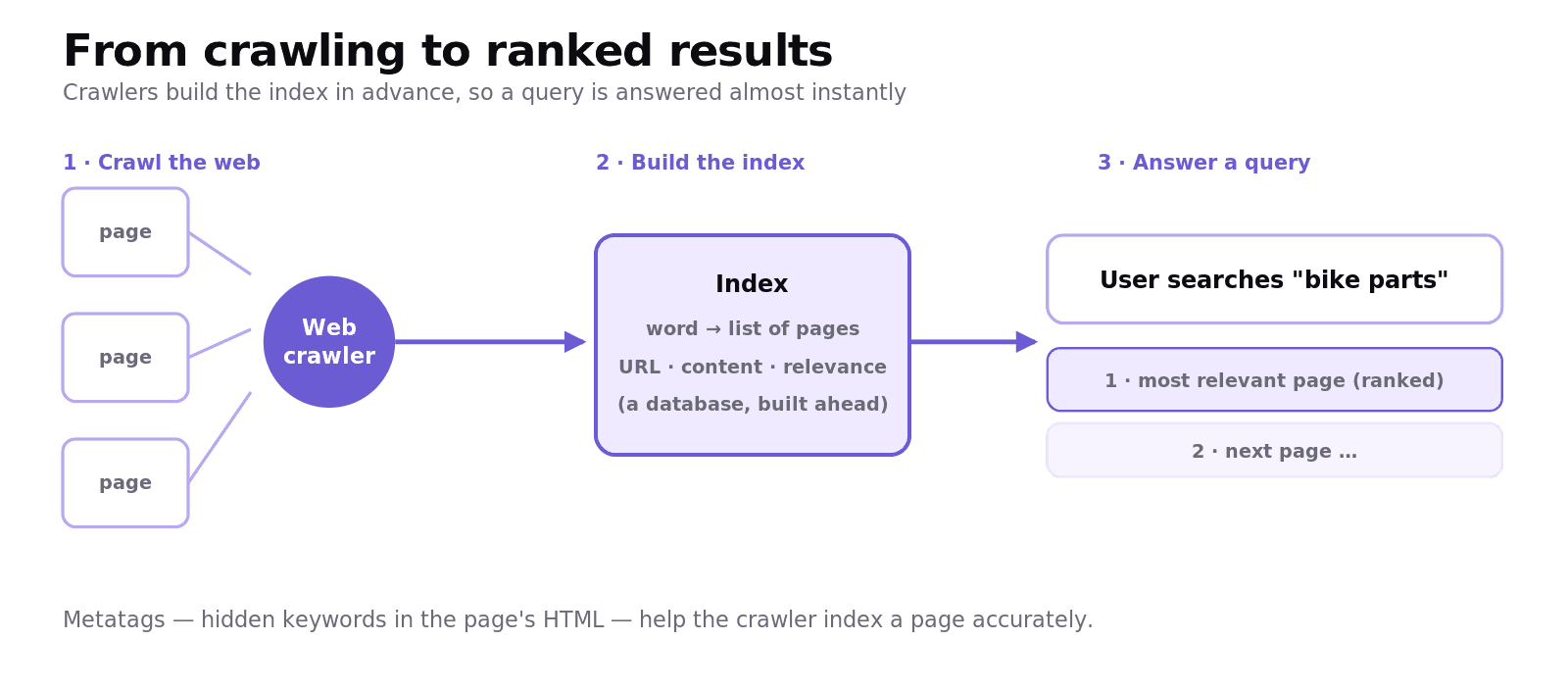
A search engine doesn't search the live web when you type a query — that would be far too slow. Instead it builds an index in advance:
Web crawlers (also called spiders or bots) are programs that automatically browse the web, following the links from page to page to discover content. For each page they record information such as the URL, the content and its relevance.
This information is added to a giant index — essentially a database of words and which pages contain them, much like the index at the back of a textbook. Search engine indexing is the process of building and maintaining that index.
When you search, the engine looks up your terms in the pre-built index rather than the live web, which is what makes results appear almost instantly.
Metatags help this process. They are keywords placed in the background of a page's HTML (not visible to the reader) that describe the page's content, so the crawler can index it more accurately. (They can be abused — stuffing irrelevant keywords — which is one reason ranking relies on more than metatags.)
How does PageRank decide the order?

Indexing finds the matching pages; PageRank decides which order to show them in. PageRank, developed by Google's founders, rates a page's importance based on its incoming links — treating each link as a "vote." The original algorithm is:
Where PR(A) is the PageRank of page A, each Ti is a page that links to A, C(Ti) is the number of outbound links on that page, and d is the damping factor. The key ideas you must be able to explain:
A page is ranked higher if many pages link to it, and especially if those linking pages are themselves highly ranked. A link from an important page is worth more.
A vote is diluted if the linking page links to lots of other pages too (that's the
/C(Ti)term).The damping factor (d), usually about 0.85, models the probability that a user keeps clicking links rather than stopping. It stops rank "leaking away" and keeps the maths stable.
Lots of other factors influence modern rankings too — keywords in the domain and content, page age, load speed, mobile-friendliness — but for the exam, PageRank's core idea is importance measured by quality and quantity of incoming links.
Server-side vs client-side processing
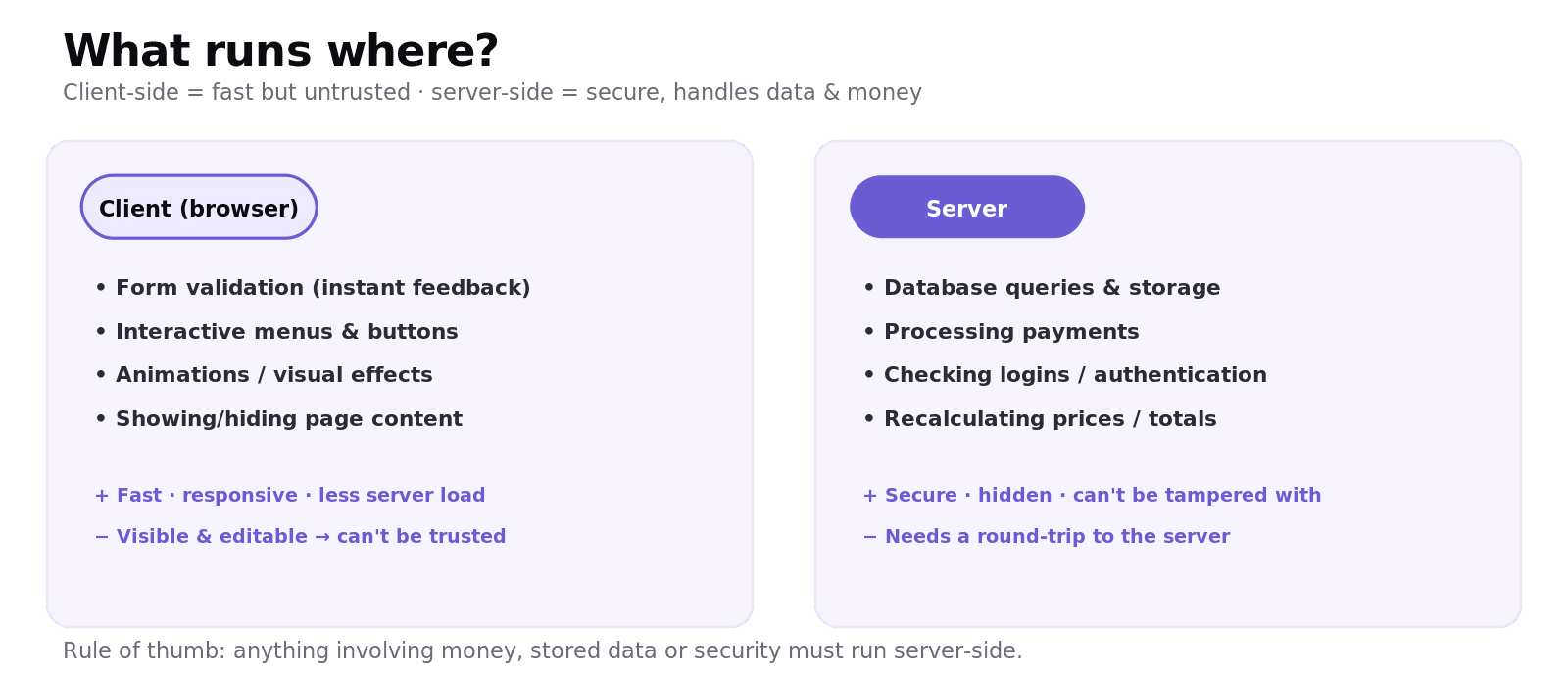
The third idea is where the processing for a web page happens:
Client-side processing runs in the user's browser (typically JavaScript) — form validation, interactive menus, animations. It's fast and responsive (no round-trip to the server) and reduces server load, but the user can see and change it, so it can't be trusted for anything security-critical.
Server-side processing runs on the web server — database queries, processing payments, checking logins, and recalculating important values like prices. It's secure (hidden from the user and can't be tampered with) but each request means a round-trip to the server.
The classic exam point ties back to validation: you might validate a form client-side for instant feedback, but the server must re-check it because client-side checks can be bypassed. Anything involving money, stored data, or security must happen server-side.
Worked example: a film-review site
A user submits a star rating and a review. Client-side, JavaScript instantly checks the rating isn't blank and updates the page — fast and smooth. When it reaches the server, the server re-validates the rating (a malicious user could have bypassed the JavaScript) and stores it in the database, then recalculates the film's average score. Interactivity is handled client-side; the trusted work — validation that matters, the database write, the recalculation — happens server-side.
Common exam mistakes
Confusing indexing with searching. Crawlers build the index in advance; your query searches that pre-built index, not the live web.
Saying PageRank counts links equally. A link from a highly ranked page counts more, and a vote is diluted across a page's many outbound links.
Defining the damping factor vaguely. It's the probability a user keeps following links; it stabilises the calculation.
Putting trust-critical work client-side. Payments, logins and final prices must be server-side; client-side can be bypassed.
Forgetting metatags are hidden. They sit in the HTML, invisible to the reader, to help indexing.
Quick recap
Web crawlers follow links to discover pages; their findings build a search index; queries search that index for speed.
Metatags are hidden keywords in the HTML that help a page be indexed.
PageRank orders results by importance = quality + quantity of incoming links; a link from an important page counts more.
The damping factor (d ≈ 0.85) is the probability a user keeps clicking links; it stabilises the algorithm.
Client-side (browser) = fast, interactive, untrusted; server-side = secure, handles data/payments. Trust-critical work goes server-side.
Frequently asked questions
What is a web crawler? A web crawler, also called a spider or bot, is a program that automatically browses the web by following links from page to page. For each page it records information such as the URL, content and relevance, which is then added to the search engine's index.
What is search engine indexing? Search engine indexing is the process of building and maintaining an index of web pages — a database of words and which pages contain them. When a user searches, the engine looks up the terms in this pre-built index rather than the live web, which makes results appear almost instantly.
How does the PageRank algorithm work? PageRank rates a page's importance based on its incoming links, treating each link as a vote. A page ranks higher if many pages link to it, especially highly ranked pages, and a page's vote is shared across all of its outbound links. The result determines the order in which matching pages are shown.
What is the damping factor in PageRank? The damping factor, usually around 0.85, represents the probability that a user continues clicking links rather than stopping. It prevents rank from leaking away and keeps the PageRank calculation stable.
What is the difference between client-side and server-side processing? Client-side processing runs in the user's browser, such as JavaScript for validation and interactivity, which is fast but can be bypassed. Server-side processing runs on the web server, such as database queries and payments, which is secure and cannot be tampered with by the user.
Why is some processing done server-side rather than client-side? Client-side processing can be seen and altered by the user, so anything security-critical — checking logins, processing payments, recalculating prices, or storing data — must be done server-side where it is hidden and cannot be tampered with, even if the same check was also done client-side for speed.