JavaScript & Web Forms for OCR A-Level Computer Science (1.3.4)
OCR A-Level CS 1.3.4: what JavaScript does, manipulating HTML elements, form validation, why JS is interpreted, and client-side vs server-side validation.

Free JavaScript Web Forms revision resources (OCR A-Level Computer Science, 1.3.4)
We’ve made exam-style practice for this exact topic, free to download: JavaScript Web Forms question sheet, mark scheme and cheat sheet. Grab them, have a go, then read the full guide below.
HTML and CSS make a page that just sits there. JavaScript makes it do things — respond to clicks, change content, and check what a user types into a form before it's sent. Spec point 1.3.4(a) includes JavaScript, and it turns up most often around web forms and validation, including questions like "complete this JavaScript function" and "explain why JavaScript is interpreted rather than compiled."
This post covers what JavaScript does, the syntax you'll be asked to read and write, and the all-important idea of validating forms on both the client and the server.
What is JavaScript and where does it run?
JavaScript is a scripting language that runs client-side — inside the user's browser — to make web pages interactive. It's embedded in a page between <script> tags (or linked from a .js file). Because it runs in the browser, it can respond instantly to the user without contacting the server.
A key exam fact: JavaScript is interpreted, not compiled. A compiler produces machine code for one specific type of processor, but a web page can be opened on any device with any processor. So the browser interprets the JavaScript line by line at run time, which keeps it portable across all those different machines. (Modern browsers add just-in-time compilation for speed, but the principle examiners want is portability.)
Manipulating the page: the key syntax
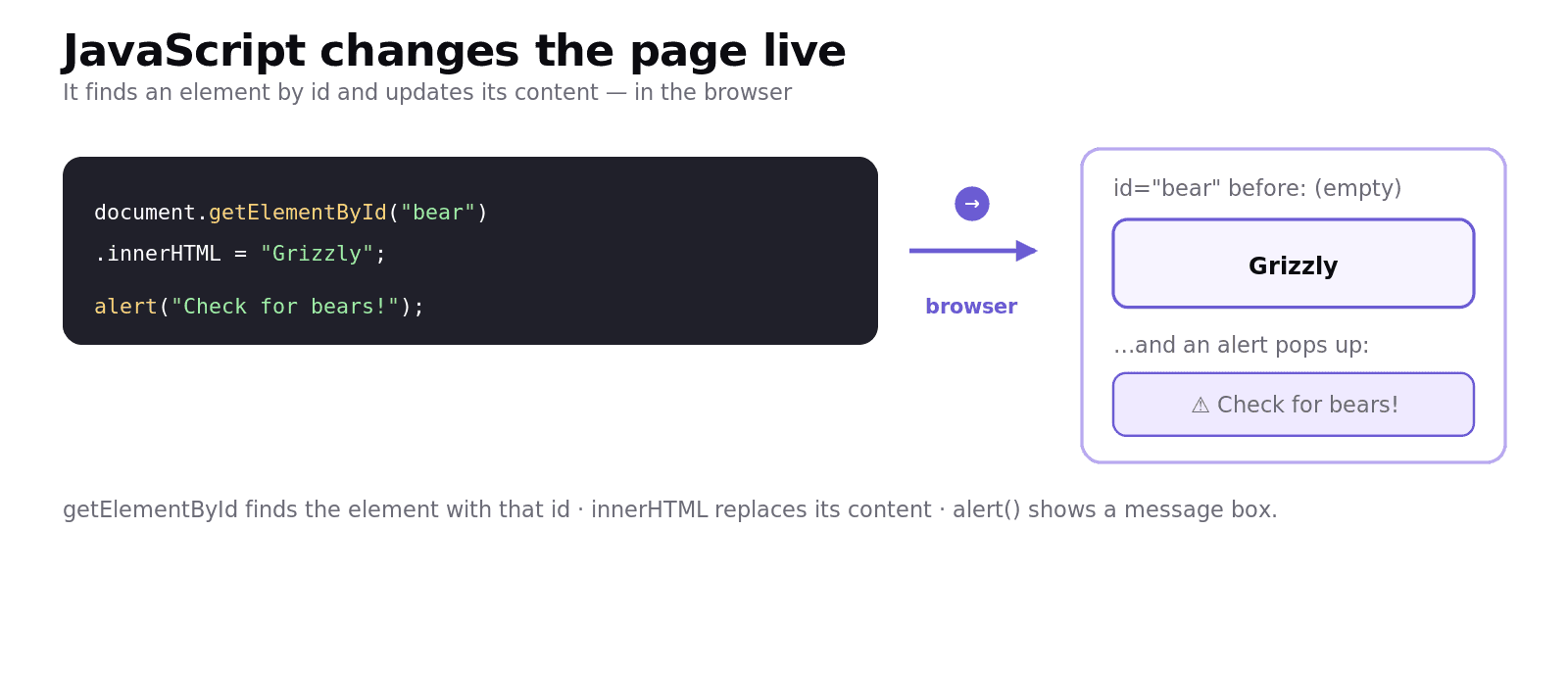
JavaScript reaches into the page using the id of an element, then reads or changes it. The two pieces of syntax you must recognise:
document.getElementById("bear") finds the HTML element with id="bear", and .innerHTML = "Grizzly" replaces its content. An alert() forces a message box the user must dismiss before continuing — handy for warnings.
You may also be asked to read or write a small function:
This counts how many items are in the products array and pops up the total.
Web forms and validation
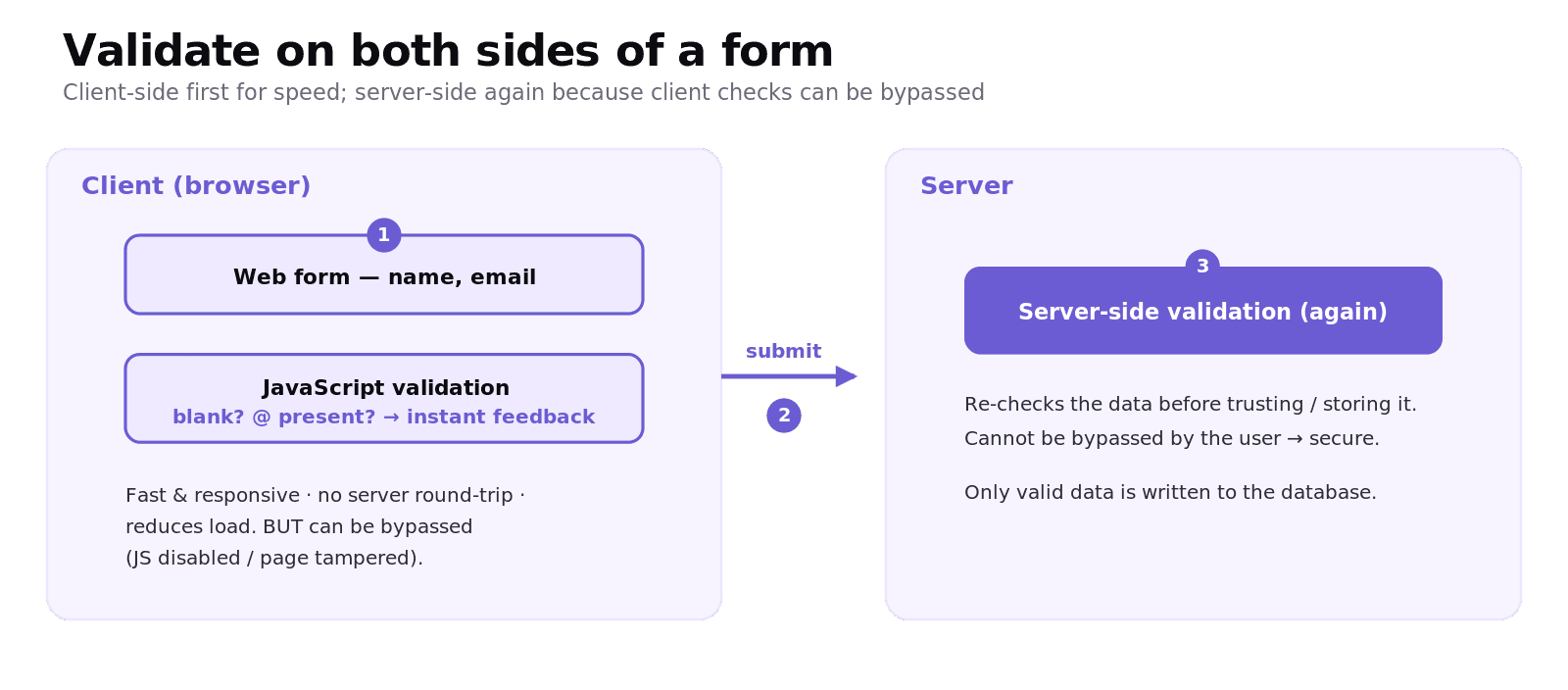
A web form collects input — name, email, password — and JavaScript can validate it (check it's sensible) before it is sent. For example, checking a box isn't blank, or that an email contains an @:
The big idea OCR keeps testing is why you validate on both sides:
Client-side validation (JavaScript) is fast and responsive — the user gets instant feedback without waiting for the server, and it reduces unnecessary traffic to the server.
But client-side checks can be bypassed — a user can disable JavaScript or tamper with the page — so the data must be checked again server-side before it's trusted or stored.
So you validate client-side for a good user experience, and server-side for security and integrity. Saying only one side is the classic mark-loser.
Worked example: validating an email field
A sign-up form must reject a blank email. Client-side, JavaScript checks the field the moment the user submits and shows an alert if it's empty — instant, no server round-trip. When the (non-blank) email reaches the server, the server checks it again — because a malicious user could have skipped the JavaScript entirely. Two layers: convenience first, trust second.
Common exam mistakes
Confusing the three languages. HTML = structure, CSS = style, JavaScript = behaviour/interactivity.
Wrong DOM syntax. It's
document.getElementById("id")then.innerHTMLor.value. Spelling and capital letters are marked.Saying validation only needs to be client-side. Client-side can be bypassed; always re-check server-side.
Explaining "interpreted" weakly. The point is portability: compiled code is processor-specific, but the page runs on any device, so the browser interprets it.
Mixing up
alert()and changing the page.alert()shows a pop-up;innerHTML/.valuechanges element content.
Quick recap
JavaScript runs client-side in the browser to make pages interactive; embedded in
<script>tags.It's interpreted, not compiled, for portability across different processors.
document.getElementById("x").innerHTML = "…"changes an element;alert("…")shows a message box.Forms: validate client-side (fast, responsive) and server-side (secure — client checks can be bypassed).
Know the difference: HTML structure, CSS style, JavaScript behaviour.
Frequently asked questions
What is JavaScript used for? JavaScript is a scripting language that runs in the user's browser to make web pages interactive. It can respond to user actions, change the content and appearance of elements, and validate data entered into forms before it is sent to the server.
Why is JavaScript interpreted rather than compiled? A compiler produces machine code for one specific type of processor, but a web page can be opened on many different devices. The browser therefore interprets the JavaScript at run time so the same code is portable and runs on any processor.
How does JavaScript change the content of an HTML element? It selects the element by its id and sets its content, for example document.getElementById("bear").innerHTML = "Grizzly". This finds the element with id="bear" and replaces its inner content with the new text.
What is form validation? Form validation is checking that the data a user enters into a form is sensible and complete before it is accepted, for example ensuring a field is not blank or that an email address contains an @ symbol. JavaScript can do this in the browser before the form is submitted.
Why should form data be validated on both the client and the server? Client-side validation with JavaScript is fast and gives the user instant feedback while reducing load on the server, but it can be bypassed if the user disables JavaScript. Server-side validation re-checks the data after it is received, so it can be trusted before being stored.
What is the difference between client-side and server-side processing? Client-side processing runs in the user's browser, such as JavaScript validating a form, giving fast and interactive responses. Server-side processing runs on the web server, such as re-checking data and updating a database, where it is secure and not visible to the user.