Network Hardware, Client–Server & Peer-to-Peer (OCR A-Level CS 1.3.3)
OCR A-Level CS 1.3.3: network hardware (NIC, switch, router, gateway, WAP, transmission media) and the difference between client–server and peer-to-peer networks.

Free Hardware Client Server P2P revision resources (OCR A-Level Computer Science, 1.3.3)
We’ve made exam-style practice for this exact topic, free to download: Hardware Client Server P2P question sheet, mark scheme and cheat sheet. Grab them, have a go, then read the full guide below.
You can't build a network out of cables alone. OCR's spec points 1.3.3(d) and (e) cover the hardware that makes a network work — NICs, switches, routers, gateways and wireless access points — and the two ways of organising the computers on it: client–server and peer-to-peer. Both come up regularly, including "explain the purpose of a network switch" and "give two advantages of client–server over peer-to-peer."
This guide walks through each piece of hardware, then compares the two network models.
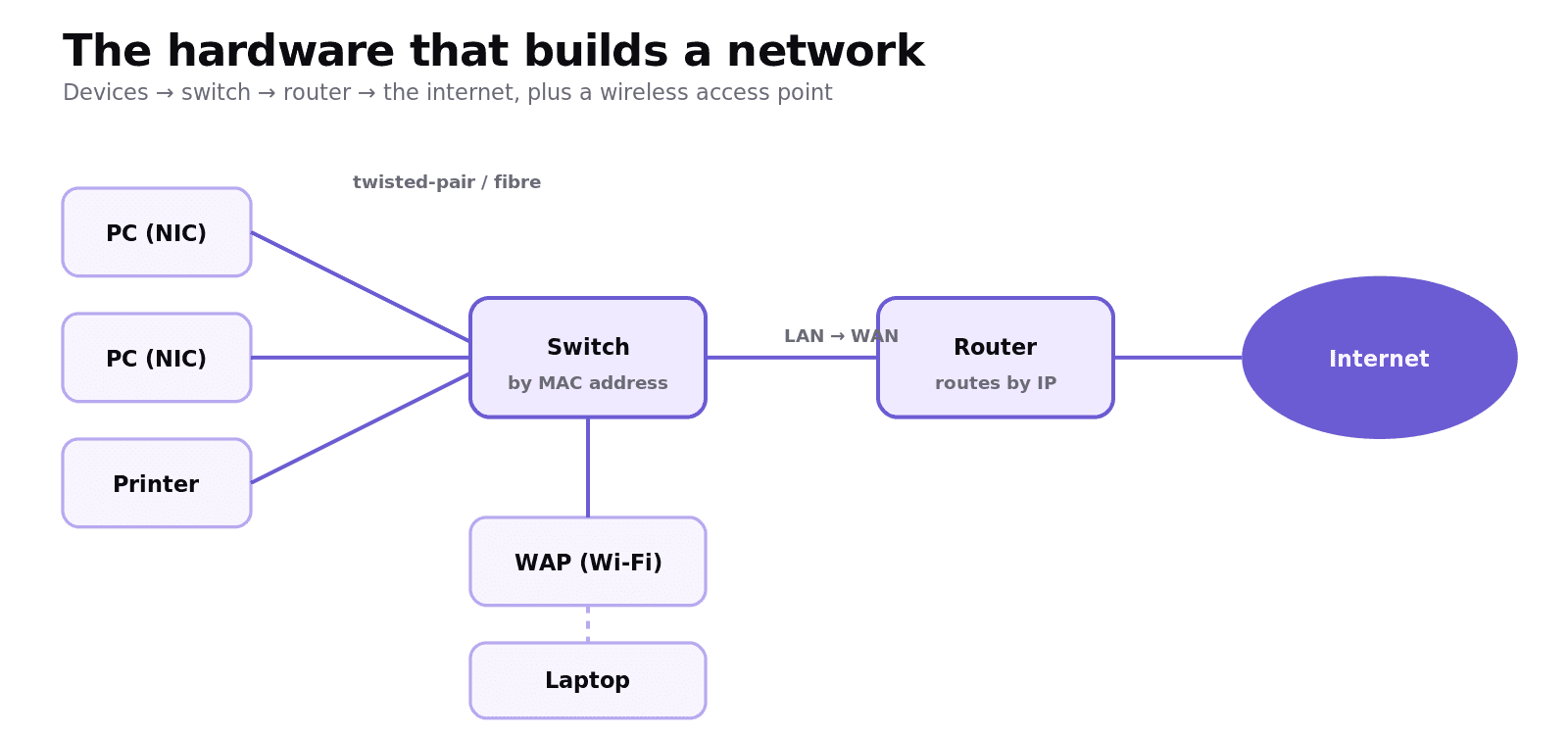
What hardware do you need to build a network?
A few key devices do the work:
Network Interface Card (NIC) — the component in each device that lets it connect to a network. Every NIC has a unique MAC address burned in, which identifies that device on the local network.
Switch — connects devices on a LAN and sends each frame only to the device it is addressed to, using MAC addresses. This keeps traffic efficient (more on this below).
Router — connects different networks together and routes packets between them using IP addresses. Your home router is what connects your LAN to your ISP and the wider internet.
Gateway — connects two networks that use different protocols, translating between them so they can communicate. (A router connects networks using the same protocols; a gateway is needed when they differ.)
Wireless Access Point (WAP) — lets devices connect to the network wirelessly over Wi-Fi, rather than through a cable.
Transmission media — the physical connections: wired (copper twisted-pair or coaxial cable, or high-speed fibre-optic) or wireless (radio waves such as Wi-Fi).
Switch vs hub: why a switch is smarter
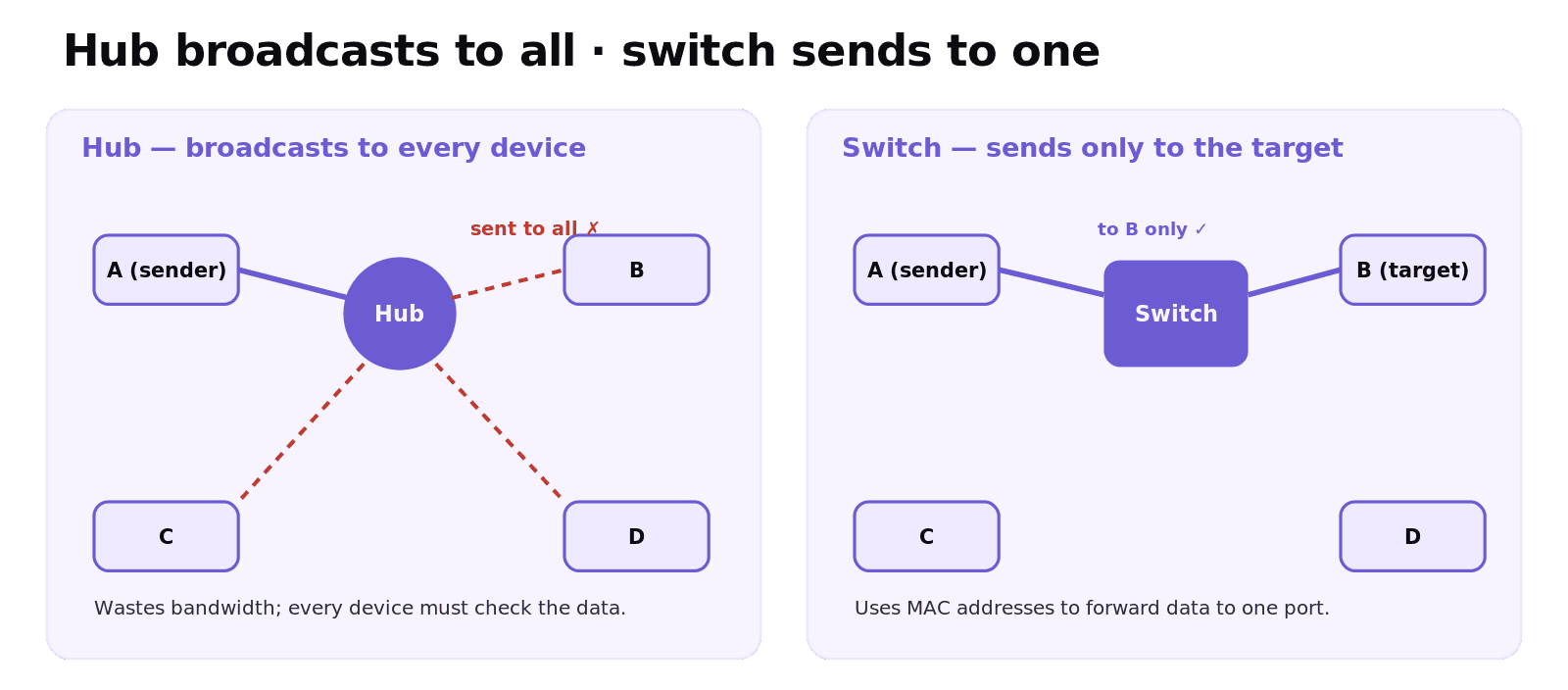
Older networks used a hub, which simply broadcasts any data it receives to every device connected to it. Every device has to check whether the data is for them, which wastes bandwidth and creates collisions.
A switch is smarter: it keeps a table of which MAC address is on which port, so it sends each frame only to the intended device. This reduces unnecessary traffic and improves security and performance. If an exam asks you to "explain the purpose of a network switch," that's the answer: it connects devices on a LAN and forwards data only to the device it is addressed to, using MAC addresses.
Client–server vs peer-to-peer
These are two ways of organising the computers on a network.
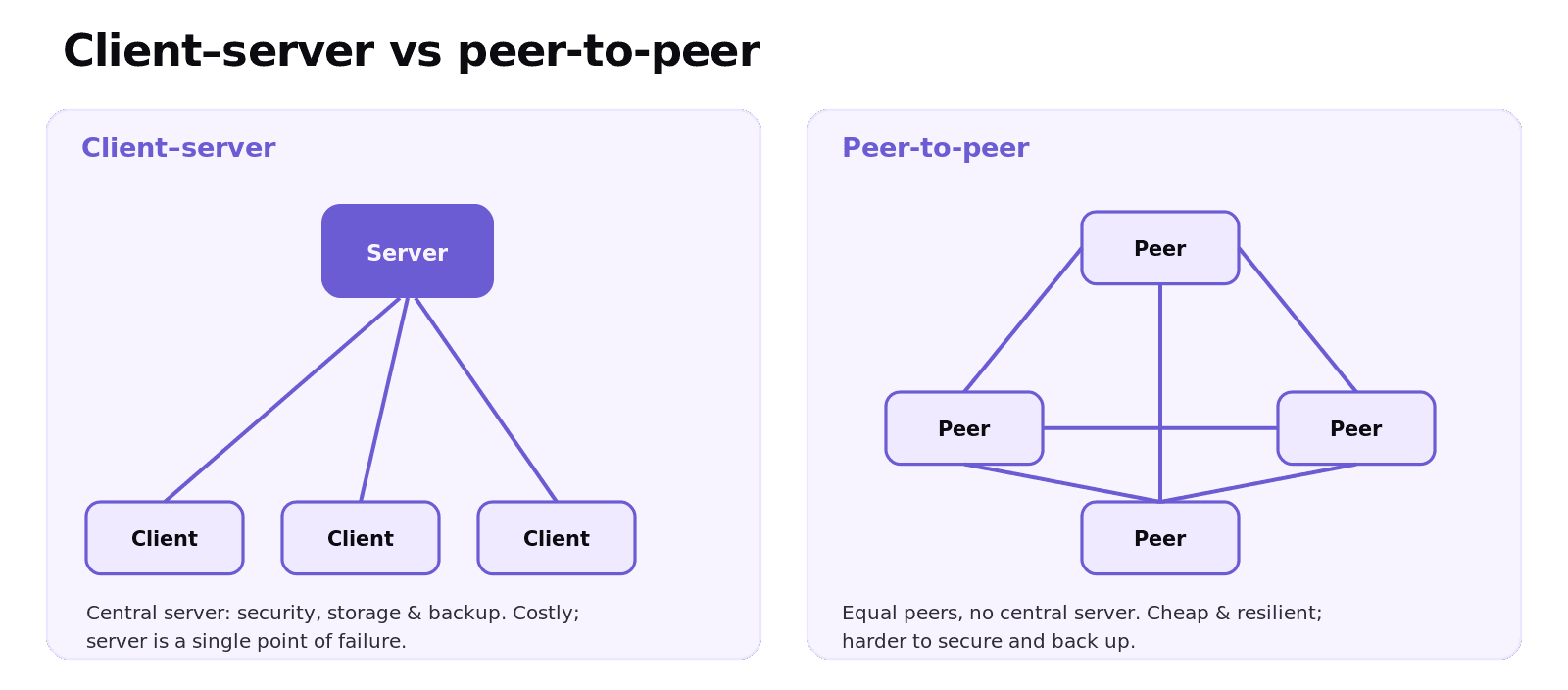
In a client–server network, one or more powerful servers provide resources and services (files, websites, email, authentication), and the other computers — the clients — request those services. Control is centralised: the server manages security, stores the files, and handles backups.
In a peer-to-peer (P2P) network, every computer is an equal "peer." There is no central server; each machine can both request and provide resources directly to the others. P2P is common for file sharing and some streaming services.
The trade-offs:
Client–server | Peer-to-peer | |
|---|---|---|
Control & security | Centralised, easier to manage and secure | No central control; harder to secure |
Backup | Central backup of all data | Each machine responsible for its own |
Cost & setup | Expensive (needs a dedicated server, expertise) | Cheap, simple to set up |
Reliability | Server is a single point of failure | No central dependency; more resilient |
Best for | Schools, businesses, large organisations | Small home networks, file sharing |
Worked example: choosing a model
A small primary school with 40 computers needs pupils to log in anywhere, share files, and have data backed up centrally and kept secure.
A client–server network fits: the server can manage logins and permissions, store everyone's files centrally, enforce security, and run automatic backups — all things a school needs. The extra cost and the need for a server administrator are worth it. A peer-to-peer setup would be cheaper, but with no central control it would be a nightmare to secure and back up 40 separate machines. So the justified choice is client–server, because the school values central security and backup over low cost.
Common exam mistakes
Mixing up switch and router. A switch connects devices within a LAN (MAC addresses); a router connects different networks and routes packets between them (IP addresses).
Saying a hub and switch are the same. A hub broadcasts to all; a switch sends data only to the target device.
Confusing router and gateway. A router connects networks using the same protocols; a gateway connects networks using different protocols.
Vague client–server answers. Name the benefit precisely: centralised security, file storage and backup; the server handles requests from clients.
Forgetting the downside of each model. Client–server: costly, server is a single point of failure. P2P: hard to secure and back up.
Quick recap
NIC connects a device to the network and holds its MAC address; transmission media can be wired (copper, fibre) or wireless.
Switch sends data only to the addressed device on a LAN (by MAC); a hub broadcasts to all.
Router connects different networks and routes packets by IP; a gateway links networks using different protocols.
Client–server: central server, centralised security/storage/backup; costly, single point of failure.
Peer-to-peer: equal peers, cheap and resilient; harder to secure and back up.
Frequently asked questions
What is the purpose of a network switch? A switch connects devices together on a LAN and forwards each frame only to the device it is addressed to, using MAC addresses. This avoids the unnecessary traffic a hub creates by broadcasting data to every device.
What is the difference between a switch and a router? A switch connects devices within a single LAN and directs data using MAC addresses. A router connects different networks together, such as a home LAN to the internet, and routes packets between them using IP addresses.
What is the difference between a router and a gateway? A router connects two or more networks that use the same protocols and routes packets between them. A gateway connects two networks that use different protocols, translating between them so the networks can communicate.
What is a client–server network? In a client–server network, one or more central servers provide resources and services such as files, websites and authentication, and client computers request those services. Security, storage and backups are managed centrally on the server.
What is a peer-to-peer network? In a peer-to-peer network there is no central server; every computer is an equal peer that can both request and provide resources directly to the others. It is cheap and simple to set up and is commonly used for file sharing.
What are the advantages of client–server over peer-to-peer? Client–server offers centralised security and management, central storage and backup of data, and easier control of user access. The trade-off is higher cost and that the server is a single point of failure, whereas peer-to-peer is cheaper and has no central dependency.