SQL: Querying, Defining & Updating Tables (OCR A-Level CS 1.3.2)
OCR A-Level CS 1.3.2: SQL SELECT queries with WHERE and joins, plus CREATE, INSERT, UPDATE and DELETE. Worked examples and exam tips.

Free SQL revision resources (OCR A-Level Computer Science, 1.3.2)
We’ve made exam-style practice for this exact topic, free to download: SQL question sheet, mark scheme and cheat sheet. Grab them, have a go, then read the full guide below.
SQL (Structured Query Language) is how you actually talk to a relational database. Spec point 1.3.2 requires you to interpret and modify SQL — and the exam asks you to write SQL almost every year, from a simple SELECT to a DELETE with conditions.
This guide covers the SQL you must be able to read and write: querying with SELECT, and defining and updating tables.
How does a SELECT query work?
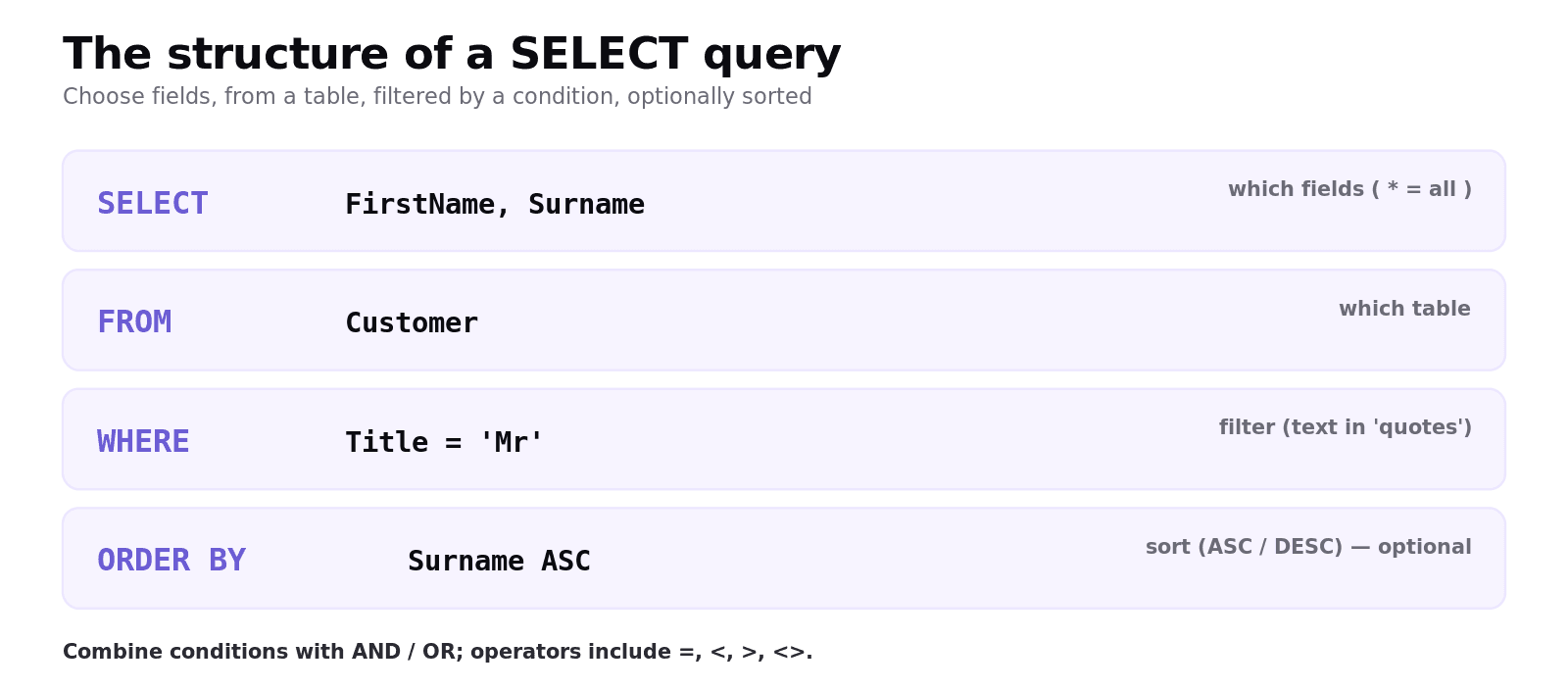
SELECT retrieves data from one or more tables. Its parts, in order:
SELECTthe fields you want (or*for all).FROMthe table.WHEREan optional condition to filter rows.ORDER BYan optional field to sort the results (ASCorDESC).
This returns the first name and surname of every customer whose title is "Mr", sorted by surname. Note text values go in single quotes; conditions can combine with AND, OR and comparison operators (=, <, >, <>).
How do you query more than one table (joins)?
When data spans two tables linked by keys, you join them on the matching key:
The WHERE clause matches each order's foreign key to the customer's primary key, so you get each order with its customer's surname. (OCR also accepts the INNER JOIN ... ON form.)
How do you define a table?
CREATE TABLE defines a new table, its fields and their data types, and the primary key:
How do you add, change and delete records?
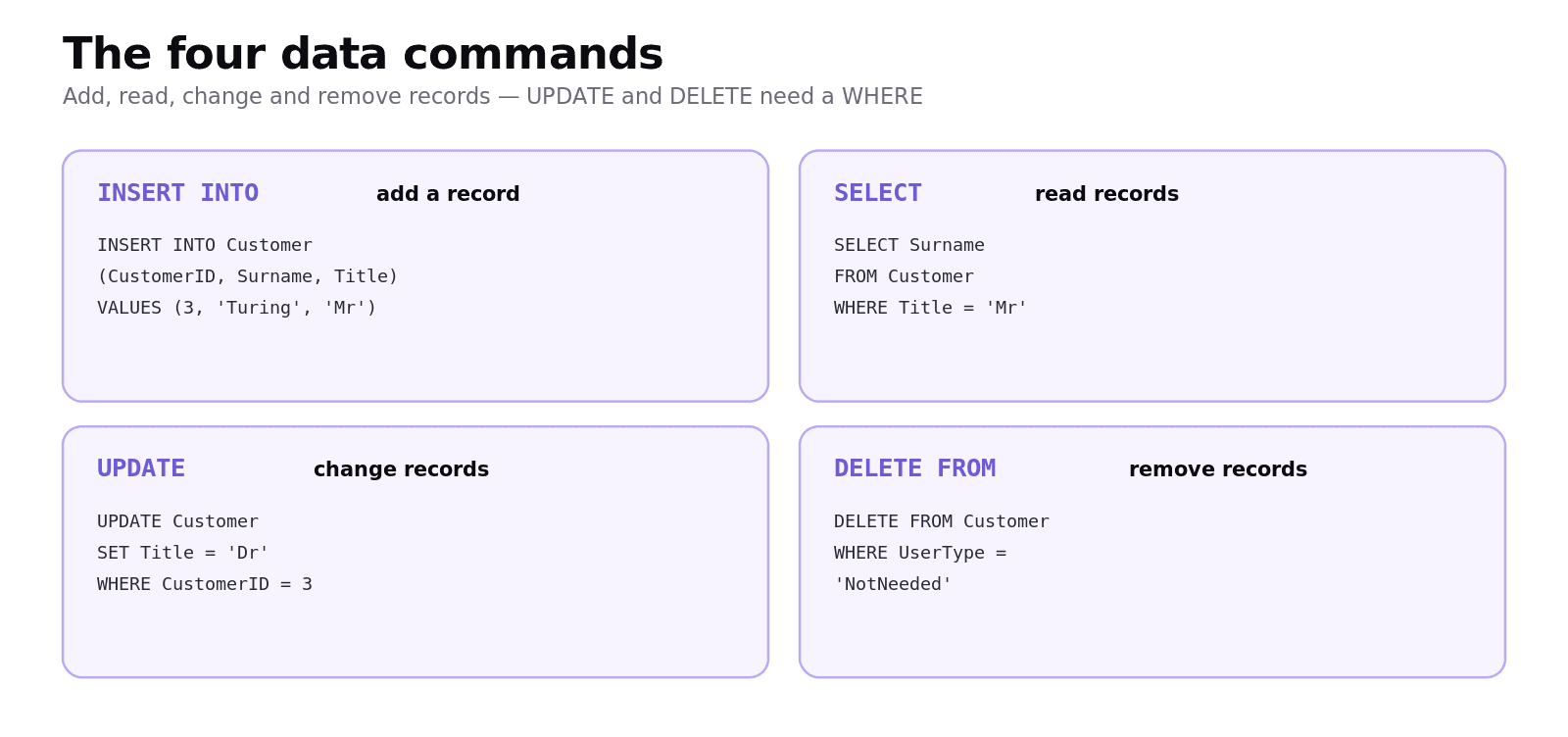
Add a record with
INSERT INTO:
Change records with
UPDATE ... SET ... WHERE:
Remove records with
DELETE FROM ... WHERE:
The exam warning: an UPDATE or DELETE without a WHERE clause affects every record in the table — a common, costly mistake.
Common exam mistakes
Forgetting the WHERE clause.
DELETE FROM Customerwith noWHEREempties the whole table;UPDATEwithoutWHEREchanges every row.Missing quotes on text. Text literals need single quotes (
'Mr'); numbers do not.Confusing the verbs.
SELECTreads,INSERTadds,UPDATEchanges,DELETEremoves.Not joining tables. To combine data from two tables, match the foreign key to the primary key in the
WHERE/ON.Listing fields in the wrong place. Fields go after
SELECT; the table goes afterFROM.
Quick recap
SELECT fields FROM table WHERE condition ORDER BY field— read and filter data; text in single quotes.Join tables by matching the foreign key to the primary key in
WHERE/ON.CREATE TABLEdefines fields, types and the primary key.INSERT INTO ... VALUESadds;UPDATE ... SET ... WHEREchanges;DELETE FROM ... WHEREremoves.Always include a
WHEREonUPDATE/DELETEunless you really mean every record.
Frequently asked questions
What does a SELECT statement do? SELECT retrieves data from a database. You list the fields after SELECT, the table after FROM, an optional filter after WHERE, and an optional sort after ORDER BY. Using * selects all fields.
How do you filter records in SQL? Add a WHERE clause with a condition, for example WHERE Title = 'Mr'. Conditions can use comparison operators such as =, <, > and <>, and be combined with AND and OR. Text values are written in single quotes.
How do you query data from two tables? You join the tables on their linking keys, matching the foreign key in one table to the primary key in the other, for example WHERE Order.CustomerID = Customer.CustomerID. OCR also accepts the INNER JOIN ... ON form.
How do you add, change and delete records in SQL? Use INSERT INTO ... VALUES to add a record, UPDATE ... SET ... WHERE to change records, and DELETE FROM ... WHERE to remove records. Always include a WHERE clause unless you intend to affect every record.
Why is the WHERE clause important in UPDATE and DELETE? Without a WHERE clause, UPDATE changes every record in the table and DELETE removes every record. The WHERE clause restricts the command to only the records that match the condition, which is essential to avoid losing or corrupting data.
How do you create a table in SQL? Use CREATE TABLE with the table name, then list each field and its data type in brackets and mark the primary key, for example CREATE TABLE Customer (CustomerID INTEGER PRIMARY KEY, Surname VARCHAR(30)).