Database Concepts, Keys & ER Modelling (OCR A-Level CS 1.3.2)
OCR A-Level CS 1.3.2: flat file vs relational databases, primary, foreign and secondary keys, ER diagrams, and capturing, selecting and exchanging data. Exam tips.

Free Database Concepts Keys ER revision resources (OCR A-Level Computer Science, 1.3.2)
We’ve made exam-style practice for this exact topic, free to download: Database Concepts Keys ER question sheet, mark scheme and cheat sheet. Grab them, have a go, then read the full guide below.
Almost every system you use — shops, schools, banks, social media — runs on a database. Spec point 1.3.2 covers flat file versus relational databases, the different kinds of key, entity relationship (ER) modelling, and how data is captured, selected, managed and exchanged. It is one of the most heavily examined areas of Paper 1, with 18 past-paper question-parts on the concepts and keys alone.
This guide explains the core database concepts, the keys you must know, and how to read and draw ER diagrams.
What is the difference between a flat file and a relational database?
A flat file database stores all the data in a single table. That is fine for very simple needs, but it causes problems as data grows: the same information is repeated in many rows (data redundancy), which wastes space and risks inconsistency (the same customer's address stored differently in different rows), and updates must be made in many places.
A relational database stores data in several linked tables, each about one type of thing (an entity such as Customer or Order). Tables are linked using keys, so each fact is stored once. This reduces redundancy, avoids inconsistency, and makes the data easier to update and query — the classic flat-file-vs-relational comparison.
What are primary, foreign and secondary keys?
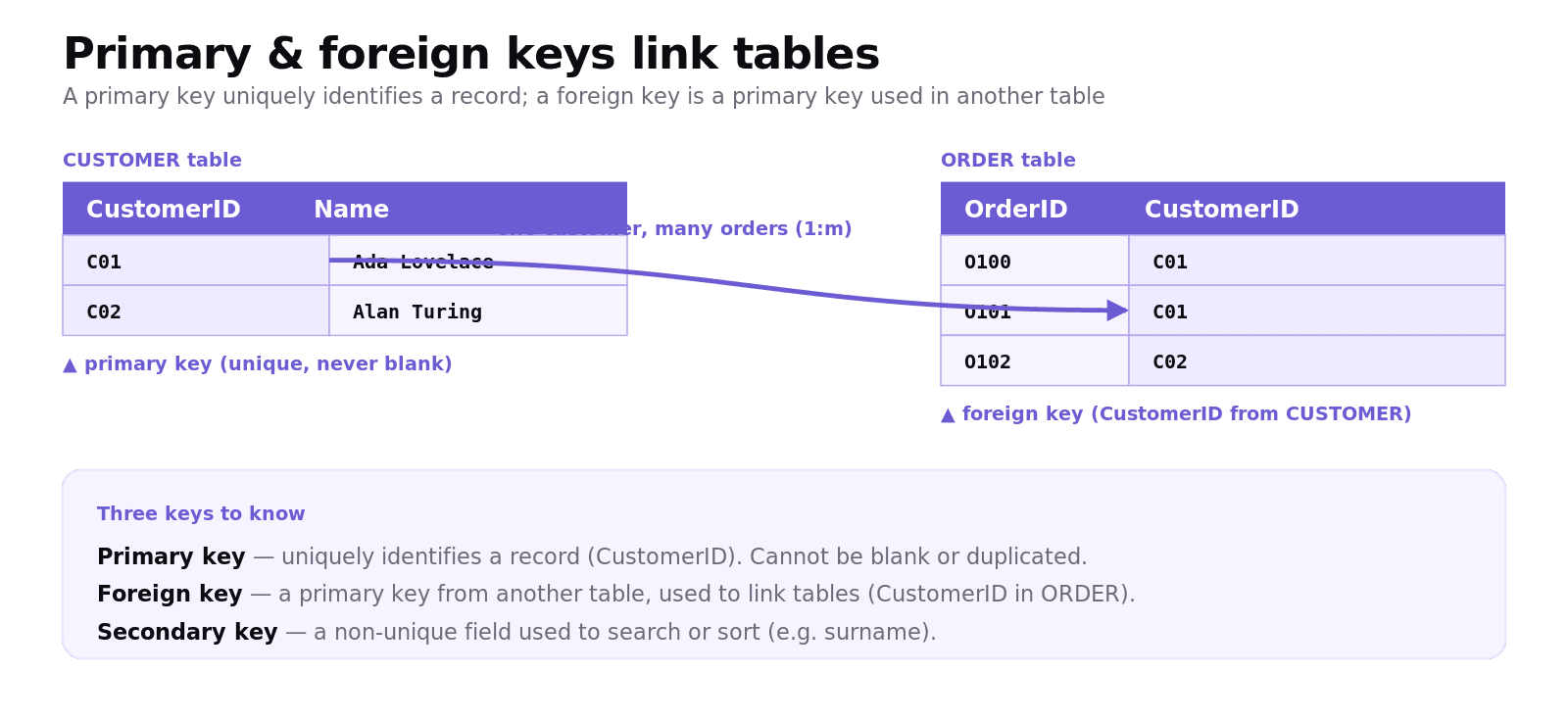
Primary key — a field (or combination of fields) that uniquely identifies each record in a table, for example a
CustomerID. Every table should have one, and it cannot be blank or duplicated.Foreign key — a field in one table that is the primary key of another table, used to link the two tables. For example, an
Ordertable holds theCustomerIDof the customer who placed it.Secondary key — a field used to search or sort records that is not the primary key, such as a surname. It does not have to be unique.
The exam test: a good primary key must be unique and never empty (so a surname or a non-unique code is not suitable); a foreign key is "a primary key from another table".
What is an entity relationship (ER) diagram?
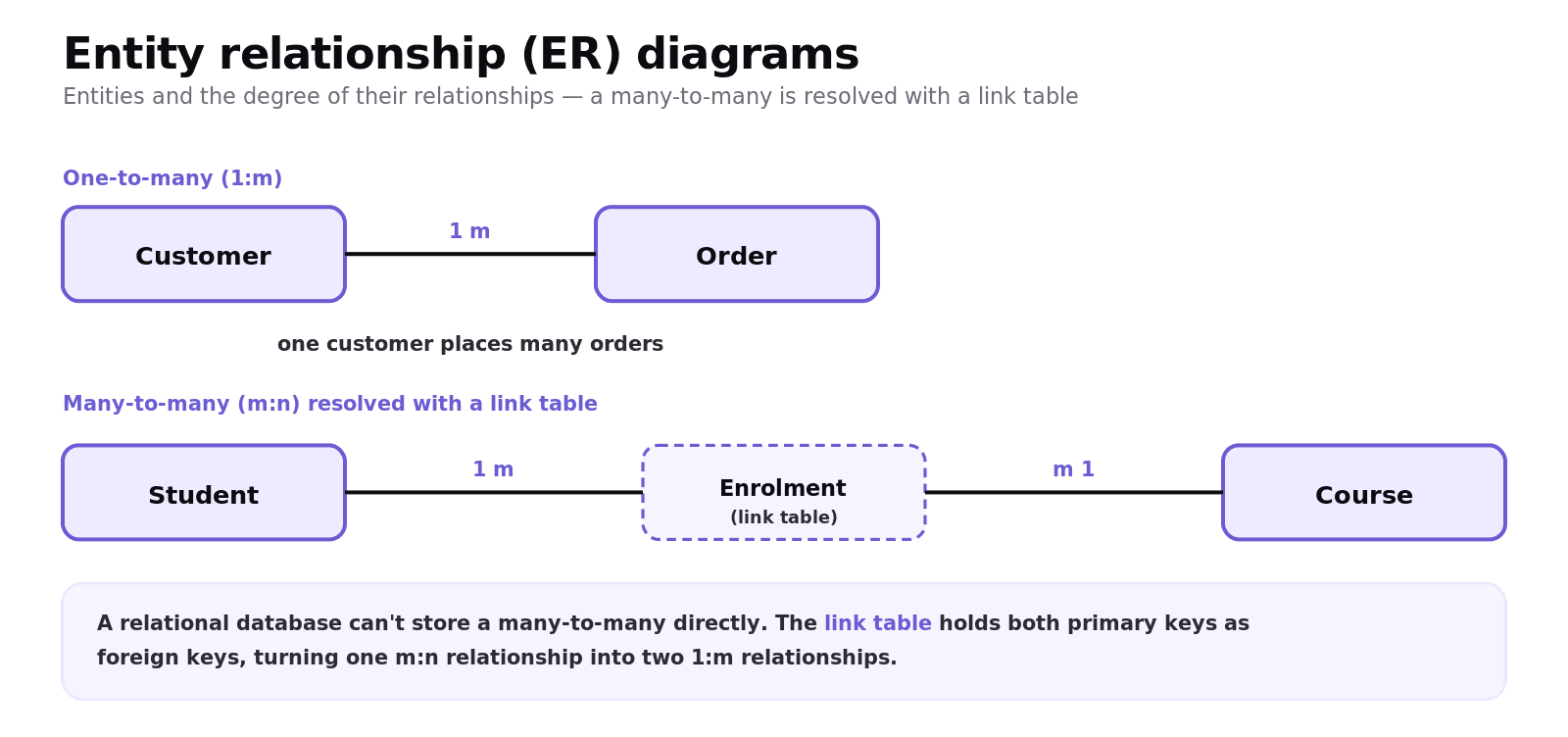
An ER diagram shows the entities in a database and the relationships between them. Relationships are described by their degree:
One-to-one (1:1) — each record in A relates to exactly one in B.
One-to-many (1:m) — one record in A relates to many in B (one customer has many orders). This is the most common.
Many-to-many (m:n) — many records in A relate to many in B (students and courses).
A many-to-many relationship cannot be implemented directly in a relational database, so it is resolved with a link (junction) table that holds the two primary keys as foreign keys, turning one m:n into two 1:m relationships. Drawing and fixing this is a recurring exam task.
How is data captured, selected, managed and exchanged?
Capturing data — getting it into the system: keyboard entry, online forms, OMR (optical mark recognition) for multiple-choice sheets, OCR (optical character recognition), barcode/QR scanning, or sensors.
Selecting data — choosing the records you need, typically with an SQL query (covered in the SQL post) or a search on a secondary key.
Managing data — the database management system (DBMS) handling storage, security, backups and access.
Exchanging data — moving data between systems using standard formats such as CSV, JSON or XML, or via an EDI/API link, so different computer systems can read it.
Common exam mistakes
Choosing a non-unique primary key. A primary key must be unique and never blank — a surname or a code that can repeat is not suitable.
Mixing up foreign and secondary keys. A foreign key links tables (it is another table's primary key); a secondary key is for searching/sorting.
Implementing a many-to-many directly. Resolve it with a link table; this is the most common ER-fix question.
Listing flat-file problems vaguely. Name them: redundancy, inconsistency, and harder updates.
Confusing capturing and exchanging. Capturing gets data in (forms, OMR); exchanging moves it between systems (CSV, JSON).
Quick recap
Flat file = one table, causing redundancy and inconsistency; relational = linked tables, each fact stored once.
Primary key = unique identifier for a record; foreign key = another table's primary key used to link tables; secondary key = a non-unique field for searching/sorting.
ER diagrams show entities and relationships: 1:1, 1:m, m:n.
A many-to-many relationship is resolved with a link table (two 1:m relationships).
Data is captured (forms, OMR, OCR, sensors), selected (queries), managed (DBMS) and exchanged (CSV, JSON, XML).
Frequently asked questions
What is the difference between a flat file and a relational database? A flat file stores all data in one table, which leads to data redundancy and inconsistency as it grows. A relational database stores data in several linked tables, each about one entity, so each fact is stored once, reducing redundancy and making updates and queries easier.
What is a primary key? A primary key is a field, or combination of fields, that uniquely identifies each record in a table, such as a CustomerID. It cannot be blank or duplicated, so it can always be used to find one specific record.
What is a foreign key? A foreign key is a field in one table that is the primary key of another table. It is used to link the two tables, for example an Order table storing the CustomerID of the customer who placed the order.
What is a secondary key? A secondary key is a field used to search or sort records that is not the primary key, such as a surname. It does not need to be unique, and a table can have several secondary keys.
What is an ER diagram? An entity relationship diagram shows the entities in a database and the relationships between them, described as one-to-one, one-to-many or many-to-many. It is used to plan the structure of a relational database.
How do you resolve a many-to-many relationship? You add a link (junction) table between the two entities. The link table contains the primary keys of both entities as foreign keys, which turns the many-to-many relationship into two one-to-many relationships that a relational database can implement.