Compression: Lossy, Lossless, RLE & Dictionary Coding (OCR A-Level CS 1.3.1)
OCR A-Level CS 1.3.1: lossy vs lossless compression, run length encoding and dictionary coding, with worked examples, diagrams and exam tips.

Free Compression revision resources (OCR A-Level Computer Science, 1.3.1)
We’ve made exam-style practice for this exact topic, free to download: Compression question sheet, mark scheme and cheat sheet. Grab them, have a go, then read the full guide below.
Streaming a film, sending a photo, zipping a folder — all rely on compression, making files smaller so they take less storage and transfer faster. Spec point 1.3.1 covers lossy versus lossless compression and two lossless techniques, run length encoding and dictionary coding — including worked "compress this" questions and a 12-mark discussion of the two methods.
This guide explains the two types of compression and how the two lossless algorithms work.
What is compression and why is it used?
Compression reduces the number of bits needed to represent a file. Smaller files use less storage, transfer faster and use less bandwidth — which is why it matters for streaming, downloads and web pages.
What is the difference between lossy and lossless compression?
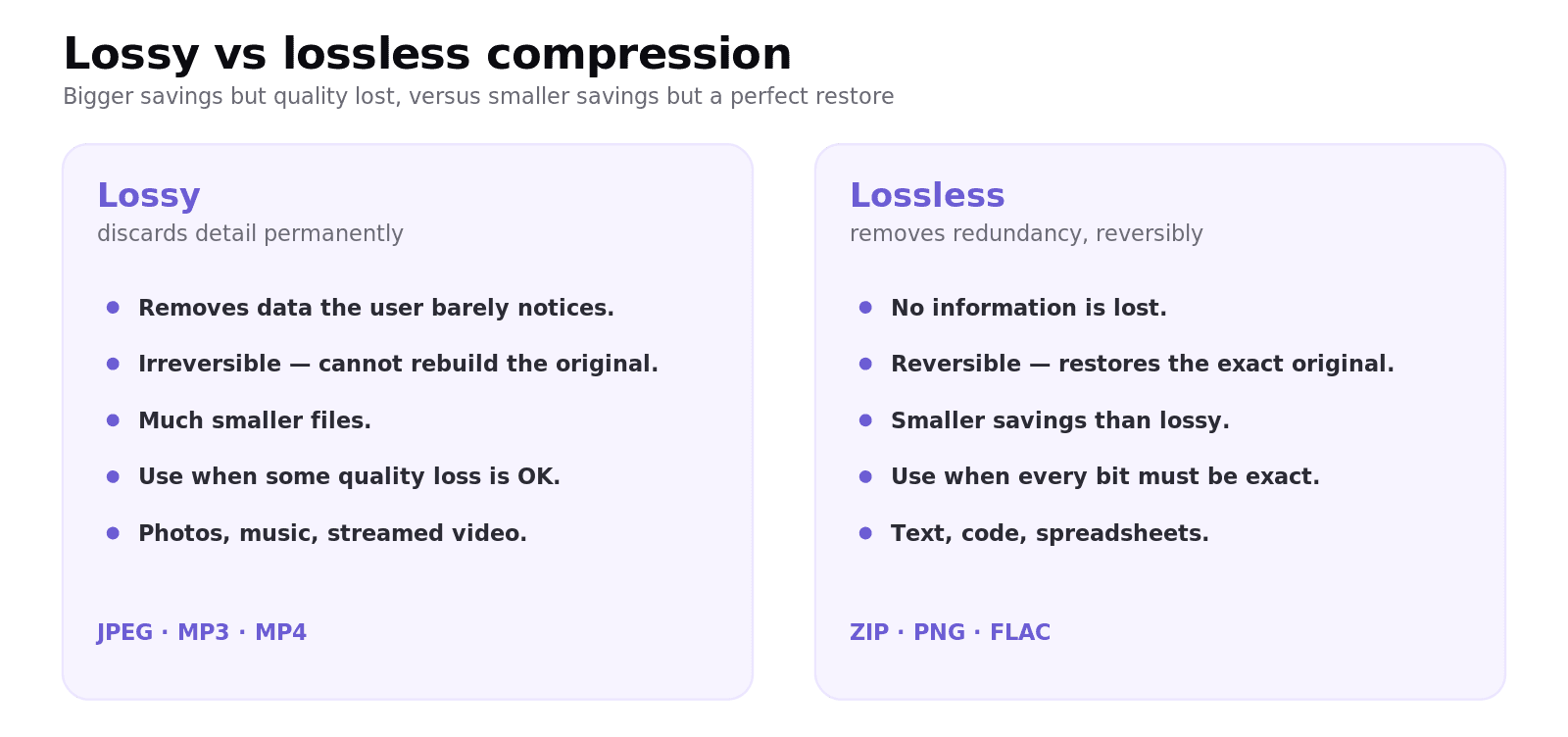
Lossy compression makes files much smaller by permanently discarding data the user is least likely to notice — detail the eye or ear barely perceives. It is irreversible: you cannot rebuild the exact original. It suits photos, music and video (JPEG, MP3, most streaming) where a small quality loss is acceptable for a big size saving.
Lossless compression makes files smaller by removing redundancy in a way that can be perfectly reversed, so the original is restored exactly. It gives smaller savings than lossy but loses nothing. It is essential for text, program code, spreadsheets and any file where every bit matters (ZIP, PNG).
The exam rule: if the data must be reconstructed exactly (text, code, a spreadsheet of figures), you must use lossless; only use lossy when some quality loss is acceptable.
How does run length encoding (RLE) work?
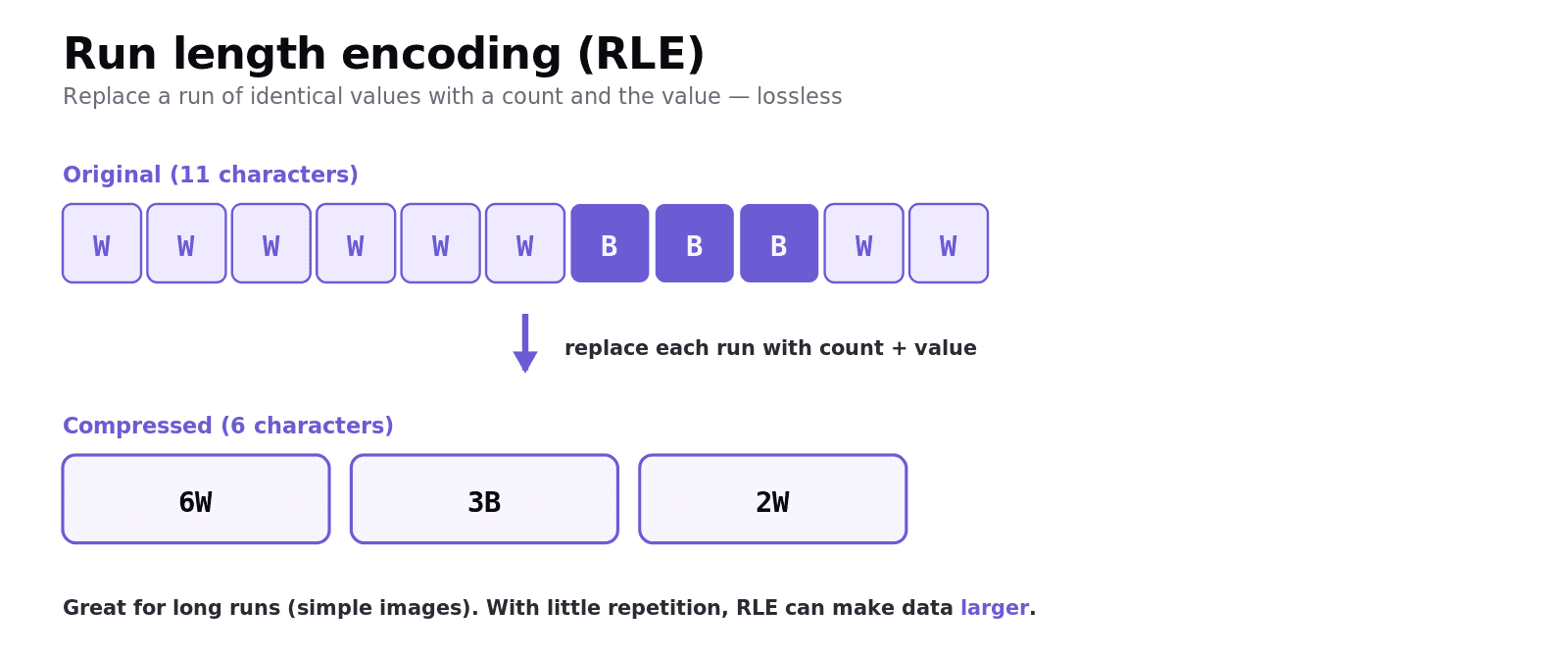
Run length encoding replaces a run of identical values with a single value and a count. It is lossless and works best when data has long runs of repetition, such as simple images with large blocks of one colour.
Worked example
Compress WWWWWWBBBWW:
six W →
6Wthree B →
3Btwo W →
2W
The compressed form is 6W3B2W — 6 characters instead of 11. To decompress 3C3M4C you reverse it: CCCMMMCCCC. Note RLE only saves space when runs are long; data with little repetition can end up larger.
How does dictionary coding work?
Dictionary coding finds repeating patterns (words or sequences) in the data and stores them once in a dictionary, replacing each occurrence with a short index/code. The dictionary is sent with the compressed data so it can be rebuilt. It is lossless and works well on text, where whole words repeat.
Worked example
For "the cat sat on the mat", a dictionary might be 1 = the, 2 = at. The text becomes 1 c2 s2 on 1 m2, with the dictionary stored alongside. The more a pattern repeats, the greater the saving.
Common exam mistakes
Saying lossy "loses some data so it's worse". It is the right choice when a size saving matters more than perfect quality (streaming, photos).
Using lossy for text or code. Anything that must be exact needs lossless — a favourite "explain why" question.
Forgetting RLE can grow data. With little repetition, run length encoding can make a file larger.
Forgetting to store the dictionary. Dictionary coding must include the dictionary, which is part of why short, low-repetition data may not compress well.
Confusing the two techniques. RLE compresses runs of the same value; dictionary coding replaces repeated patterns with codes.
Quick recap
Compression shrinks files: less storage, faster transfer, less bandwidth.
Lossy = discards detail, irreversible, big savings (JPEG, MP3); lossless = removes redundancy, reversible, exact (ZIP, PNG).
Use lossless whenever the data must be restored exactly (text, code, spreadsheets).
RLE replaces runs with count + value (
WWWWW→5W); great for repetitive images, can grow non-repetitive data.Dictionary coding stores repeated patterns once and replaces them with codes; great for text; the dictionary travels with the data.
Frequently asked questions
What is compression? Compression reduces the number of bits used to store a file, making it smaller. This saves storage space, speeds up transfer and reduces the bandwidth needed, which is important for streaming, downloads and web pages.
What is the difference between lossy and lossless compression? Lossy compression permanently discards data the user is unlikely to notice, giving large size savings but no way to restore the exact original. Lossless compression removes redundancy in a fully reversible way, so the original is restored exactly, with smaller savings.
When should you use lossless rather than lossy compression? Whenever the data must be reconstructed exactly, such as text, program code, spreadsheets or archives. Lossy is only suitable when some loss of quality is acceptable, such as photos, music and streamed video.
How does run length encoding work? Run length encoding replaces a run of identical values with the value and a count, so AAAAA becomes 5A. It is lossless and works well on data with long runs of repetition, but it can make data with little repetition larger.
How does dictionary coding work? Dictionary coding identifies repeating patterns, stores each once in a dictionary, and replaces every occurrence in the data with a short code. The dictionary is stored with the compressed data so the original can be rebuilt. It works well on text.
Why is compression important for streaming video? High-resolution video is huge, so without compression it could not be transferred fast enough to play smoothly. Compression reduces the file size and bandwidth needed, allowing video to stream in real time, usually using lossy compression.