Writing & Following Algorithms (OCR A-Level CS 1.2.3)
OCR A-Level CS 1.2.3: how to trace an algorithm with a trace table and how to write algorithms in OCR Exam Reference Language. Worked examples and exam tips.

Free Writing Following Algorithms revision resources (OCR A-Level Computer Science, 1.2.3)
We’ve made exam-style practice for this exact topic, free to download: Writing Following Algorithms question sheet, mark scheme and cheat sheet. Grab them, have a go, then read the full guide below.
Two skills run right through OCR Paper 1: following an algorithm (working out what code does) and writing one (turning a problem into pseudocode). Spec point 1.2.3 is one of the most heavily tested on the paper — expect "state the output", "complete the trace table", and "write an algorithm" questions worth anything from 1 to 8 marks.
This guide shows you how to trace an algorithm with a trace table, and how to write clear algorithms in OCR Exam Reference Language (the pseudocode used in the exam).
What does "following an algorithm" mean?
Following (or tracing) an algorithm means working through it line by line, keeping track of every variable's value, exactly as the computer would. The tool for this is a trace table: one column per variable (plus one for output), one row per change. It stops you guessing and is the safest way to answer "state the output" questions.
Worked example: tracing a loop
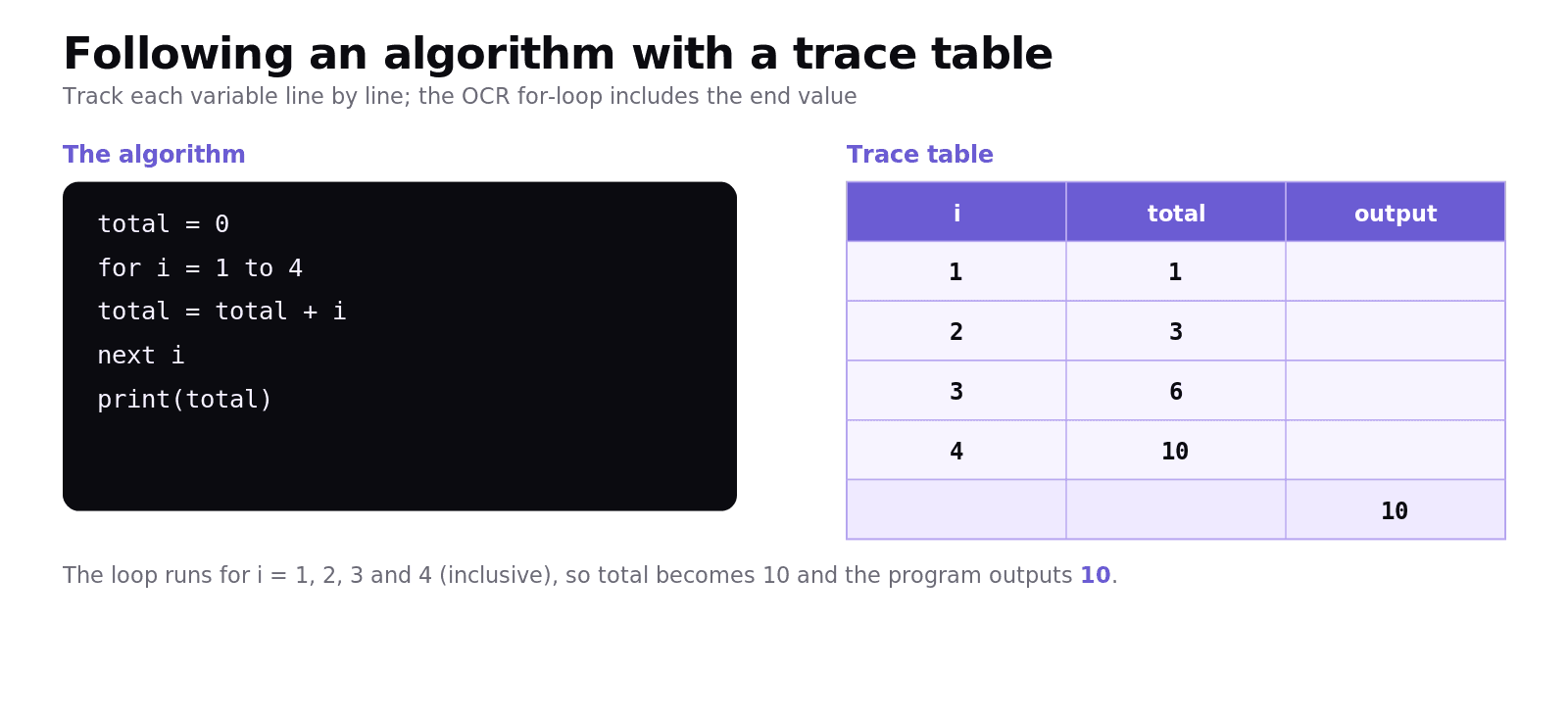
Trace this program:
Build a trace table, updating a row each time total changes:
i | total | output |
|---|---|---|
1 | 1 | |
2 | 3 | |
3 | 6 | |
4 | 10 | |
10 |
The loop runs for i = 1, 2, 3, 4 (the OCR for loop is inclusive of the end value), adding each to total. The output is 10. Writing the table beats doing it in your head every time.
How do you write algorithms in OCR Exam Reference Language?
OCR exams use a consistent pseudocode. You should be fluent in these constructs:
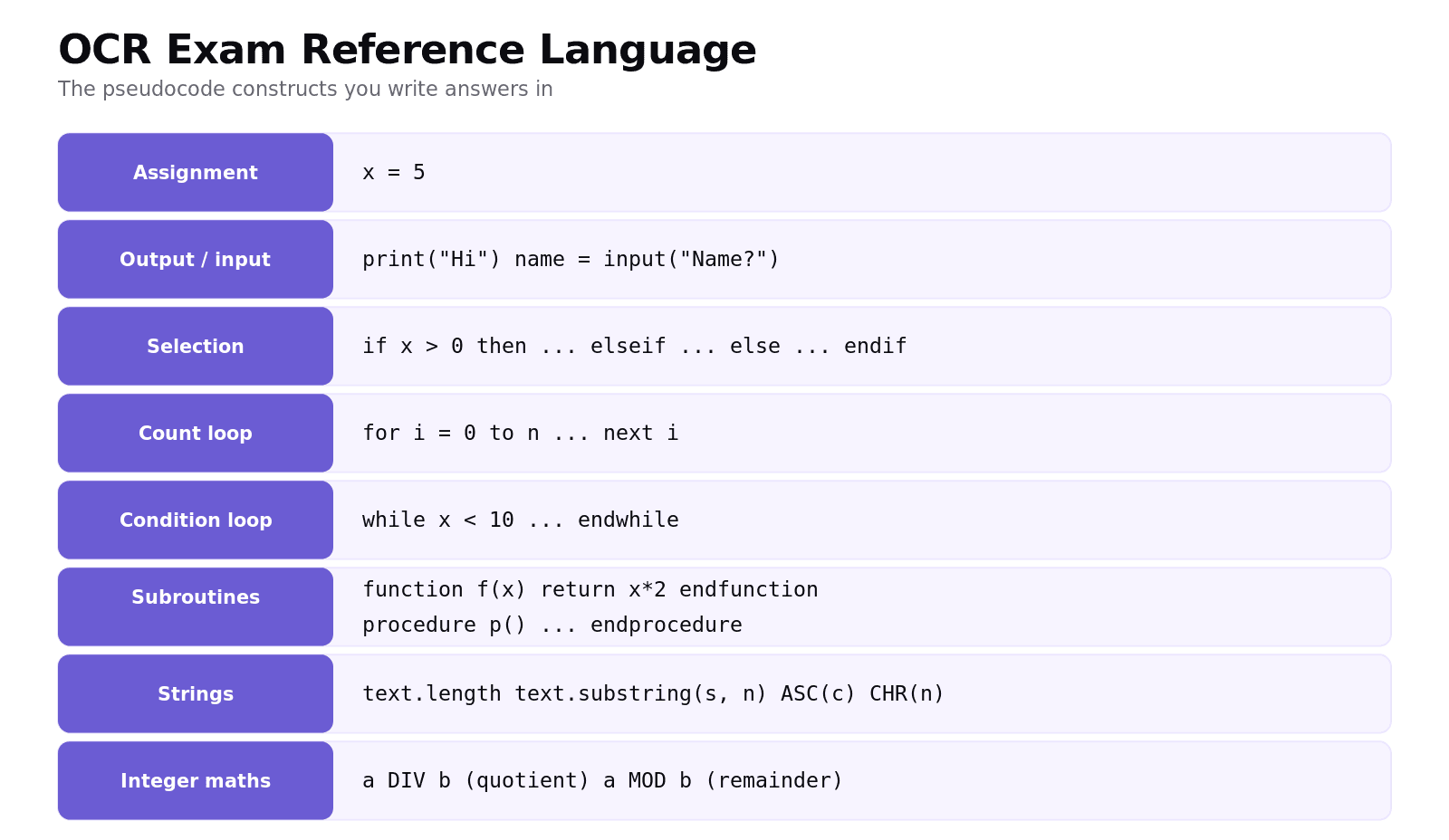
The essentials: assignment with =, print(...) and input(...), selection with if ... then ... elseif ... else ... endif, count-controlled loops with for i = 0 to n ... next i, condition-controlled loops with while ... endwhile, and subroutines with function ... return ... endfunction or procedure ... endprocedure. For text you use text.length, text.substring(start, number) and the ASC() / CHR() functions; for whole-number maths, DIV and MOD.
Worked example: writing an algorithm
Write a function that counts the capital letters in a string, using ASCII values (capitals A–Z are codes 65–90):
This shows the marks examiners look for: a correct loop over the string, the right condition (using ASCII), a counter updated correctly, and a return of the result.
Common exam mistakes
Skipping the trace table. For "state the output", a trace table prevents silly slips, especially with loops.
Off-by-one on
forloops. OCR'sfor i = 1 to 4runs for 1, 2, 3 and 4 — the end value is included.Forgetting to return a value. A function that calculates an answer must
returnit; printing is not the same as returning.Mixing up
=and==. Use=for assignment and==for comparison in OCR pseudocode.Ignoring edge cases when writing. Check empty input, the first and last items, and values on the boundary of a condition.
Quick recap
Following an algorithm = tracing it line by line; use a trace table (one column per variable + output).
OCR's
for i = a to bloop is inclusive ofb.Know the OCR constructs: assignment,
print/input,if/elseif/else/endif,for/next,while/endwhile,function/procedure.For text:
text.length,text.substring(start, number),ASC(),CHR(); for integer maths:DIV,MOD.When writing, a function must
returnits result, and you should handle edge cases.
Frequently asked questions
What is a trace table? A trace table is a table used to follow an algorithm by hand. It has a column for each variable (and usually one for output) and a row for each change, so you can record exactly how the values change as the program runs.
How do I trace through an algorithm? Go line by line, and each time a variable changes write its new value in a new row of the trace table. For loops, record the loop variable and the variables inside the loop on every pass. The output column captures anything printed.
What is OCR Exam Reference Language? It is the standard pseudocode OCR uses in its exam papers, with set conventions for assignment, input and output, selection, iteration and subroutines. Writing answers in it (rather than a real language) is accepted unless a question names a specific language.
How do I write a count-controlled loop in OCR pseudocode? Use for i = start to end ... next i. The loop runs once for each value from start to end inclusive, so for i = 1 to 5 runs five times with i taking the values 1, 2, 3, 4 and 5.
How do I find a character's ASCII value in OCR pseudocode? Use the ASC() function, for example ASC("A") returns 65. The reverse function CHR() turns a code back into a character, so CHR(65) returns "A". These are useful for checking letter ranges.
What is the difference between a function and a procedure? A function returns a value with return and is typically used inside an expression. A procedure carries out a task but does not return a value. In OCR pseudocode they use function ... endfunction and procedure ... endprocedure respectively.