Applications, Utilities & Open vs Closed Source (OCR A-Level CS 1.2.2)
OCR A-Level CS 1.2.2: applications vs systems software, utility programs, and open source vs closed source software. Worked example, diagrams and exam tips.

Free Applications Utilities Open Source revision resources (OCR A-Level Computer Science, 1.2.2)
We’ve made exam-style practice for this exact topic, free to download: Applications Utilities Open Source question sheet, mark scheme and cheat sheet. Grab them, have a go, then read the full guide below.
What is the difference between Microsoft Word, a disk defragmenter and Linux? They sit in different software categories you must be able to tell apart. Spec point 1.2.2 covers the nature of applications, utility programs, and open source versus closed source software — and OCR tests it with "give the most appropriate application for each task", "give two utilities and explain their purpose", and a full discussion on open versus closed source.
This guide sorts software into its categories and weighs up the open/closed source debate.
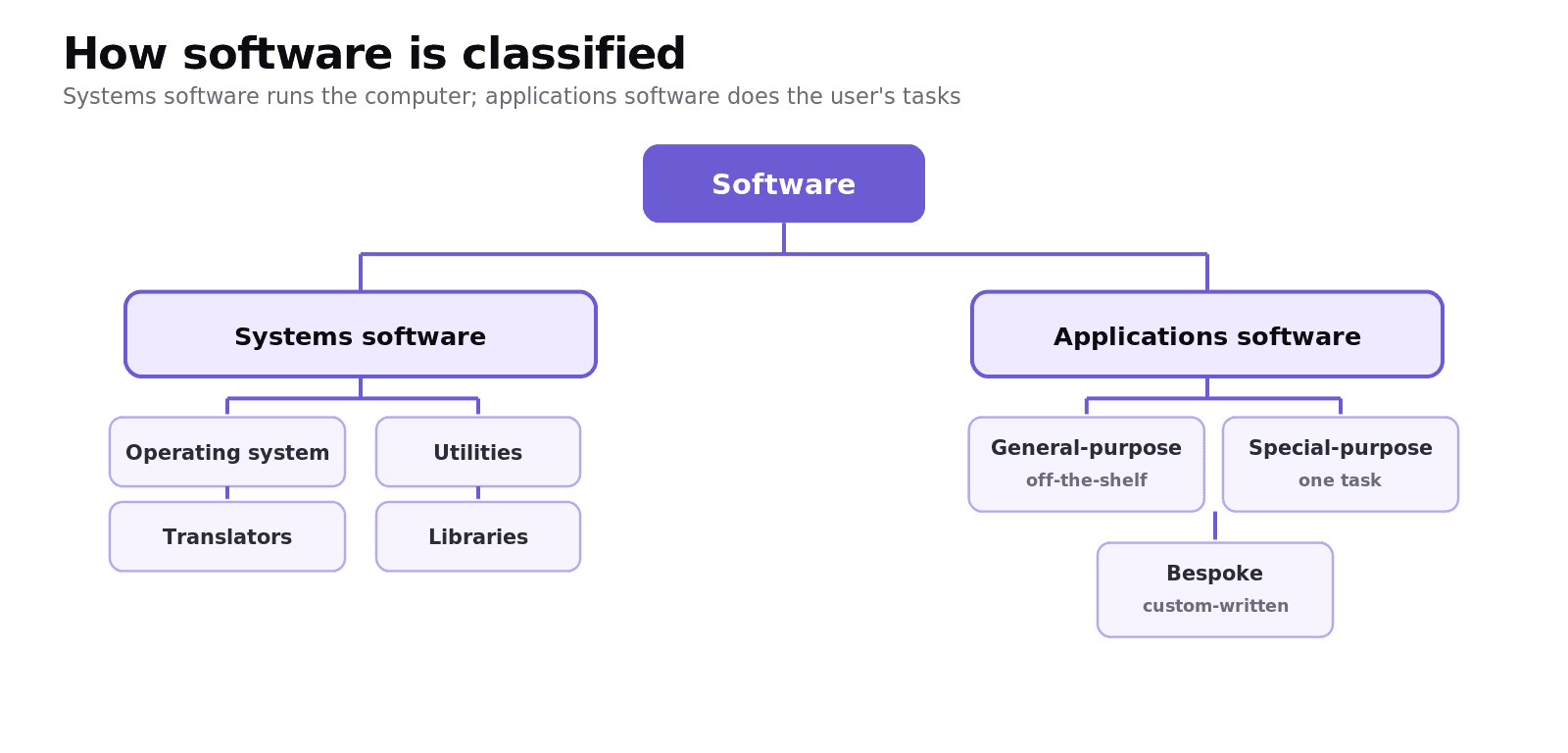
What is the difference between systems software and applications software?
Systems software is the software needed to run the computer and its hardware. It includes the operating system, utility programs, libraries and translators. The user does not usually buy it to do a task; it keeps the machine working.
Applications software is software the user runs to do a real-world task, such as writing a letter, editing a photo or calculating wages. Examples include word processors, spreadsheets, web browsers and games.
How is applications software categorised?
General-purpose — flexible software used for many tasks, bought off-the-shelf, ready to use (a word processor, a spreadsheet).
Special-purpose — designed for one type of task (accounting software, photo editing).
Bespoke (custom-written) — made to order for a specific organisation. It fits the need exactly but costs more and takes time to develop, whereas off-the-shelf is cheap, immediate and well-tested.
Worked example: choosing applications for a business
A small business needs to: produce a newsletter, calculate staff wages, and store customer records.
Newsletter → word processor or desktop publishing (DTP) software, for laying out text and images.
Wages → spreadsheet, because formulas recalculate totals automatically when figures change.
Customer records → database (DBMS), to store, search and sort many structured records reliably.
Each choice is justified by what the task actually needs — exactly what "state the most appropriate application" questions reward.
What is a utility program?
A utility is system software that maintains or optimises the computer, rather than doing a user task. Common examples and their purposes:
Disk defragmenter — reorganises files on a magnetic hard disk so the parts of each file are together, making reads faster.
Backup utility — copies files so they can be restored if lost; can be scheduled to run automatically.
Compression utility — shrinks files to save space or speed up transfer.
Antivirus / virus checker — scans for and removes malware.
File management — copy, move, delete and organise files and folders.
The exam line: an application does a user's task; a utility keeps the computer itself running well.
What is the difference between open source and closed source software?
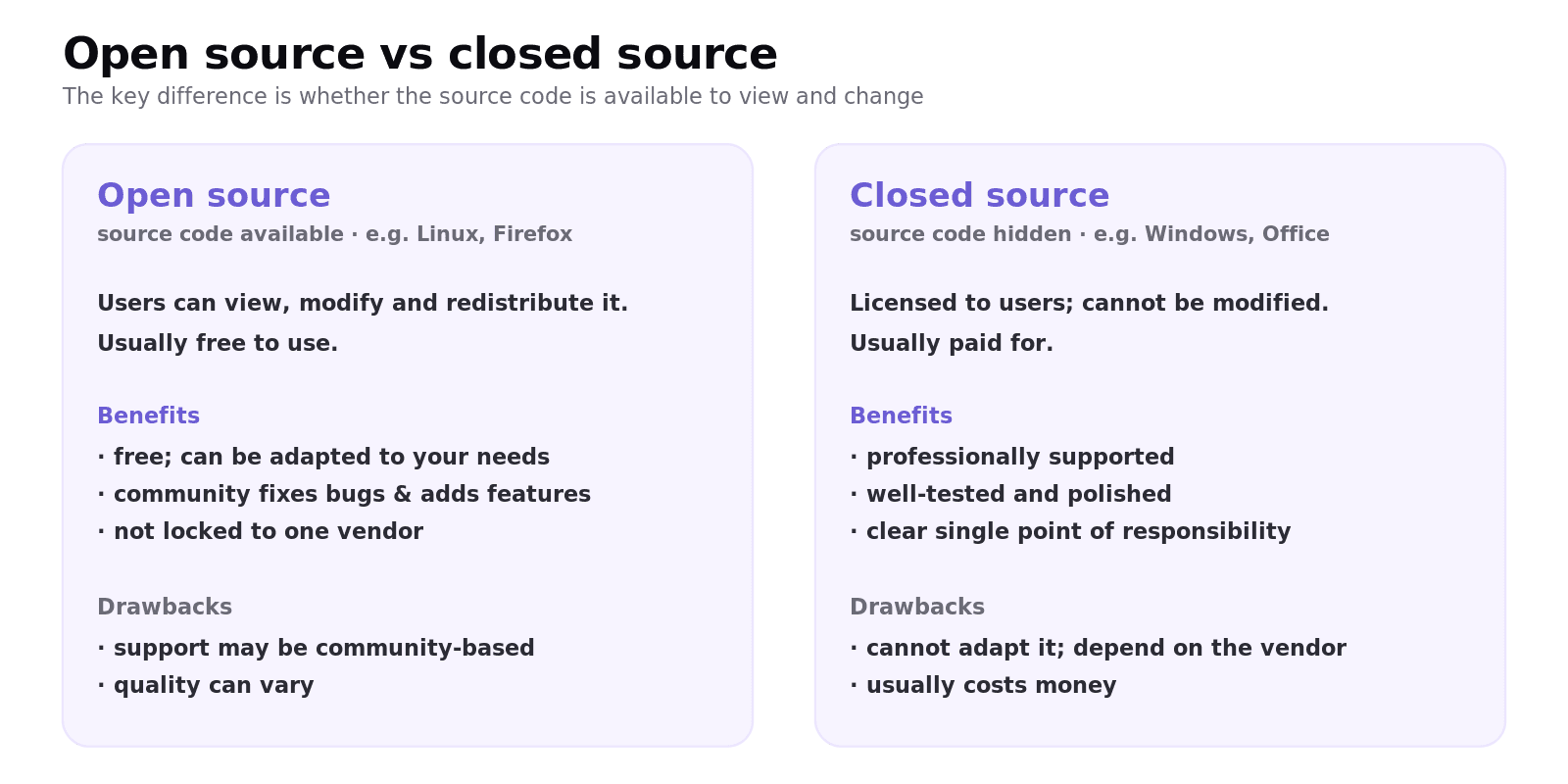
Open source software is released with its source code available, so users can view, modify and redistribute it, usually for free. Examples include Linux and Firefox. Benefits: free to use, can be adapted to your needs, a community can fix bugs and add features, and you are not locked to one vendor. Drawbacks: support may be community-based rather than guaranteed, and quality varies.
Closed source (proprietary) software keeps the source code hidden and is licensed, not given away. Examples include Windows and Microsoft Office. Benefits: usually professionally supported, well-tested and polished. Drawbacks: you cannot modify it, you depend on the vendor, and it usually costs money.
Common exam mistakes
Confusing applications and utilities. An application does a user task; a utility maintains the computer. Defragmenter = utility; spreadsheet = application.
Calling the OS an application. The operating system is systems software.
Saying open source just means "free". The defining feature is that the source code is available to view and modify; many open-source programs are free, but that is not the definition.
One-sided open/closed answers. "Discuss" questions need both benefits and drawbacks of each, then a justified choice.
Vague utility examples. Name a specific utility (defragmenter, backup) and its purpose.
Quick recap
Systems software runs the computer (OS, utilities, translators, libraries); applications software does user tasks.
Applications: general-purpose (off-the-shelf), special-purpose, bespoke (custom-written, exact fit but costly).
A utility maintains/optimises the computer: defragmenter, backup, compression, antivirus, file management.
Open source = source code available to view/modify/redistribute (Linux, Firefox); closed source = hidden, licensed (Windows, Office).
Open source: free, adaptable, community support. Closed source: polished, professionally supported, but locked and paid.
Frequently asked questions
What is the difference between systems software and applications software? Systems software runs the computer and its hardware, including the operating system, utilities, libraries and translators. Applications software is what the user runs to do a real-world task, such as a word processor, spreadsheet or web browser.
What is a utility program? A utility is system software that maintains or optimises the computer rather than doing a user task. Examples include disk defragmenters, backup utilities, compression tools, antivirus software and file management.
What is the difference between an application and a utility? An application performs a task for the user, such as writing a document. A utility keeps the computer itself running well, such as backing up files or defragmenting the disk. Both are software, but they serve different purposes.
What is the difference between open source and closed source software? Open source software is released with its source code available, so users can view, modify and redistribute it, often for free. Closed source (proprietary) software keeps its source code hidden and is licensed to users, who cannot modify it.
What are the benefits of open source software? It is usually free, can be adapted to a user's exact needs, benefits from a community that fixes bugs and adds features, and avoids being locked to a single vendor. The trade-off is that support may be community-based rather than guaranteed.
What is the difference between off-the-shelf and bespoke software? Off-the-shelf software is ready-made, cheap, immediately available and well-tested, but may not fit every need. Bespoke (custom-written) software is built for a specific organisation and fits its needs exactly, but costs more and takes time to develop.