Operating Systems: Functions & Memory Management (OCR A-Level CS 1.2.1)
OCR A-Level CS 1.2.1: the purpose and functions of an operating system, plus memory management — paging, segmentation and virtual memory. Diagrams and exam tips.

Free Operating Systems Memory revision resources (OCR A-Level Computer Science, 1.2.1)
We’ve made exam-style practice for this exact topic, free to download: Operating Systems Memory question sheet, mark scheme and cheat sheet. Grab them, have a go, then read the full guide below.
You never talk to your computer's hardware directly — the operating system does it for you. Spec point 1.2.1 covers what an OS is for, the functions it performs, and how it manages memory using paging, segmentation and virtual memory. Memory management is one of the most heavily examined topics in this section, including a full extended-response question on how and why an OS manages memory.
This guide explains the purpose and functions of an operating system, then drills into memory management.

What is an operating system and why do we need one?
An operating system (OS) is a program, or set of programs, that manages the computer's resources and acts as a bridge between the user and the hardware. A user cannot communicate with hardware directly, so the OS hides that complexity behind a simple interface: you click "save" and the OS handles the disk, drivers and file system for you.
The OS itself lives in secondary storage. When you switch the machine on, a small loader (bootstrap) program in ROM copies the operating system into RAM so it can run.
What are the main functions of an operating system?
You should be able to list and describe several functions:
Memory management — allocating memory to processes and reclaiming it (covered in detail below).
Processor scheduling — deciding which process gets the CPU and when.
Interrupt handling — responding to signals from hardware and software via interrupt service routines.
Managing input and output — coordinating devices through device drivers.
Backing store / file management — organising files and folders on storage.
Providing a user interface — graphical or command-line.
Security — user accounts, passwords and access rights.
(Scheduling and interrupts are examined in their own right; this post focuses on functions and memory management.)
What is memory management?
A modern computer runs many things at once: music streaming, a browser, a code editor, email. Memory management is the OS function that allocates each running program a region of RAM, keeps them separated, and frees memory when it is no longer needed — making the best use of limited RAM.
What are paging and segmentation?
Paging and segmentation are two techniques for dividing memory so it can be used efficiently.
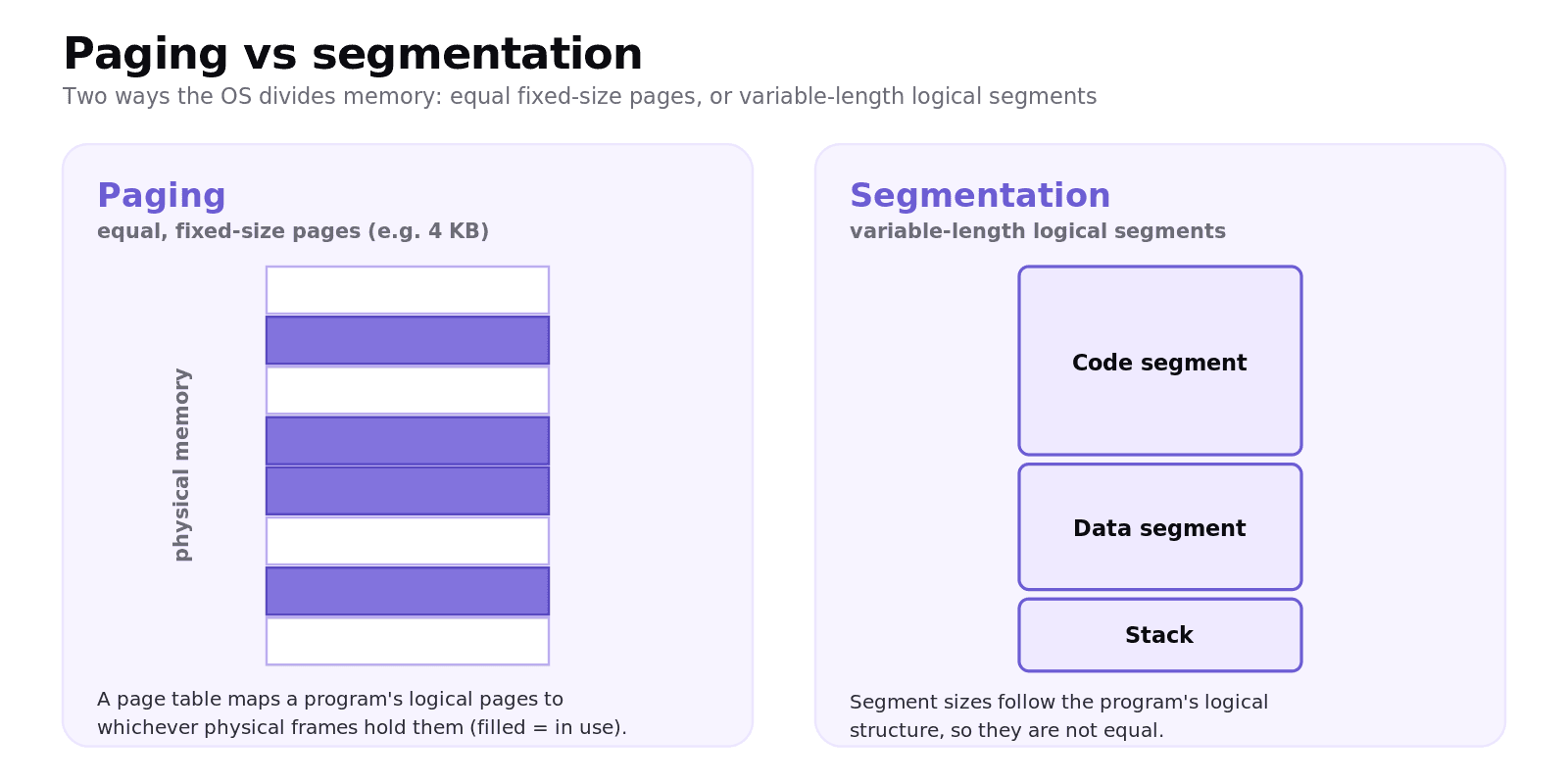
Paging divides memory into fixed-size blocks called pages (for example 4 KB each). A program does not need to occupy one continuous block; its pages can sit anywhere in physical memory. A page table maps each program's logical addresses to the physical addresses where its pages actually live.
Segmentation divides a program into variable-length, logical segments that reflect its structure (for example a segment for code, one for data, one for the stack). Unlike pages, segments vary in size because they follow the program's logical divisions.
The key contrast for the exam: paging uses equal, fixed-size divisions; segmentation uses variable-size, logical ones.
What is virtual memory?
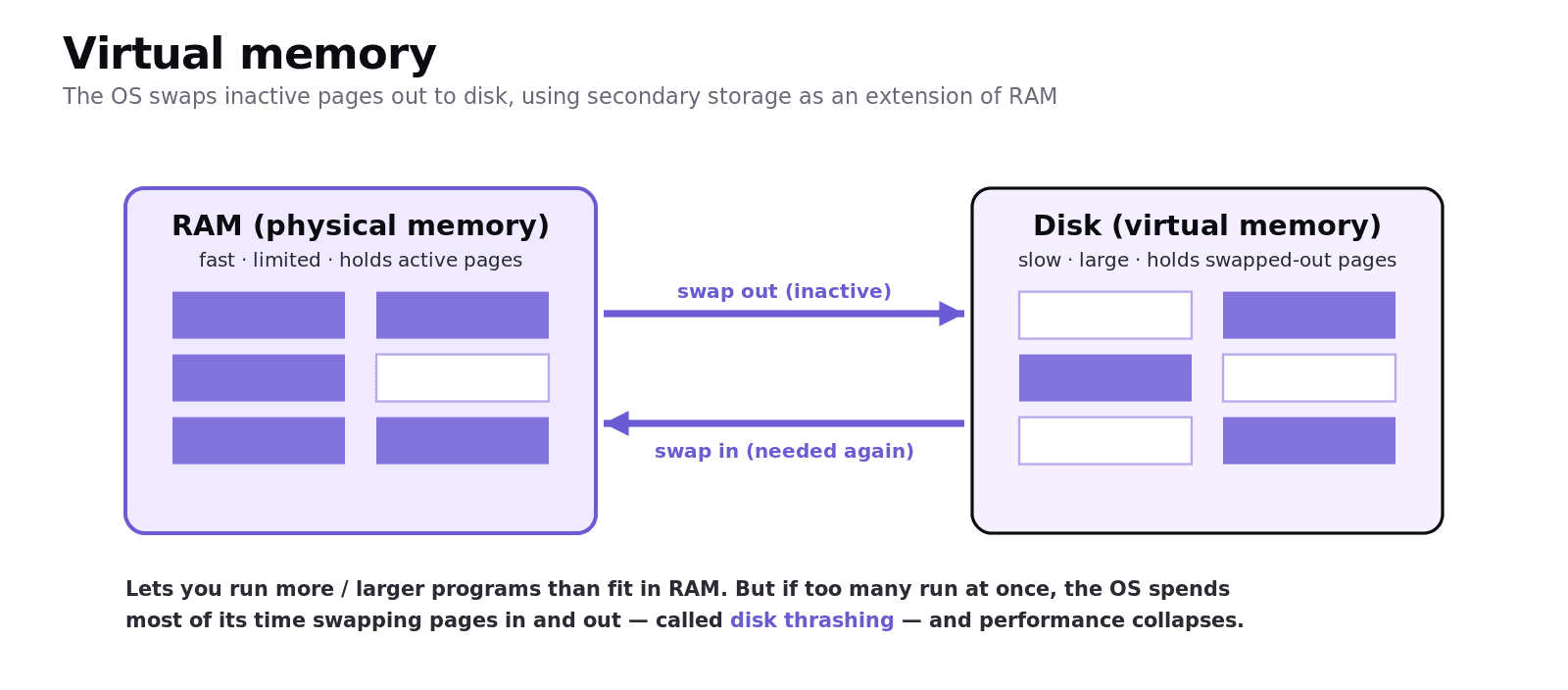
Memory is finite, so as more programs load the OS may move pages of inactive processes out to secondary storage, using the disk as an extension of RAM. This is virtual memory. When a swapped-out page is needed again, it is brought back in, and something else may be swapped out.
Virtual memory lets a user run more (or larger) programs than would fit in physical RAM. The downside: if too many programs run at once, the OS spends most of its time swapping pages in and out — called disk thrashing — and performance collapses. Adding more RAM reduces this.
Worked example
A computer has 8 GB of RAM and the user opens programs needing 10 GB in total. The OS keeps the active pages in RAM and swaps the inactive ones to the disk's virtual memory. As the user switches between programs, pages are swapped back and forth. It works, but each swap touches slow storage, so the machine feels sluggish — the classic symptom of relying on virtual memory because there is too little RAM.
Common exam mistakes
Saying the OS "is stored in ROM". Only the small loader is in ROM; the OS is in secondary storage and loaded into RAM at boot.
Mixing up paging and segmentation. Paging = fixed-size pages; segmentation = variable logical segments. "Equally sized chunks" always means paging.
Confusing virtual memory and virtual storage. Virtual memory uses disk to extend RAM; virtual storage adds more storage space (often cloud).
Forgetting the page table. Paging needs a page table to map logical addresses to physical ones.
Listing functions without describing them. "Describe two functions" needs a sentence on what each does, not just a label.
Quick recap
An OS manages the computer's resources and bridges the user/applications and the hardware; the loader in ROM copies it from storage into RAM at boot.
Functions include memory management, scheduling, interrupt handling, I/O management, file management, the user interface and security.
Memory management allocates RAM to processes and keeps them separated.
Paging = fixed-size pages mapped by a page table; segmentation = variable-length logical segments.
Virtual memory swaps inactive pages to disk to extend RAM; overuse causes disk thrashing.
Frequently asked questions
What is an operating system? An operating system is a program or set of programs that manages a computer's hardware and resources and acts as a bridge between the user and the hardware, hiding the complexity behind a simple interface.
What are the main functions of an operating system? Memory management, processor scheduling, interrupt handling, managing input and output, backing store and file management, providing a user interface, and security such as user accounts and access rights.
What is the difference between paging and segmentation? Paging divides memory into fixed-size pages and uses a page table to map logical addresses to physical ones. Segmentation divides a program into variable-length logical segments that reflect its structure, so the divisions are not equal in size.
What is virtual memory? Virtual memory is the use of secondary storage as an extension of RAM. The operating system swaps pages of inactive processes out to disk to free up RAM, and brings them back when needed, allowing more programs to run than would fit in physical memory.
What is disk thrashing? Disk thrashing happens when so many programs are open that the operating system spends most of its time swapping pages between RAM and disk rather than doing useful work, causing performance to slow dramatically. Adding more RAM reduces it.
Where is the operating system stored? The operating system is stored in secondary storage, such as a hard disk or SSD. A small loader program held in ROM copies it into RAM when the computer is switched on so that it can run.