Storage Devices, RAM, ROM & Virtual Storage (OCR A-Level CS 1.1.3)
OCR A-Level CS 1.1.3: magnetic, flash and optical storage, the difference between RAM and ROM, and virtual storage. Worked example, diagrams and exam tips.

Free Storage RAM ROM Virtual revision resources (OCR A-Level Computer Science, 1.1.3)
We’ve made exam-style practice for this exact topic, free to download: Storage RAM ROM Virtual question sheet, mark scheme and cheat sheet. Grab them, have a go, then read the full guide below.
Every computer needs two very different kinds of memory: somewhere to keep your data safe when the power is off, and somewhere fast to work with it while the machine is on. Spec point 1.1.3 covers the three types of secondary storage, the difference between RAM and ROM, and virtual storage. Here is what you need to know up front: OCR rarely asks you to simply describe these. It asks "which is most suitable, and why", right up to a full extended-response comparing magnetic and solid-state storage for a server. So as you read, keep one eye on the trade-offs, because that is exactly where the marks live.
This guide explains how each storage type works, when to use it, the RAM versus ROM distinction, and what virtual storage means.
Why do computers need secondary storage?
Primary memory (RAM) is fast but volatile, which means it loses its contents the moment the power goes off. Secondary storage is non-volatile: it keeps data permanently, even unplugged. It is not directly accessible to the processor and is slower than RAM, but it is where your files, programs and operating system actually live.
What are the three types of storage?
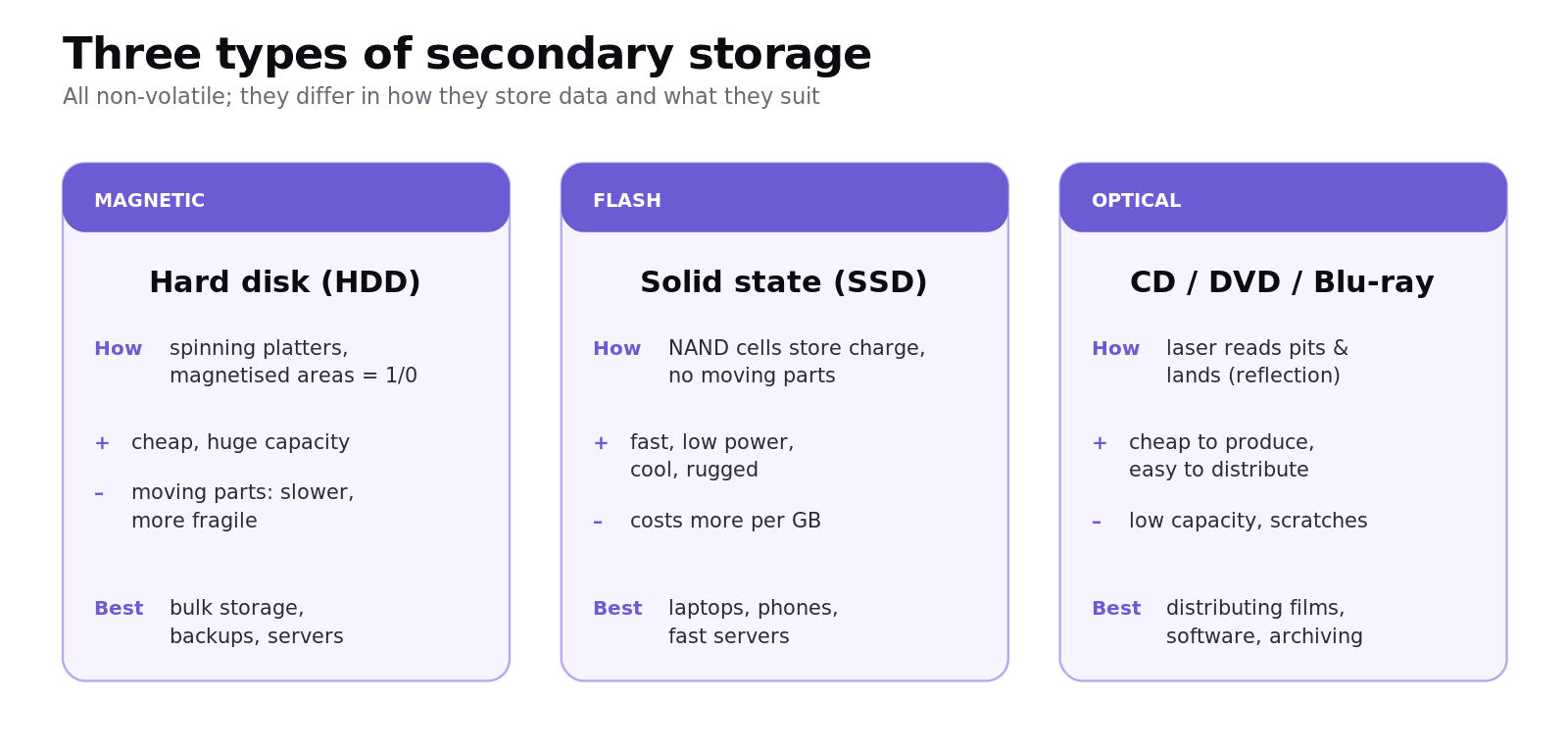
Magnetic storage, such as a hard disk drive (HDD), uses rigid spinning platters coated with a magnetic material. Tiny areas are magnetised north or south to represent 1s and 0s. A moving read/write head accesses data as the platters spin. HDDs are cheap per gigabyte and offer huge capacity, but the moving parts make them slower and more fragile.
Flash (solid-state) storage, such as an SSD or USB stick, uses NAND flash memory cells with no moving parts. Charge trapped in each cell represents the data. SSDs are much faster than HDDs, use less power, run cooler and are more shock-resistant, but cost more per gigabyte.
Optical storage, such as CDs, DVDs and Blu-ray, uses a laser to read patterns of pits and lands burned into the disc surface; the difference in reflected light is read as 1s and 0s. Optical media are cheap to produce and easy to distribute, but have low capacity and scratch easily.
When should you use each type?
Match the medium to the job. Use an HDD when you need lots of cheap capacity and speed matters less (desktop bulk storage, servers, backups). Use an SSD when speed, low power, portability or ruggedness matter (laptops, phones, fast servers). Use optical for cheap mass distribution of films or software, or low-cost archiving.
What is the difference between RAM and ROM?
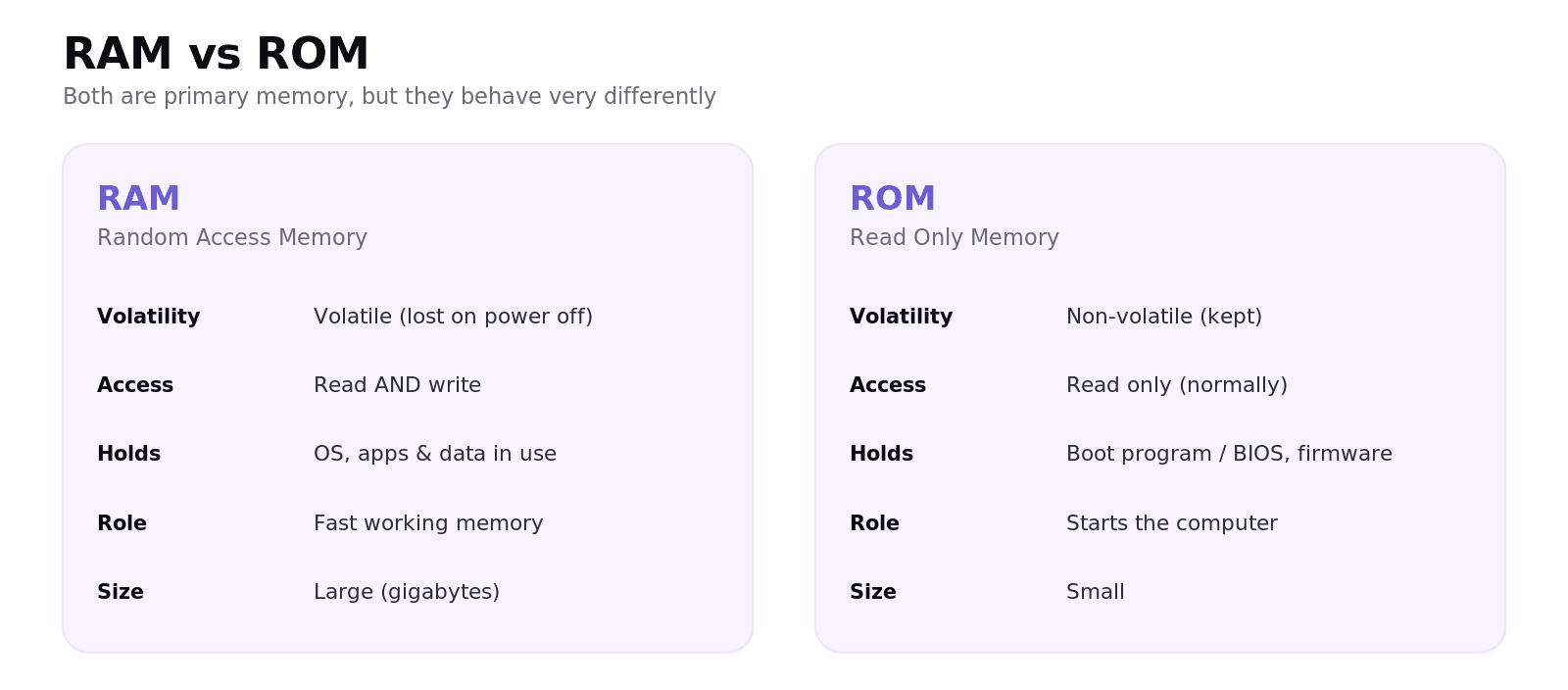
RAM (Random Access Memory) is the computer's working memory. It is volatile and can be read from and written to. It holds the parts of the operating system, applications and data that are currently in use, so the CPU can reach them quickly.
ROM (Read Only Memory) is non-volatile and normally read-only. It holds data that must survive a power-off and rarely changes, most importantly the small boot program (the loader/BIOS) that starts the computer and copies the operating system from storage into RAM. In embedded systems, ROM often holds the device's fixed firmware.
Why does adding more RAM improve performance?
This is the most important part, and it is a guaranteed "explain" question worth easy marks. When RAM fills up, the operating system moves inactive data out to slow secondary storage (virtual memory). Adding more RAM means more programs and data can stay in fast memory at once, so the computer relies less on slow disk swapping and runs noticeably faster. Say that full chain of cause and effect, not just "it is faster", and the marks are yours.
What is virtual storage?
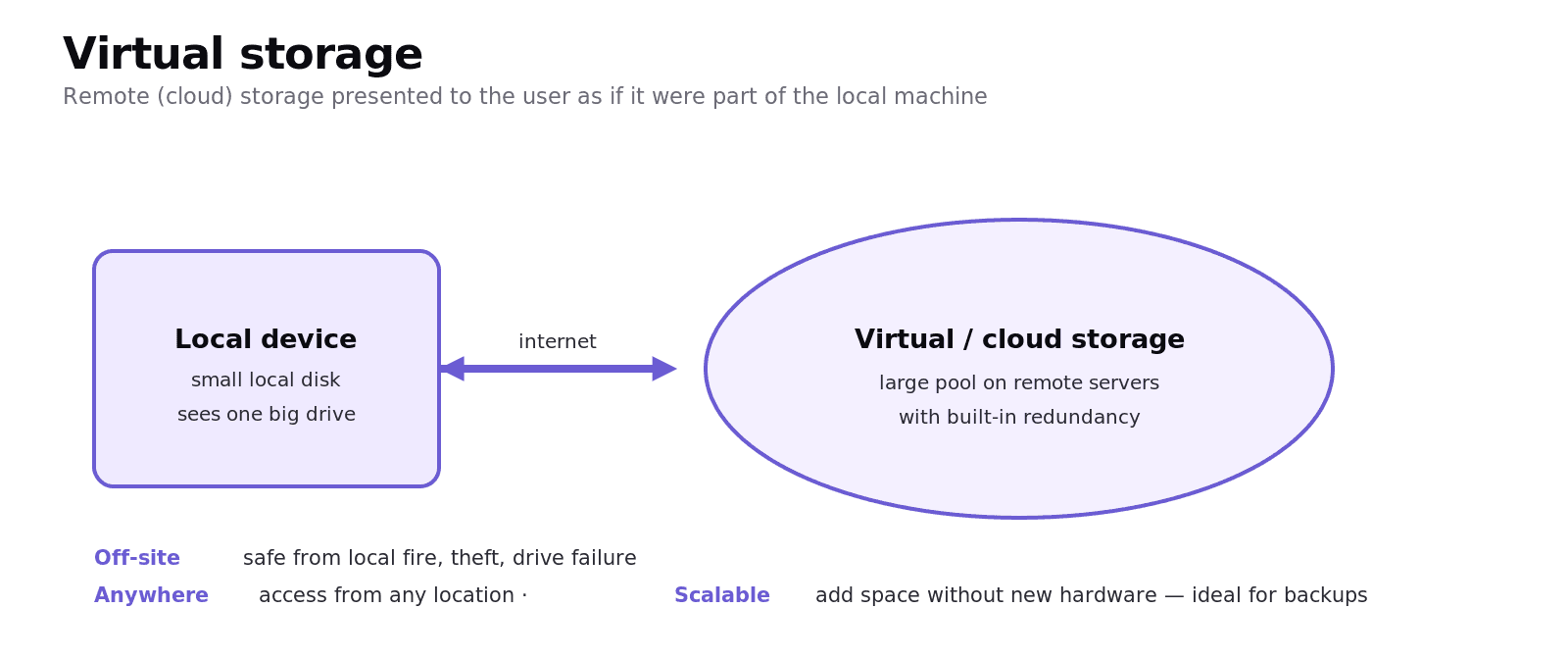
Virtual storage treats remote or networked storage (often cloud storage) as if it were part of the local machine. The user sees one large storage space, while the data actually lives on remote servers. It is well-suited to backups because copies are kept off-site (safe from local fire, theft or hardware failure), can be accessed from anywhere, and can scale to as much space as needed without buying new hardware.
Worked example
A company stores 2 TB of customer records that must survive any single hardware failure. A single HDD is cheap but fails as a unit; an SSD is faster but pricier per gigabyte. Virtual (cloud) storage keeps the data off-site with built-in redundancy, so a failed drive in the data centre does not lose the data, and staff can reach it from any office. For the active database the company still wants fast SSDs; for the backup it wants virtual storage.
Common exam mistakes
These are the slips that quietly cost people marks every year. None are hard to avoid once you have seen them.
Confusing volatile and non-volatile. RAM is volatile (loses data without power); ROM and all secondary storage are non-volatile.
Saying ROM "stores the operating system". The OS lives in secondary storage; ROM holds the small boot program that loads it into RAM.
Treating "flash" and "optical" as the same. Flash = solid-state chips (SSD, USB); optical = laser-read discs (CD/DVD/Blu-ray).
Vague "which is best" answers. Justify against the scenario: capacity, speed, cost per GB, power, durability and portability.
Mixing up virtual storage and virtual memory. Virtual storage = extra storage space (often cloud); virtual memory = using disk to extend RAM.
Quick recap
Secondary storage is non-volatile; RAM is fast but volatile.
Magnetic (HDD): cheap, high capacity, moving parts. Flash (SSD): fast, low power, rugged, pricier. Optical: cheap distribution, low capacity.
RAM: volatile, read/write, holds what is in use. ROM: non-volatile, read-only, holds the boot program/firmware.
More RAM = less slow disk swapping = better performance.
Virtual storage uses remote/cloud space as if local; ideal for off-site, scalable backups.
And look, the trap in this topic is treating it as pure recall. It is not. Almost every mark comes from matching a storage type to a situation and saying why. Practise that with one scenario, a phone, a busy server, a film studio's long-term archive, and you will handle anything they ask. Stick with it, you have got this.
Frequently asked questions
Why do computers need secondary storage? Because RAM is volatile and loses its contents when the power is off. Secondary storage is non-volatile, so it keeps files, programs and the operating system permanently, even though it is slower than RAM.
What is the difference between magnetic, flash and optical storage? Magnetic storage (HDD) magnetises areas of spinning platters; flash storage (SSD, USB) stores charge in NAND cells with no moving parts; optical storage (CD/DVD/Blu-ray) uses a laser to read pits and lands on a disc.
What is the difference between RAM and ROM? RAM is volatile working memory that can be read from and written to, holding what is currently in use. ROM is non-volatile and read-only, holding data that must survive a power-off, such as the boot program that loads the operating system.
Why does adding more RAM make a computer faster? More RAM lets more programs and data stay in fast memory at once, so the operating system relies less on swapping data to slow secondary storage (virtual memory). Less disk swapping means the computer runs faster.
Is an SSD better than a hard disk drive? It depends on the need. SSDs are faster, lower-power and more rugged, so they suit laptops and fast servers. HDDs are cheaper per gigabyte with larger capacities, so they suit bulk storage and backups where cost matters more than speed.
What is virtual storage? Virtual storage presents remote or cloud storage as if it were part of the local machine. The data lives on remote servers, which makes it ideal for off-site backups, access from anywhere, and scaling capacity without buying new hardware.