Processor Performance & Pipelining (OCR A-Level CS 1.1.1)
OCR A-Level CS 1.1.1 explained: how clock speed, cores and cache affect CPU performance, and how pipelining improves it. Worked example, diagrams and exam tips.

Free Processor Performance Pipelining revision resources (OCR A-Level Computer Science, 1.1.1)
We’ve made exam-style practice for this exact topic, free to download: Processor Performance Pipelining question sheet, mark scheme and cheat sheet. Grab them, have a go, then read the full guide below.
Here is a question students think they can answer, right up until they try it in an exam: why is one processor faster than another? Two CPUs can run the exact same program at very different speeds, and spec point 1.1.1 expects you to explain why: what genuinely makes one faster, and how a neat technique called pipelining squeezes more work out of the same hardware. I'll be honest with you: most people drop these marks not because the topic is hard, but because they write something vague like "it has a faster processor". We are going to fix that today. These points come up on Paper 1 most years, usually as "state two factors" or "explain how pipelining improves performance".
This guide covers the three factors that affect CPU performance (clock speed, number of cores, cache) and how pipelining overlaps instructions to raise throughput.
What three factors affect CPU performance?
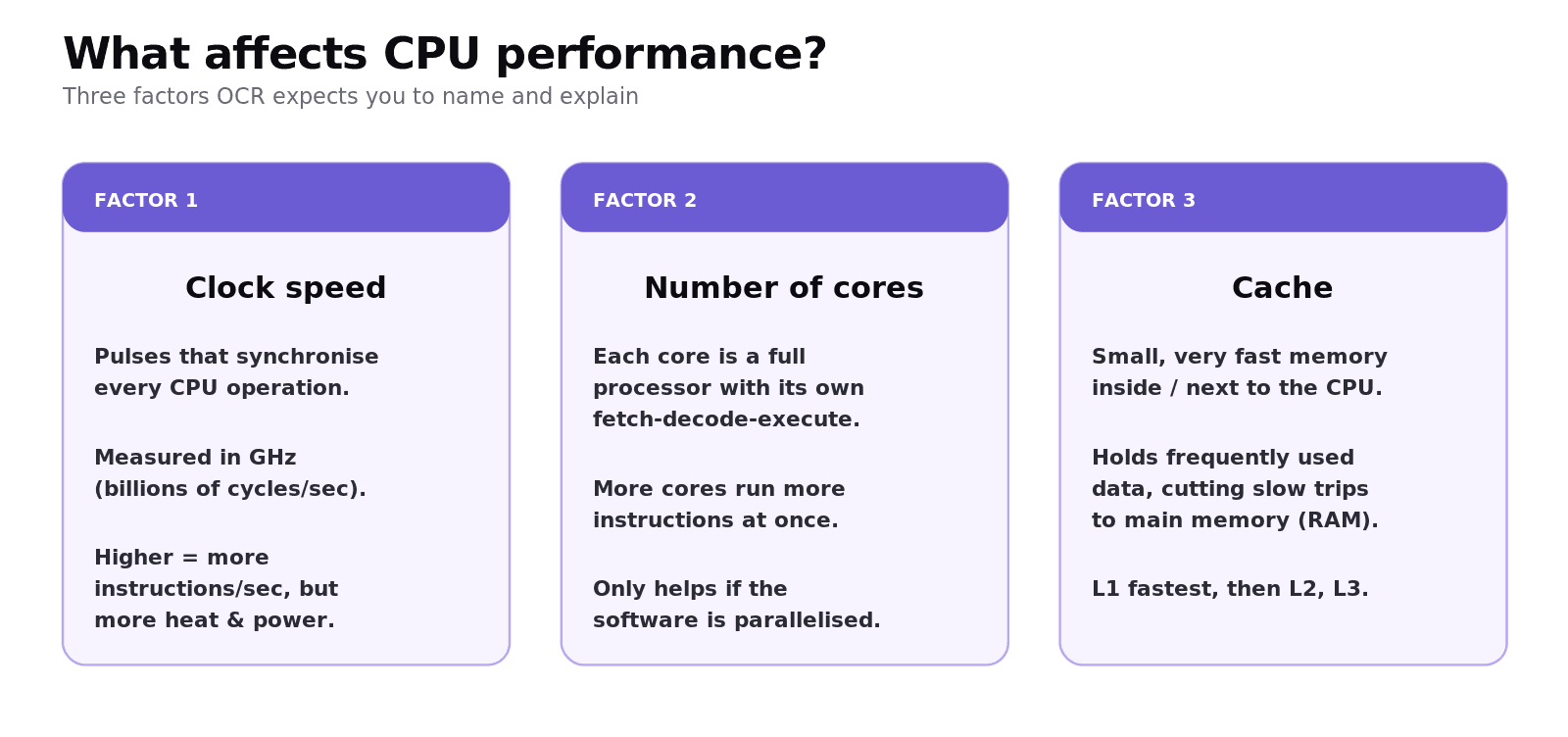
OCR wants three named factors: clock speed, the number of cores, and the amount and type of cache. Think of a kitchen: clock speed is how fast the chef works, cores are how many chefs you have, and cache is how close the most-used ingredients are kept.
How does clock speed affect performance?
The system clock sends out a steady pulse that synchronises the CPU. Every operation begins on a clock pulse, and the CPU cannot go faster than its clock. One cycle per second is 1 hertz (Hz), and modern clock speeds are measured in gigahertz (GHz), billions of cycles per second, typically 2 to 4 GHz in a PC.
A higher clock speed means more fetch-decode-execute cycles per second, so more instructions are executed. The catch: pushing clock speed up generates more heat and uses more power, which is why manufacturers add cores instead of endlessly raising the clock.
Why don't more cores always mean more speed?
A core is a complete processor. A dual-core chip has two, a quad-core has four, each able to run its own fetch-decode-execute cycle on a different instruction at the same time. In theory a quad-core chip is four times faster.
In practice it rarely is. The speed-up depends on whether the software is written to be parallelised. If a task is sequential, where each step needs the result of the previous one, extra cores sit idle. A web browser running several tabs benefits from multiple cores; a single long calculation often does not.
How does cache memory speed things up?
Cache is a small amount of very fast memory inside or very close to the CPU. When data is fetched from RAM, a copy is kept in cache, so if it is needed again it can be fetched far faster than going back to main memory.
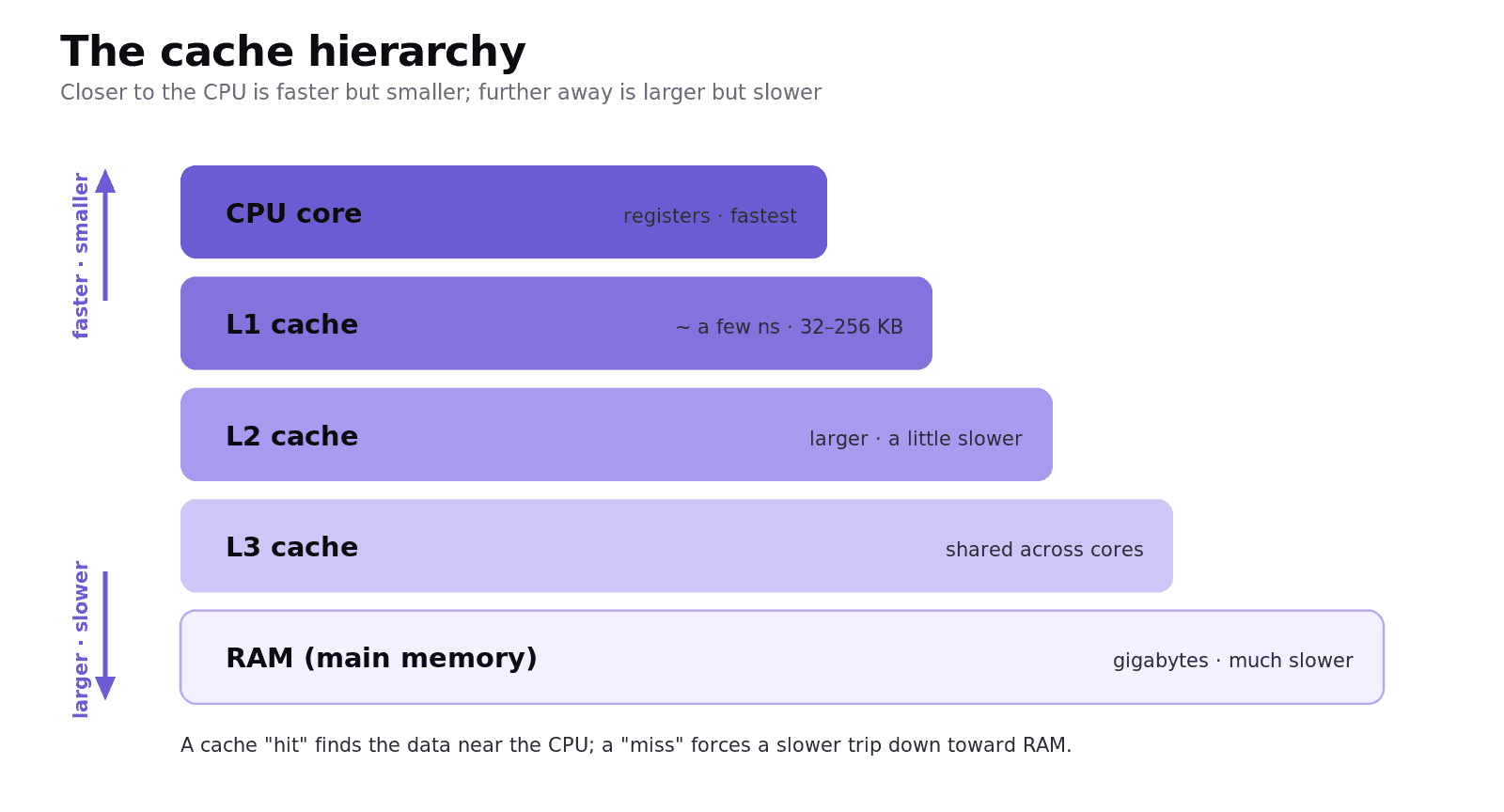
There are levels, fastest and smallest first: Level 1 (L1) is tiny and extremely fast; Level 2 (L2) is larger and a little slower; many CPUs add a shared Level 3 (L3). A CPU with more cache can outperform one with a higher clock speed but less cache, because it spends less time waiting on slow RAM. That is a favourite "explain why" question.
What is pipelining and how does it improve performance?
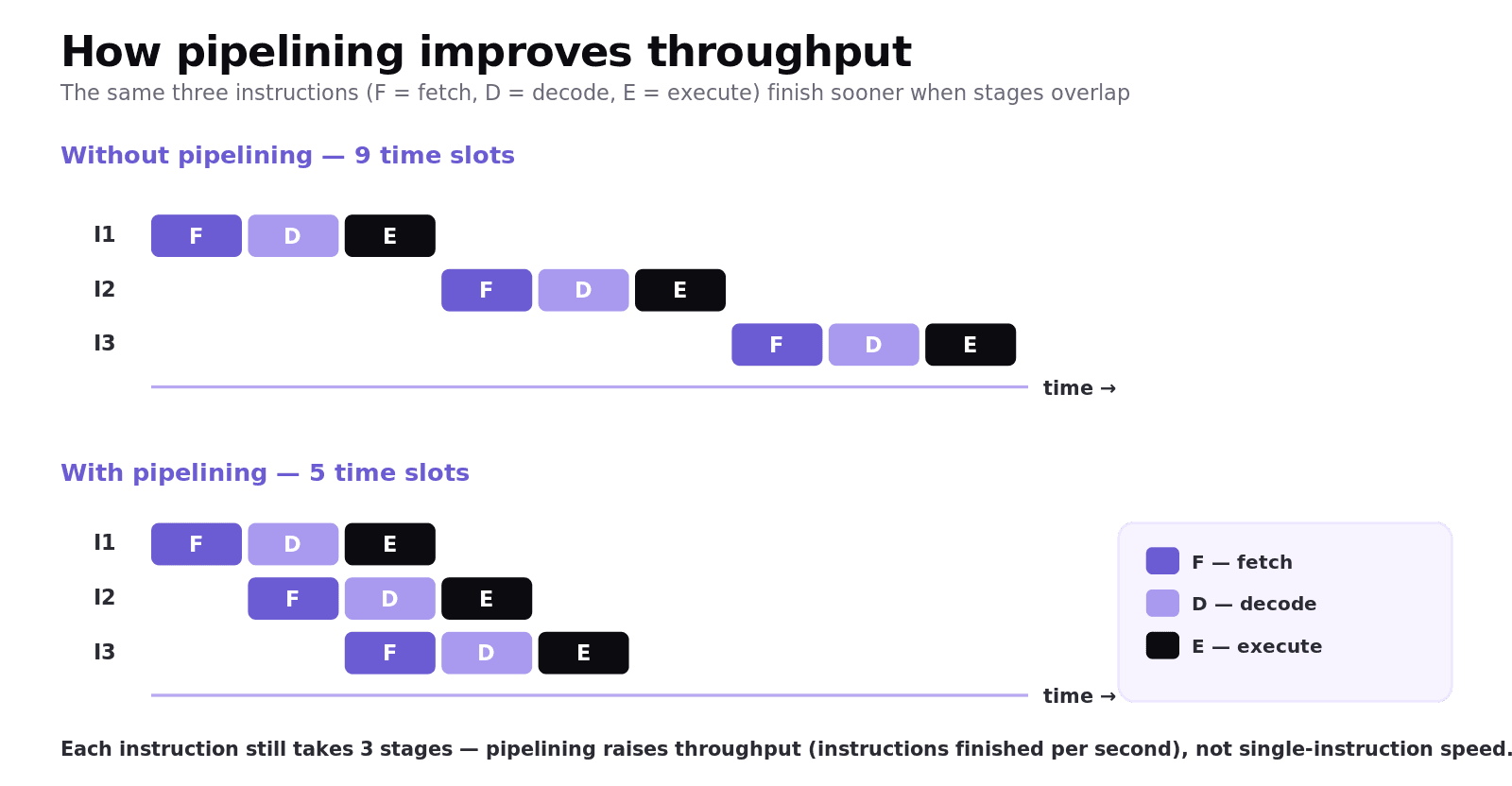
Without pipelining, the CPU finishes one instruction's fetch-decode-execute cycle before starting the next, leaving parts of the processor idle. Pipelining overlaps the stages: while one instruction is being executed, the next can be decoded and a third can be fetched.
Worked example
Imagine three instructions, each taking three equal stages (F, D, E).
Without pipelining: instruction 1 runs F-D-E, then instruction 2 runs F-D-E, then instruction 3. Nine time slots in total.
With pipelining: while instruction 1 decodes, instruction 2 is being fetched; while instruction 1 executes, instruction 2 decodes and instruction 3 is fetched. The three instructions finish in five time slots, not nine.
This is the most important part, and it is exactly what catches people out: pipelining does not make a single instruction faster. Each instruction still takes just as long to travel through its stages. What pipelining does is overlap those stages so that more instructions finish per second. It raises throughput. Get that one distinction right and the marks are yours.
Common exam mistakes
Here is where the easy marks leak away. None of these are hard to avoid once you have seen them.
Listing only clock speed. "State two factors" needs two of: clock speed, number of cores, cache. Naming "a faster CPU" earns nothing.
Claiming a quad-core is always four times faster. Always add the condition: only if the software supports parallel processing.
Saying pipelining speeds up one instruction. It increases throughput by overlapping stages, not the time for a single instruction.
Confusing cache with RAM. Cache is smaller, faster and sits inside/next to the CPU; RAM is larger and slower.
Forgetting the cost of clock speed. Higher clock speed means more heat and power consumption, worth a mark in "discuss" questions.
Quick recap
Three performance factors: clock speed, number of cores, amount/type of cache.
Clock speed = cycles per second (GHz); higher = more instructions/sec, but more heat and power.
More cores help only if the software is parallelised; otherwise cores sit idle.
Cache (L1 fastest, then L2, L3) cuts trips to slow RAM; more cache can beat a higher clock speed.
Pipelining overlaps fetch, decode and execute of different instructions to raise throughput, not single-instruction speed.
Here is the thing to take away: every one of these answers is a because. Not "it is faster", but "it is faster because the cache means fewer trips to slow RAM". Train yourself to add the because, and these become some of the most reliable marks on the whole paper. Stick with it. You have got this.
Frequently asked questions
What are the three factors that affect CPU performance? Clock speed, the number of cores, and the amount and type of cache memory. A strong answer names the factor and says briefly how it helps.
What is clock speed measured in? Hertz. One cycle per second is 1 Hz; modern CPUs run at gigahertz (GHz), meaning billions of cycles per second, typically 2 to 4 GHz in a desktop PC.
Why is a quad-core processor not always four times faster than a single core? Because the speed-up depends on the software being able to use the cores in parallel. Sequential tasks, where each step needs the previous result, cannot be split across cores, so the extra cores sit idle.
How does cache memory improve performance? Cache is very fast memory near the CPU. Frequently used data and instructions are copied into it, so they can be fetched far faster than from slow main memory, reducing how long the CPU waits.
What is pipelining in simple terms? A technique where the fetch, decode and execute stages of consecutive instructions overlap, so while one instruction is executing the next is already being decoded and another fetched. It raises the number of instructions completed per second.
Does pipelining make a single instruction run faster? No. Each instruction still takes the same time to pass through all its stages. Pipelining increases overall throughput by keeping all parts of the CPU busy at once.