Computational Thinking (IB CS B1.1): A Complete Guide
IB Computer Science B1.1 explained: problem specification, the four pillars of computational thinking, and how to read and trace flowcharts. Examples and exam tips.

Before you write a line of code, you have to think like a computer scientist. Topic B1.1 opens Theme B with the mental toolkit for solving problems: specifying them clearly, breaking them down, and turning them into precise steps. These skills underpin every programming topic that follows.
This guide covers all four B1.1 understandings: specifying a problem, the four pillars of computational thinking, applying them, and reading and tracing flowcharts.
What does IB CS topic B1.1 cover?
B1.1 has four understandings: specifying a problem clearly, describing the fundamental concepts of computational thinking, explaining how to apply them to solve a problem, and tracing flowcharts. It is the bridge between a real-world problem and a working program.
What makes a good problem specification?
A problem specification states exactly what needs to be solved. A poor one is vague, like "our customer service is inefficient", because "inefficient" could mean many things and gives nothing to measure.
A good specification is focused, measurable, and linked to impact. For example: "customers wait an average of 25 minutes on hold, leading to a 15% rise in abandoned calls last quarter." It pinpoints the problem, gives numbers, and explains why it matters, which is what lets you design and test a solution.
What are the four pillars of computational thinking?
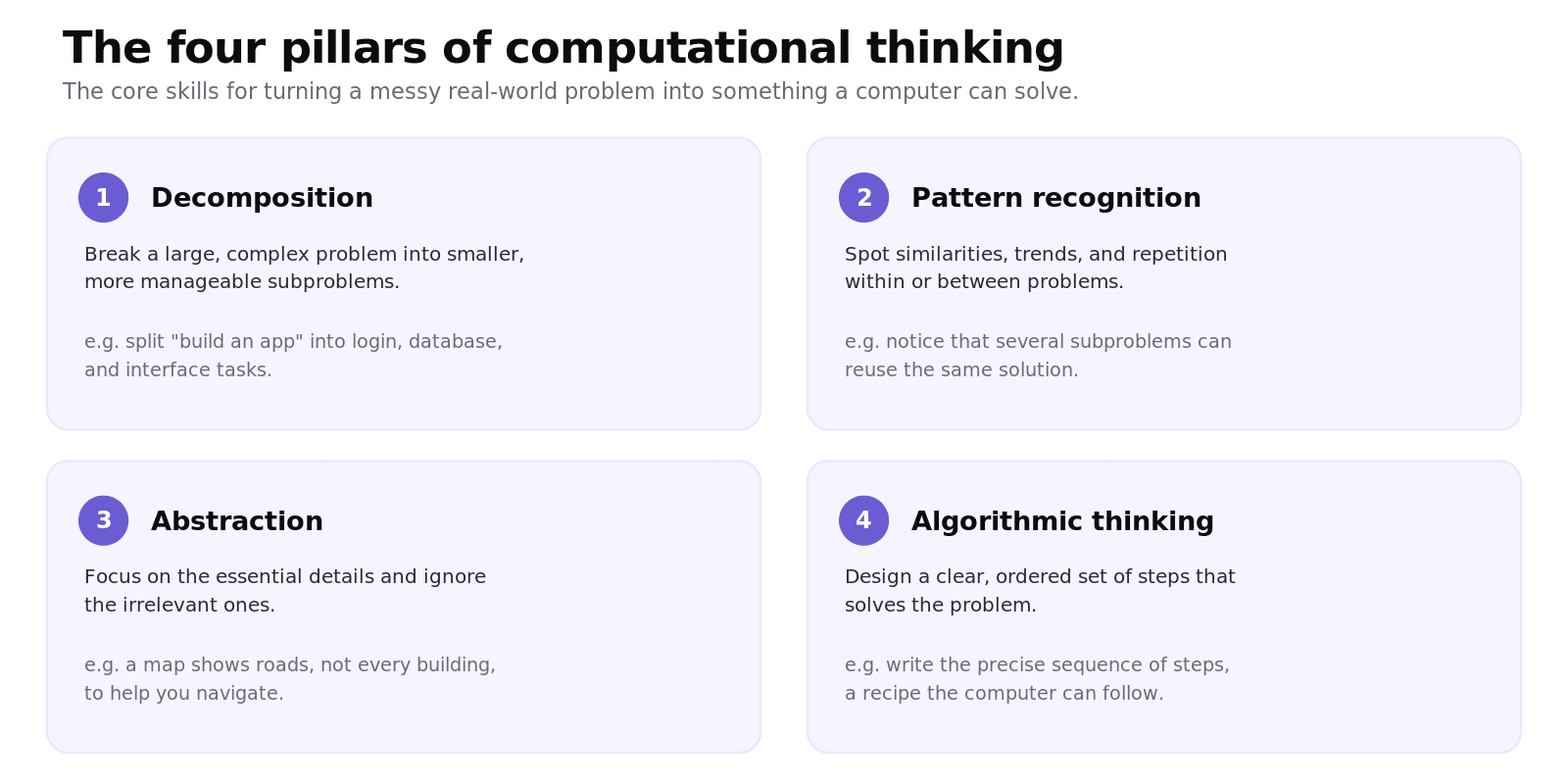
Computational thinking has four fundamental concepts that work together.
Decomposition breaks a large problem into smaller, manageable subproblems. Pattern recognition spots similarities, trends, and repetition, often revealing that subproblems can share a solution. Abstraction focuses on the essential details and ignores the irrelevant ones, like a map showing roads but not every building. Algorithmic thinking designs a clear, ordered set of steps that solves the problem, the recipe a computer can follow.
How do you apply computational thinking to a problem?
You use the pillars together. Take scheduling staff in a busy hospital.
You start with abstraction to identify the essentials (staff, shifts, skills) and ignore the rest. You decompose the big problem into subproblems, like covering each department. You apply pattern recognition to past data to see recurring demand. Finally you use algorithmic thinking to design the steps, perhaps a quick heuristic for a "good enough" schedule, or a slower method that searches for the best one. The four pillars turn a daunting problem into a solvable one.
What are the flowchart symbols?
A flowchart is a visual way to represent an algorithm, and each shape has one job.
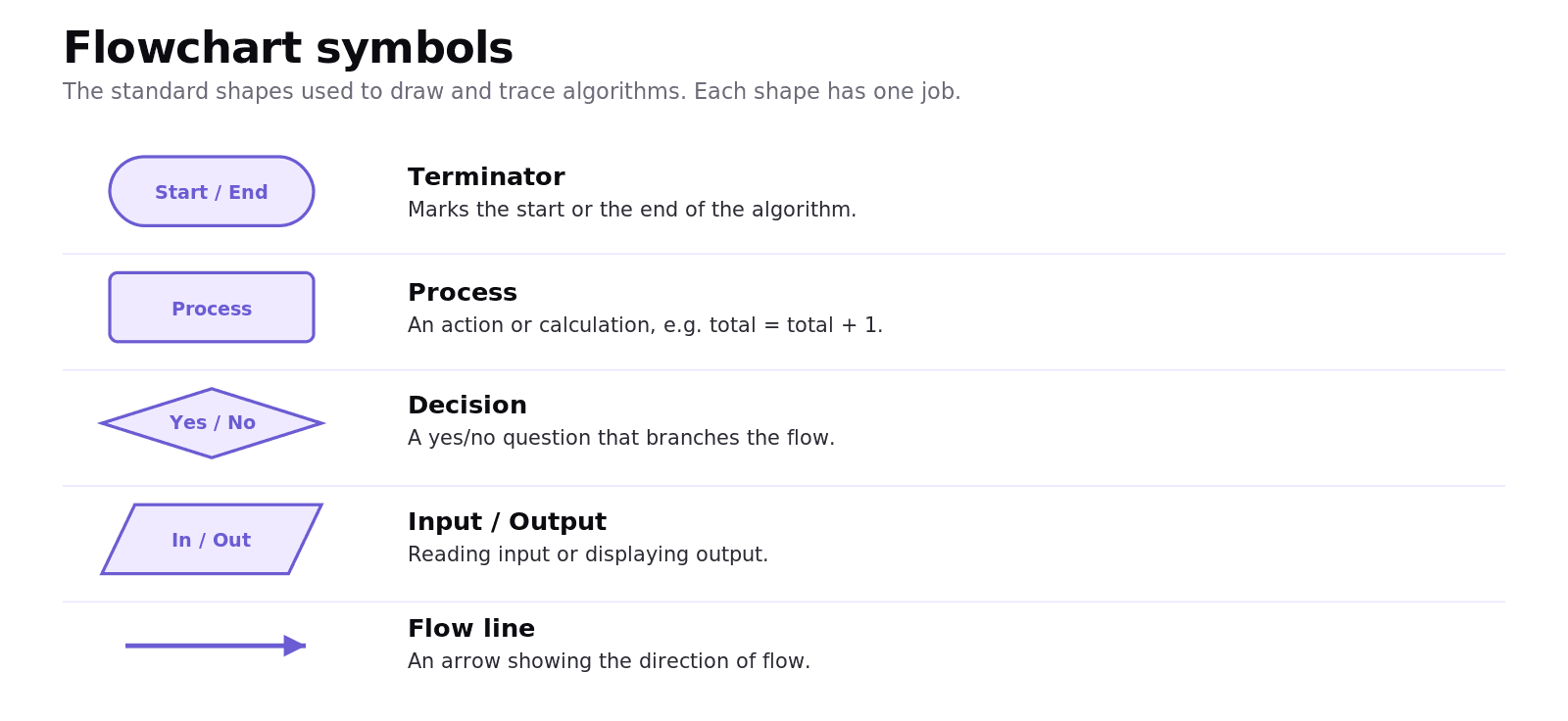
A terminator (rounded shape) marks the start or end. A process (rectangle) is an action or calculation. A decision (diamond) is a yes/no question that branches the flow. A parallelogram is input/output. Flow lines (arrows) show the direction. Knowing the diamond means a decision is the single most useful fact for reading any flowchart.
How do you trace a flowchart?
Tracing means following a flowchart step by step and recording each variable's value in a trace table, so you can work out exactly what it does.
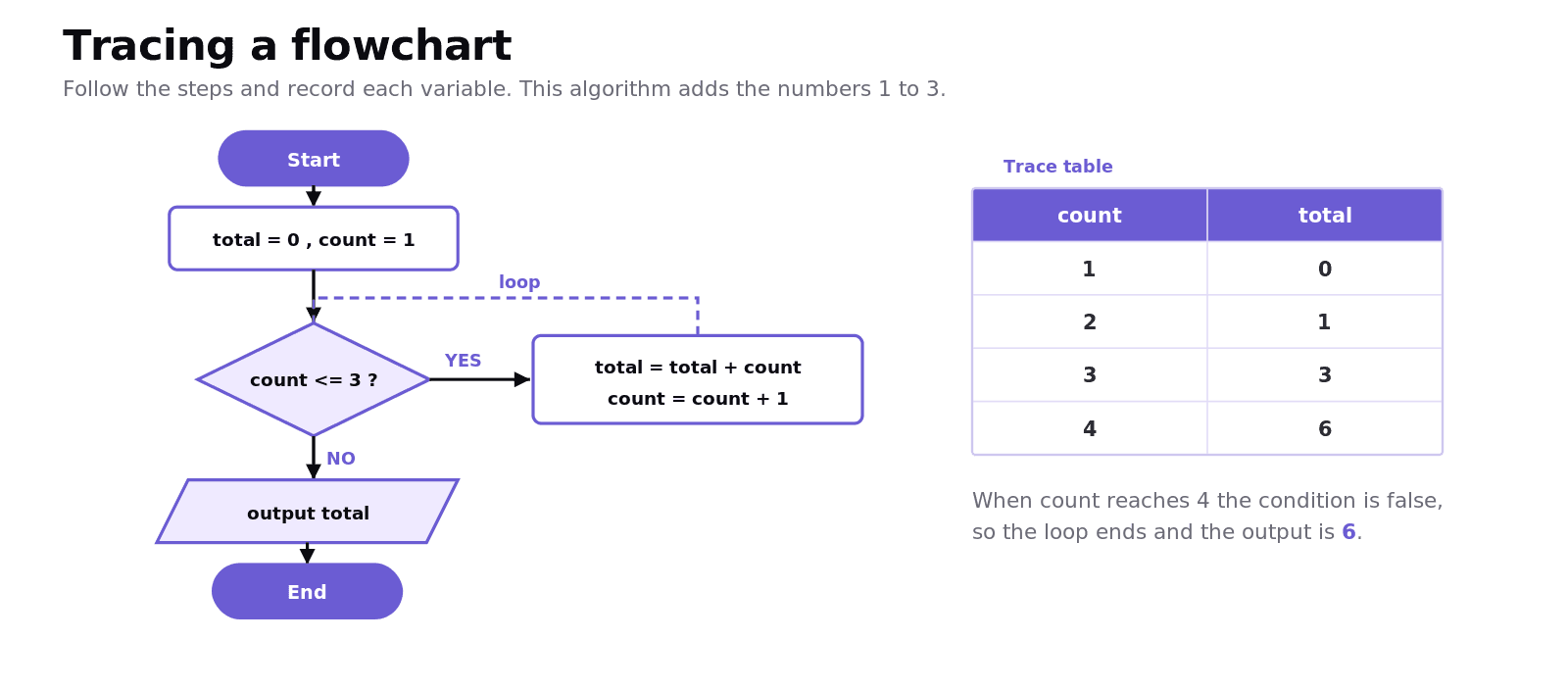
Worked example: adding the numbers 1 to 3
The flowchart sets total = 0 and count = 1, then loops while count <= 3, adding count to total and increasing count each time.
count | total |
|---|---|
1 | 0 |
2 | 1 |
3 | 3 |
4 | 6 |
When count reaches 4 the condition count <= 3 is false, so the loop ends and the output is 6. Filling in the table one row per loop is the reliable way to avoid mistakes.
Common exam mistakes for IB CS B1.1
Confusing decomposition (break into parts) with abstraction (remove irrelevant detail).
Writing a vague problem specification with no measurable detail.
Misreading flowchart shapes; the diamond is always a decision.
Tracing errors: not updating variables in order, or an off-by-one mistake in the loop condition.
Forgetting that the loop condition is checked before each pass, which is why
countends on 4.
Quick recap of B1.1
A good problem specification is focused, measurable, and tied to impact.
The four pillars are decomposition, pattern recognition, abstraction, and algorithmic thinking.
Apply them together to turn a complex problem into a clear set of steps.
Flowchart shapes: terminator, process, decision (diamond), input/output, and flow lines.
Trace a flowchart with a trace table, recording each variable at every step.
Frequently asked questions
What is computational thinking?
Computational thinking is a problem-solving approach that breaks problems down and structures them so they can be solved, often by a computer. Its four core concepts are decomposition, pattern recognition, abstraction, and algorithmic thinking.
What is decomposition?
Decomposition is breaking a large, complex problem into smaller, more manageable subproblems. Solving each smaller piece is easier than tackling the whole problem at once, and the pieces can often be worked on separately.
What is abstraction?
Abstraction is focusing on the essential details of a problem while ignoring the irrelevant ones. A classic example is a map, which shows the roads you need without every building, so it is easier to use.
What is the difference between decomposition and abstraction?
Decomposition breaks a problem into smaller parts, while abstraction removes unnecessary detail to focus on what matters. Decomposition is about splitting the problem up; abstraction is about simplifying it.
What does a diamond mean in a flowchart?
A diamond represents a decision: a yes/no (or true/false) question that branches the flow of the algorithm in two directions depending on the answer.
How do you trace a flowchart?
You follow the flowchart step by step and record the value of each variable after every step in a trace table. This lets you see exactly how the variables change and what the algorithm finally outputs.
Looking for a printable summary? Grab the B1.1 Shuttle Learning revision sheet, a three-page knowledge organiser covering everything above.
Looking for an IB Computer Science tutor?
Hi, I'm Yuness, the tutor behind Shuttle Learning. I work one to one with IB Computer Science students at SL and HL, and I deliberately take on only a handful each year so every student gets my full attention. Most go on to earn the 6s and 7s they were aiming for, in the final exams and the IA alike.
If you would like that kind of support, book a free 15-minute call and tell me what you are stuck on. You can press BOOK A LESSON .