Database Programming with SQL (IB CS A3.3): A Complete Guide
IB Computer Science A3.3 explained: SQL language types, SELECT and INNER JOIN queries with worked examples and result tables, INSERT/UPDATE/DELETE, aggregates, views and ACID.

Once a database is designed, you need a way to talk to it, and that language is SQL. Topic A3.3 is the practical, code-writing part of the database unit, and it is where Paper marks are won or lost on exact syntax. The two things students trip on most are basic SELECT queries with the right WHERE, and combining two tables with an INNER JOIN. So this guide works both through with real tables and the exact rows they return.
This guide covers every A3.3 understanding: the SQL language types, querying with SELECT and JOIN, changing data, aggregate functions, views, and transactions.
The examples below all use the same little school database, with three tables: Student, Mentor and Module.
Student
StudentID | StudentName | MentorID |
|---|---|---|
S1 | Aisha | M2 |
S2 | Ben | M1 |
S3 | Chloe | M2 |
S4 | Dan | M9 |
Mentor
MentorID | MentorName |
|---|---|
M1 | Mr Ng |
M2 | Ms Patel |
M3 | Dr Owusu |
Module
ModuleID | ModuleName | Level |
|---|---|---|
P101 | Python Basics | 1 |
P205 | Web Development | 2 |
P301 | Algorithms | 3 |
P150 | Data Handling | 1 |
What does IB CS topic A3.3 cover?
A3.3 has six understandings: the different SQL language types, constructing queries between two tables, using SQL to update data, building calculations with aggregate functions, describing views, and explaining how transactions maintain data integrity. In short, it is everything you do to a database after it has been designed.
What are the four types of SQL language?
SQL commands group into four families by purpose.
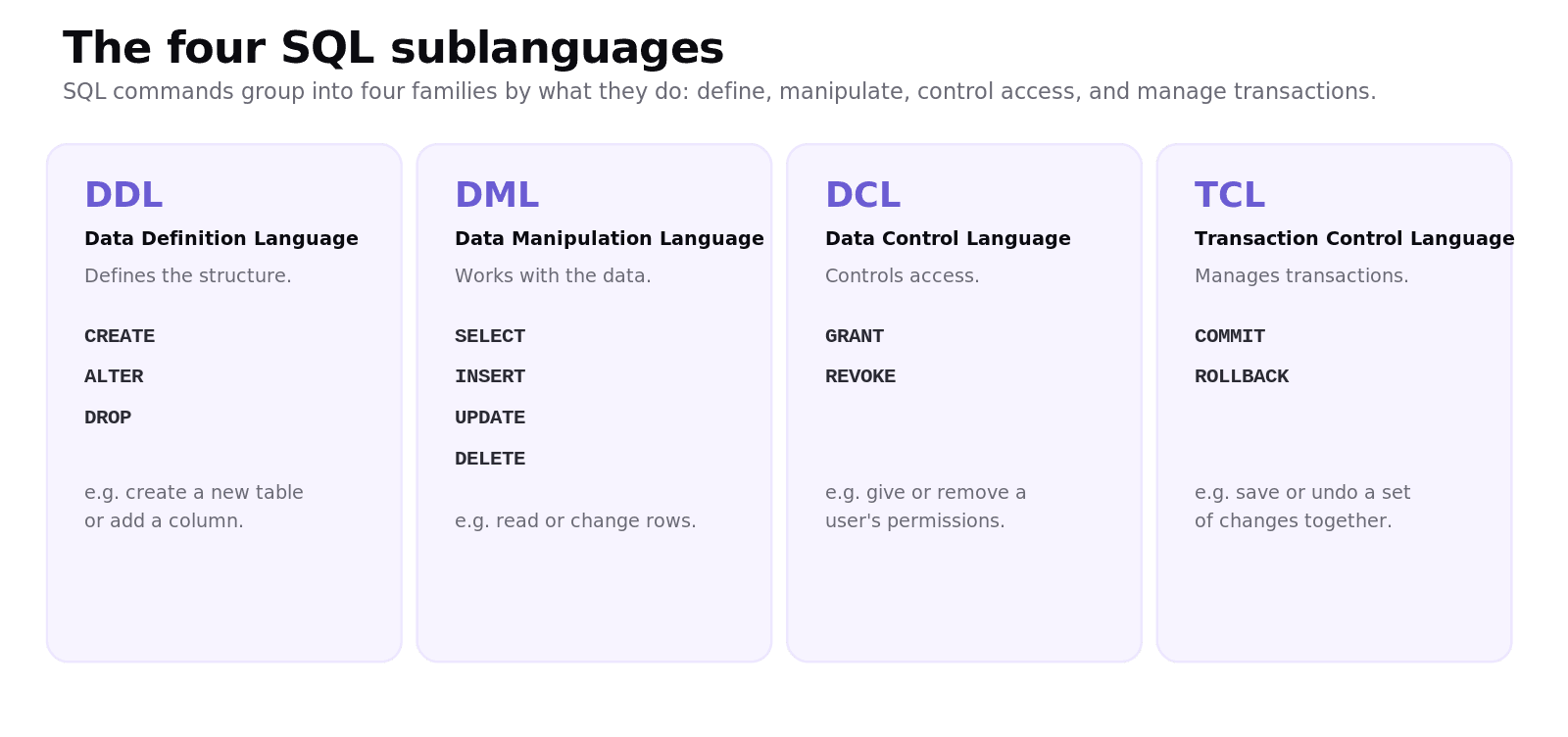
Data Definition Language (DDL) defines the structure with commands like CREATE, ALTER, and DROP. Data Manipulation Language (DML) works with the data using SELECT, INSERT, UPDATE, and DELETE. Data Control Language (DCL) manages access with GRANT and REVOKE. Transaction Control Language (TCL) manages transactions with COMMIT and ROLLBACK. Knowing which family a command belongs to is a common short exam question.
How do you write an SQL query?
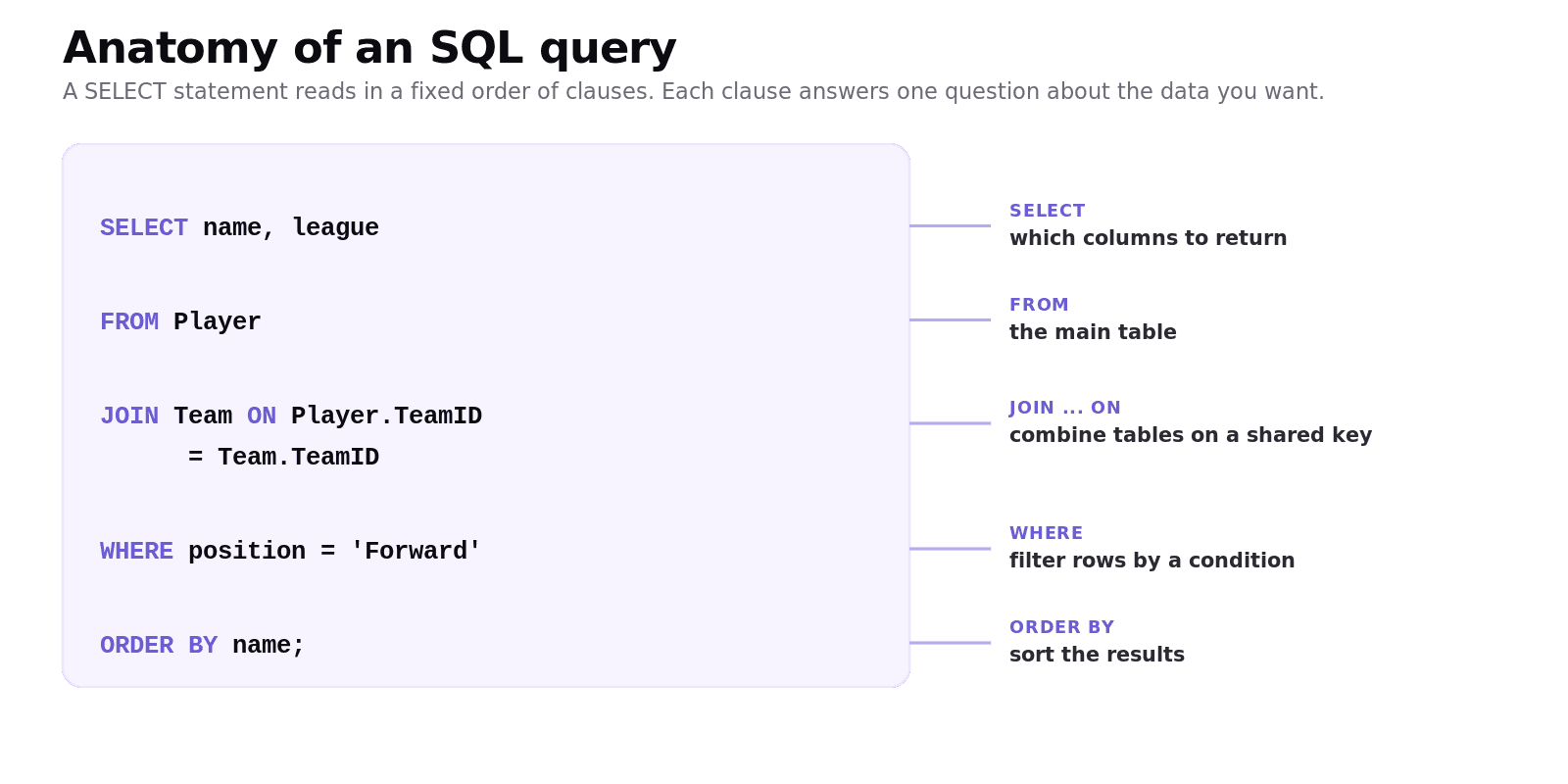
A SELECT query reads in a fixed order of clauses, and each clause answers one question. SELECT lists the columns you want, FROM names the table, WHERE filters the rows by a condition, and ORDER BY sorts the results.
Worked example: a basic SELECT
Suppose we want the name and level of every module at Level 2 or above, listed alphabetically. We run this against the Module table:
Read it clause by clause. FROM Module picks the table. WHERE Level >= 2 keeps only P205 (level 2) and P301 (level 3), dropping the two level-1 modules. SELECT ModuleName, Level keeps just those two columns. ORDER BY ModuleName sorts what is left alphabetically. The result is exactly:
ModuleName | Level |
|---|---|
Algorithms | 3 |
Web Development | 2 |
If you forget the WHERE, you get all four modules back; if you forget the ORDER BY, you get the right rows in no guaranteed order. Small clauses, big difference.
How do you query across two tables with an INNER JOIN?
The single biggest source of confusion in A3.3 is the JOIN, so let's be precise. A JOIN combines rows from two tables wherever a shared key matches. The most common is the INNER JOIN, which returns only the rows that have a match in both tables. Rows with no match are left out.
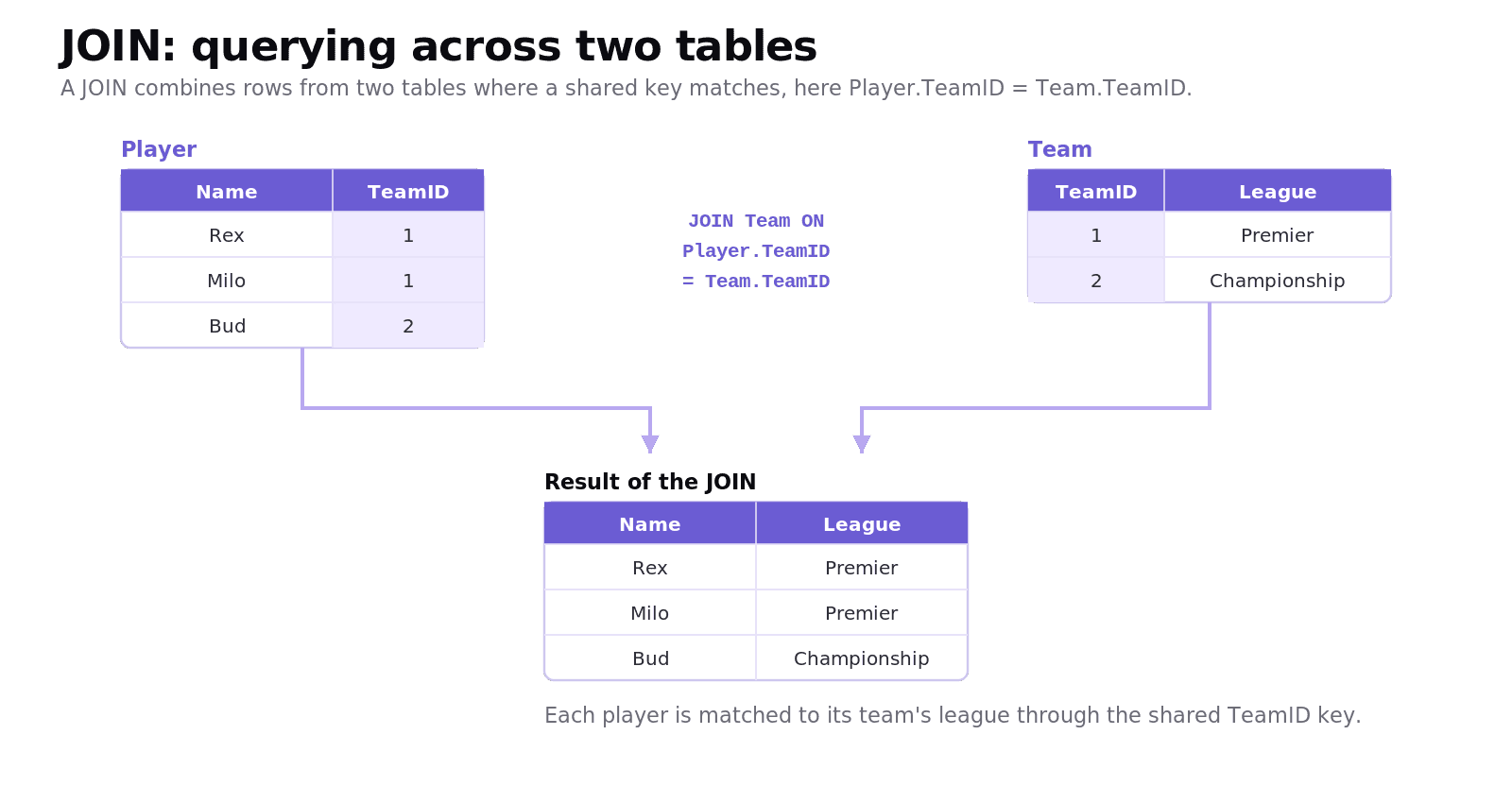
Our Student table stores a MentorID, but not the mentor's name. The name lives in the Mentor table. To list each student next to their mentor's name, we join the two tables on the MentorID they share:
The ON clause is the matching condition: pair a Student row with the Mentor row that has the same MentorID. Walk through it:
Aisha (M2) matches Ms Patel (M2). ✓
Ben (M1) matches Mr Ng (M1). ✓
Chloe (M2) matches Ms Patel (M2). ✓
Dan has
MentorIDM9, and there is no mentor M9, so Dan is left out.Dr Owusu (M3) mentors nobody, so M3 is left out too.
So the INNER JOIN returns three rows, only the ones that matched on both sides:
StudentName | MentorName |
|---|---|
Aisha | Ms Patel |
Ben | Mr Ng |
Chloe | Ms Patel |
That "only matches" behaviour is the whole point. Dan and Dr Owusu vanish because INNER JOIN keeps a row only when the key exists in both tables. (If you wanted to keep Dan even without a mentor, you would use a LEFT JOIN instead, but INNER JOIN is the one A3.3 leans on.) The everyday payoff of foreign keys is exactly this: data split across tables for tidiness can be recombined on demand.
How do you add, update, and delete data?
Three DML commands change the data. INSERT adds a new record, for example INSERT INTO Student (StudentID, StudentName, MentorID) VALUES ('S5', 'Eve', 'M1');. UPDATE changes existing records, for example UPDATE Student SET MentorID = 'M3' WHERE StudentID = 'S4';. DELETE removes records, for example DELETE FROM Student WHERE StudentID = 'S4';. The crucial habit is the WHERE clause: leave it off an UPDATE or DELETE and you change or wipe every row in the table.
What are aggregate functions?
Aggregate functions perform a calculation across many rows and return a single value: COUNT (how many), SUM (total), AVG (average), MIN, and MAX. Paired with GROUP BY, they summarise data per category.
Worked example: count students per mentor
To count how many students each mentor has:
GROUP BY MentorID collects rows with the same mentor into groups, and COUNT(*) counts the rows in each group, returning one row of output per mentor:
MentorID | COUNT(*) |
|---|---|
M1 | 1 |
M2 | 2 |
M9 | 1 |
Without GROUP BY, COUNT(*) would return a single total (4) for the whole table.
What are database views?
A view is a saved query that behaves like a virtual table. It does not store its own data; it shows a live result drawn from one or more underlying tables whenever it is opened. Views are useful for simplifying complex joins into a single named object and for security, since you can give a user access to a view that exposes only certain columns or rows rather than the whole table.
How do transactions keep data safe?
A transaction is a group of operations treated as one unit, and transactions protect data integrity through the ACID properties. Atomicity means all the operations succeed or none do. Consistency means the database moves from one valid state to another. Isolation means concurrent transactions do not interfere with each other. Durability means once committed, the changes survive even a crash. A classic example is a bank transfer: debiting one account and crediting another must both happen or neither, which is atomicity in action.
Common exam mistakes for IB CS A3.3
Confusing DDL and DML. DDL defines the structure (CREATE, ALTER, DROP); DML changes the data (SELECT, INSERT, UPDATE, DELETE).
Mixing up DELETE and DROP. DELETE removes rows; DROP removes the whole table or object.
Forgetting the WHERE clause on UPDATE or DELETE, which changes every row.
Forgetting the ON clause on a JOIN, or joining on the wrong column. The ON must match the foreign key to the primary key.
Expecting an INNER JOIN to keep unmatched rows. Rows with no match in the other table are dropped.
Using an aggregate function to summarise per category without a GROUP BY.
Treating a view as a stored table. A view is a live query with no data of its own.
Quick recap of A3.3
SQL splits into DDL (structure), DML (data), DCL (access), and TCL (transactions).
A
SELECTquery usesFROM,WHERE, andORDER BY; test each clause against the rows it should return.An INNER JOIN combines two tables on a shared key with
ON, and keeps only rows that match in both.INSERT,UPDATE, andDELETEchange data, and always need aWHEREto target specific rows.Aggregate functions (
COUNT,SUM,AVG,MIN,MAX) withGROUP BYsummarise data; a view is a virtual table; transactions protect integrity through ACID.
Frequently asked questions
What is the difference between DDL and DML?
DDL (Data Definition Language) defines and changes the structure of the database with commands like CREATE, ALTER, and DROP. DML (Data Manipulation Language) works with the data inside that structure using SELECT, INSERT, UPDATE, and DELETE.
What is an SQL JOIN?
A JOIN is an SQL operation that combines rows from two or more tables based on a related column between them, usually a foreign key matching a primary key. It lets you bring together data that has been split across tables, such as listing each player with their team's league.
What is the difference between DELETE and DROP?
DELETE is a DML command that removes one or more rows from a table while leaving the table itself in place. DROP is a DDL command that removes an entire object, such as a whole table, from the database structure.
What are aggregate functions in SQL?
Aggregate functions perform a calculation over many rows and return a single value. The main ones are COUNT, SUM, AVG, MIN, and MAX, and they are often combined with GROUP BY to produce a result for each category.
What is a database view?
A database view is a saved query that acts like a virtual table. It stores no data of its own but shows a live result from one or more underlying tables, which is useful for simplifying complex queries and for restricting what data a user can see.
What does ACID stand for?
ACID stands for Atomicity, Consistency, Isolation, and Durability. These four properties of a transaction ensure that grouped database operations either all succeed or all fail, leave the database in a valid state, do not interfere with each other, and survive once committed.
Looking for a printable summary? Grab the A3.3 Shuttle Learning revision sheet, a three-page knowledge organiser covering everything above.
Looking for an IB Computer Science tutor?
Hi, I'm Yuness, the tutor behind Shuttle Learning. I work one to one with IB Computer Science students at SL and HL, and I deliberately take on only a handful each year so every student gets my full attention. Most go on to earn the 6s and 7s they were aiming for, in the final exams and the IA alike.
If you would like that kind of support, book a free 15-minute call and tell me what you are stuck on. You can press BOOK A LESSON .