Database Design (IB CS A3.2): A Complete Guide
IB Computer Science A3.2 explained: database schema, ERDs, data types, and a full worked example normalising a database to 1NF, 2NF and 3NF with real tables.

A3.1 told you what a relational database is; A3.2 is where you actually design one. It is about turning a messy real-world problem into a clean set of tables that store each fact once. The two skills examiners test most here are drawing ERDs and normalising to 3NF, and normalisation is the one students lose the most marks on. So this guide slows right down and works a real dataset through 1NF, 2NF and 3NF, table by table.
This guide covers every A3.2 understanding: schema, ERDs, data types, building tables, the normal forms, a full normalisation walkthrough, and when to denormalise.
What does IB CS topic A3.2 cover?
A3.2 has seven understandings: describing a database schema, constructing ERDs, outlining the data types used in relational databases, constructing tables, explaining the difference between the normal forms, normalising a database to 3NF, and evaluating the need for denormalisation. In short, it is the full design pipeline from idea to well-structured tables.
What is a database schema?
A schema is the blueprint of a database: its structure rather than its data. It defines the entities (tables), the attributes (fields) in each, the data type of every attribute, and the primary keys and foreign keys that link the tables together.
Think of the schema as the empty form and the records as the answers people fill in. Designing a good schema up front is what prevents redundancy and inconsistency later.
How do you draw an ERD?
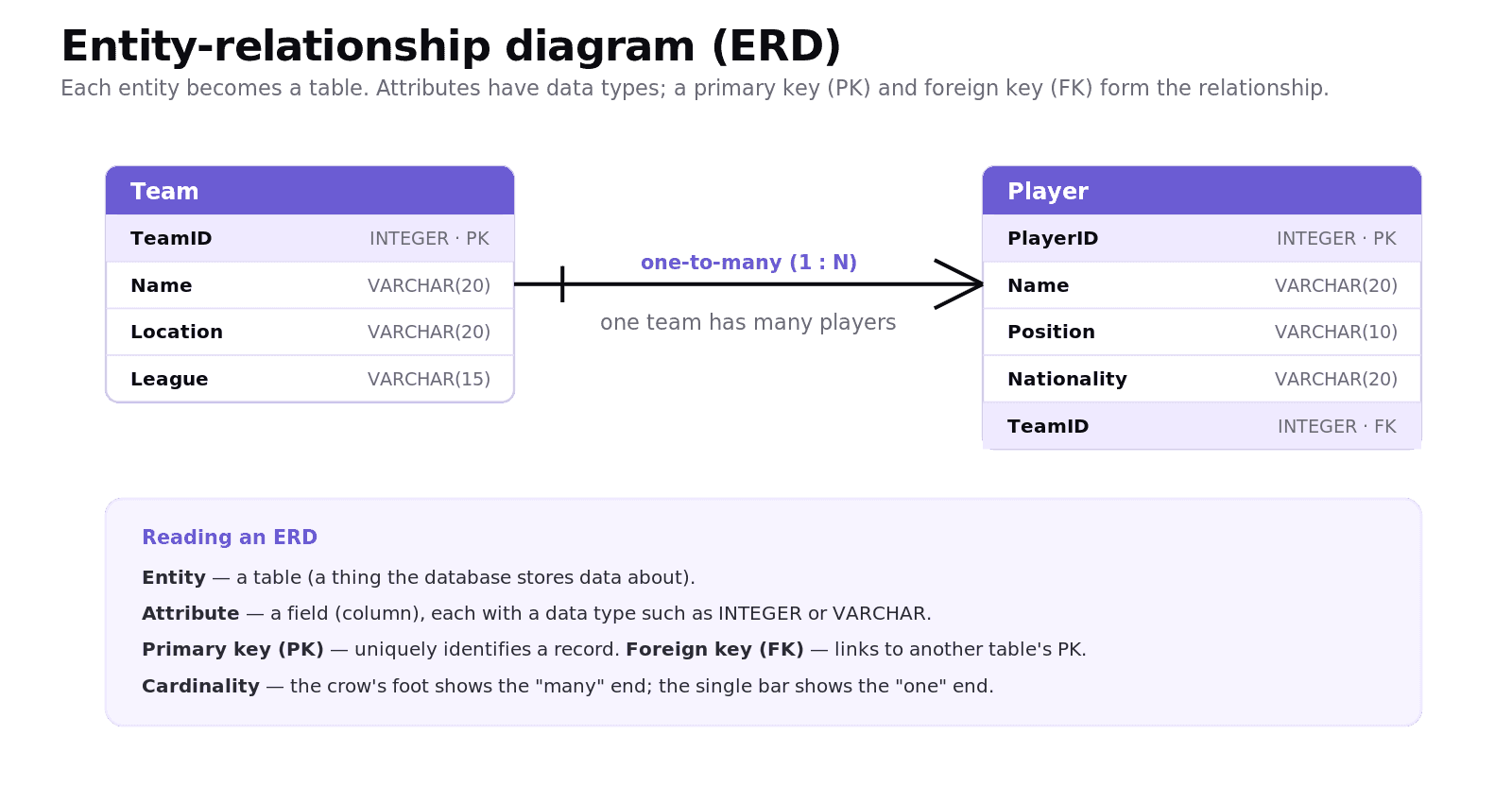
An entity-relationship diagram (ERD) is a visual model of the schema. Each entity is a box, its attributes are listed inside with their data types, and lines show the relationships between entities.
The relationship line carries the cardinality: one-to-one, one-to-many, or many-to-many. A common convention is crow's foot notation, where a three-pronged "foot" marks the "many" end and a single bar marks the "one" end. To build one: identify the entities, list their attributes and data types, mark the primary and foreign keys, and then work out the cardinality of each relationship.
What data types are used in databases?
Every attribute is given a data type, which keeps data valid and storage efficient.
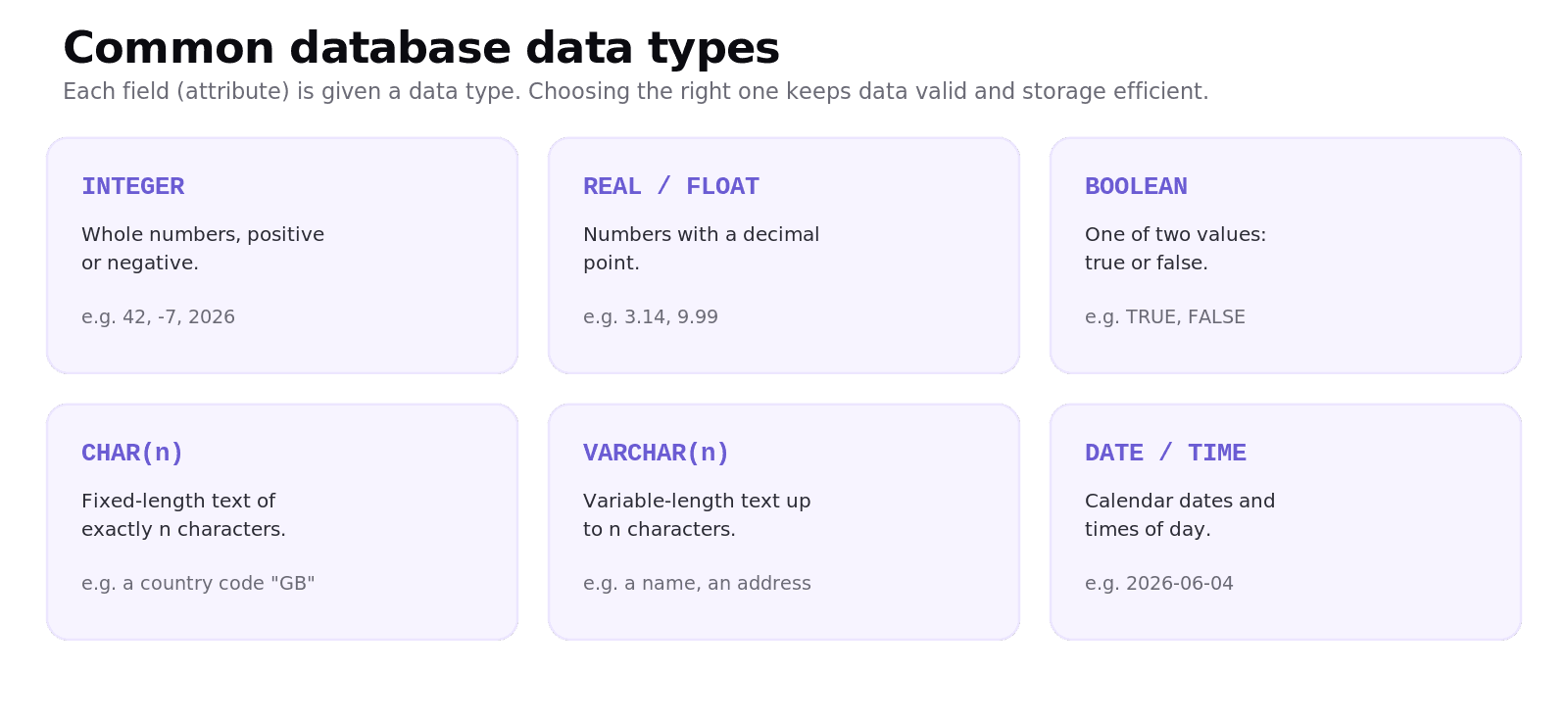
The common ones are INTEGER for whole numbers, REAL (or FLOAT) for decimals, BOOLEAN for true/false, CHAR(n) for fixed-length text, VARCHAR(n) for variable-length text such as a name, and DATE/TIME for dates and times. Choosing the right type, for example VARCHAR(20) for a name rather than an unbounded text field, is part of good design.
What is normalisation and what are the normal forms?
Normalisation is the process of structuring tables to remove redundancy (the same fact stored more than once) and to reduce the risk of inconsistent data. It works by spotting functional dependencies: which attributes depend on which. An attribute depends on a key if knowing the key tells you the value, for example knowing a StudentID tells you the StudentName.
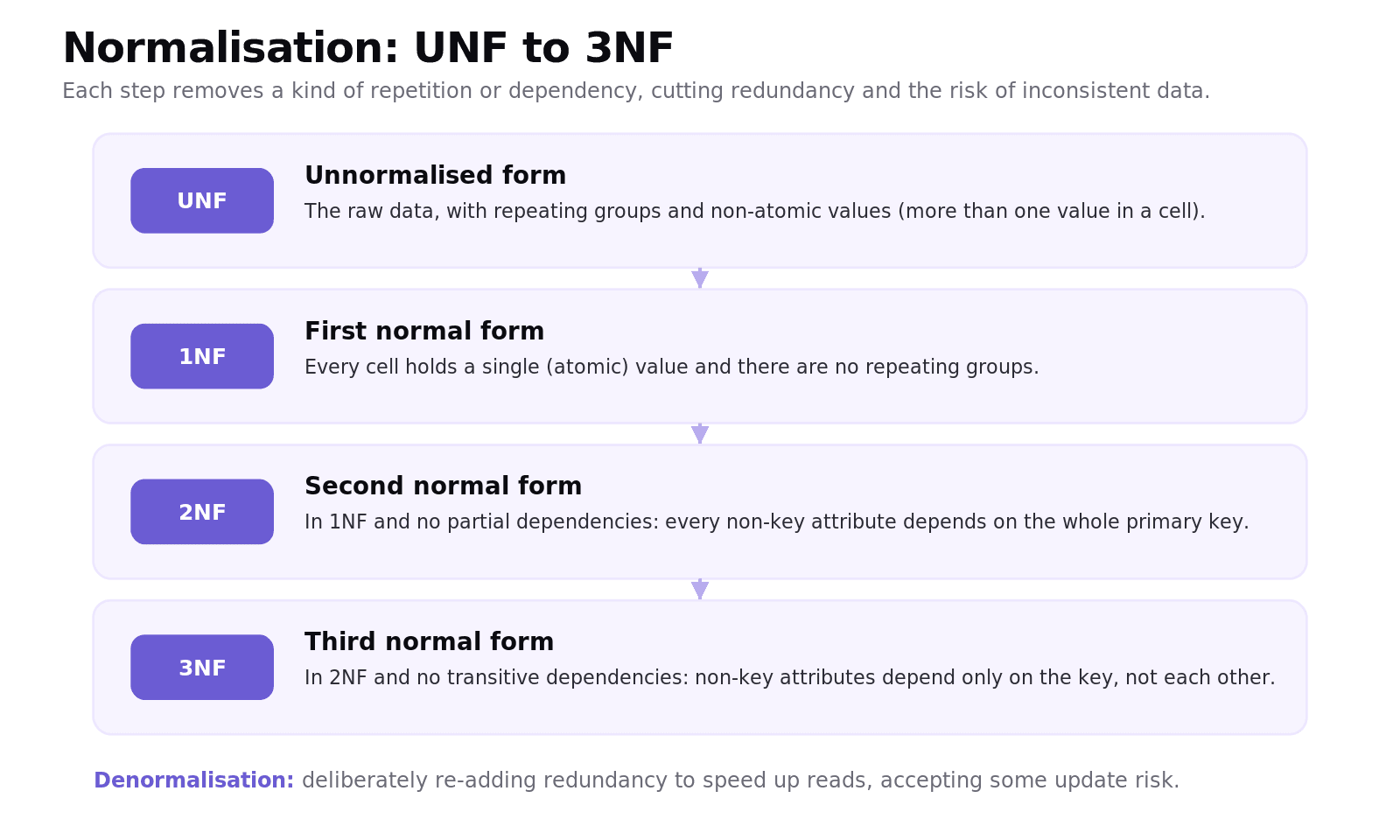
Normalisation proceeds through a series of normal forms, and for IB you need up to the third:
Unnormalised form (UNF) is the raw data, often with repeating groups and non-atomic cells.
First normal form (1NF): every cell holds a single (atomic) value, with no repeating groups.
Second normal form (2NF): 1NF, plus no partial dependencies. Every non-key attribute depends on the whole primary key. This only bites when the key is composite (made of more than one column).
Third normal form (3NF): 2NF, plus no transitive dependencies. Non-key attributes depend only on the key, not on each other.
The three problems normalisation removes are the update anomaly (you change a fact in one row but forget the duplicates), the insertion anomaly (you cannot add one fact without inventing another), and the deletion anomaly (deleting one row accidentally loses unrelated facts).
Worked example: normalising a database to 3NF
Let's take a real table all the way to 3NF. A coding academy records which modules each student is taking, the student's mentor, and the student's score in each module. Here is the raw data, straight out of a spreadsheet.
Unnormalised form (UNF). Notice the "Modules taken" cell holds several values at once: that is the repeating group we have to fix first.
StudentID | StudentName | MentorID | MentorName | Modules taken (ModuleID, ModuleName, Level, Score) |
|---|---|---|---|---|
S1 | Aisha | M2 | Ms Patel | P101 Python Basics (L1) 78; P205 Web Development (L2) 65 |
S2 | Ben | M1 | Mr Ng | P101 Python Basics (L1) 81 |
S3 | Chloe | M2 | Ms Patel | P301 Algorithms (L3) 70; P150 Data Handling (L1) 88 |
Step 1, First normal form (1NF): make every cell atomic. We split the repeating group out into its own rows. The data that does not repeat (the student) stays in one table; the data that repeats (each module a student takes) moves to a new table with a key. Because a row of the new table is only identified by both the student and the module, its key is the composite key (StudentID, ModuleID).
STUDENT
StudentID (PK) | StudentName | MentorID | MentorName |
|---|---|---|---|
S1 | Aisha | M2 | Ms Patel |
S2 | Ben | M1 | Mr Ng |
S3 | Chloe | M2 | Ms Patel |
ENROLMENT, with composite primary key (StudentID, ModuleID)
StudentID (PK, FK) | ModuleID (PK) | ModuleName | Level | Score |
|---|---|---|---|---|
S1 | P101 | Python Basics | 1 | 78 |
S1 | P205 | Web Development | 2 | 65 |
S2 | P101 | Python Basics | 1 | 81 |
S3 | P301 | Algorithms | 3 | 70 |
S3 | P150 | Data Handling | 1 | 88 |
Every cell now holds one value, so we are in 1NF.
Step 2, Second normal form (2NF): remove partial dependencies. Look at ENROLMENT's composite key (StudentID, ModuleID). Score depends on both parts (a particular student's score in a particular module), so it stays. But ModuleName and Level depend only on ModuleID, half of the key. That is a partial dependency, and it means "Python Basics" is repeated on every row where P101 appears. We move those columns into their own MODULE table.
STUDENT (unchanged)
StudentID (PK) | StudentName | MentorID | MentorName |
|---|---|---|---|
S1 | Aisha | M2 | Ms Patel |
S2 | Ben | M1 | Mr Ng |
S3 | Chloe | M2 | Ms Patel |
ENROLMENT
StudentID (PK, FK) | ModuleID (PK, FK) | Score |
|---|---|---|
S1 | P101 | 78 |
S1 | P205 | 65 |
S2 | P101 | 81 |
S3 | P301 | 70 |
S3 | P150 | 88 |
MODULE
ModuleID (PK) | ModuleName | Level |
|---|---|---|
P101 | Python Basics | 1 |
P205 | Web Development | 2 |
P301 | Algorithms | 3 |
P150 | Data Handling | 1 |
Step 3, Third normal form (3NF): remove transitive dependencies. Now look at STUDENT. The key is StudentID. StudentName depends on it directly, fine. But MentorName depends on MentorID, which is not the key. So we have StudentID → MentorID → MentorName: a transitive dependency, where one non-key attribute depends on another. It means "Ms Patel" is duplicated for every student she mentors. We move the mentor details into a MENTOR table.
STUDENT
StudentID (PK) | StudentName | MentorID (FK) |
|---|---|---|
S1 | Aisha | M2 |
S2 | Ben | M1 |
S3 | Chloe | M2 |
MENTOR
MentorID (PK) | MentorName |
|---|---|
M1 | Mr Ng |
M2 | Ms Patel |
MODULE and ENROLMENT are unchanged from 2NF.
The result. Four tidy tables, STUDENT, MENTOR, MODULE and ENROLMENT, each storing one kind of fact exactly once and linked by keys. Renaming Ms Patel is now a one-row change; you can add a brand-new module before anyone enrols on it; and deleting a student no longer wipes out a module's details. Those three wins are the update, insertion and deletion anomalies, gone.
When should you denormalise a database?
Denormalisation deliberately re-introduces some redundancy into a normalised database. You would do it when read performance matters more than perfect tidiness, for example in a reporting or analytics system where joining many tables would be too slow.
The trade-off is the one normalisation was designed to avoid: duplicated data is faster to read but harder to keep consistent on updates. So denormalisation is a considered choice for a specific performance need, not a default.
Common exam mistakes for IB CS A3.2
Confusing the normal forms. 1NF is about atomic values, 2NF about partial dependencies, 3NF about transitive dependencies.
Forgetting that 2NF only matters when the table has a composite primary key. With a single-column key, a 1NF table is already in 2NF.
Removing the wrong attribute in 2NF. Only move attributes that depend on part of the key; attributes that depend on the whole key (like
Score) must stay.Muddling ERD vocabulary: an entity is a table, an attribute is a field, and the line shows the relationship.
Getting the cardinality or crow's foot the wrong way round (the foot is the "many" end).
Treating normalisation as always best. Denormalisation can be the right call for performance.
Quick recap of A3.2
A schema is the structure of a database: entities, attributes, data types, and keys.
An ERD models entities, attributes, and relationships, with cardinality shown by crow's foot notation.
Pick sensible data types (INTEGER, VARCHAR, BOOLEAN, DATE, and so on).
1NF removes repeating groups (atomic cells); 2NF removes partial dependencies on a composite key; 3NF removes transitive dependencies between non-key attributes.
Denormalisation trades tidiness for read speed when performance demands it.
Frequently asked questions
What is a database schema?
A database schema is the blueprint of a database's structure: the entities (tables), the attributes (fields) and their data types, and the primary and foreign keys that link the tables. It describes how data is organised, separate from the data itself.
What is an ERD?
An entity-relationship diagram (ERD) is a visual model of a database schema. It shows each entity as a box with its attributes and data types, and lines between entities that show the relationships and their cardinality, often in crow's foot notation.
What is the difference between 1NF, 2NF, and 3NF?
First normal form requires every cell to hold a single atomic value with no repeating groups. Second normal form additionally removes partial dependencies, so every non-key attribute depends on the whole composite key. Third normal form additionally removes transitive dependencies, so non-key attributes depend only on the key, not on each other.
What is a partial dependency?
A partial dependency is when a non-key attribute depends on only part of a composite primary key rather than the whole of it. For example, in a table keyed by (StudentID, ModuleID), the module name depends only on ModuleID. Removing partial dependencies is the step that takes a database from first normal form to second normal form.
What is a transitive dependency?
A transitive dependency is when a non-key attribute depends on another non-key attribute rather than directly on the key, written as key to A to B. For example, StudentID determines MentorID, and MentorID determines MentorName. Removing transitive dependencies is the step that takes a database from second normal form to third normal form.
What is denormalisation?
Denormalisation is deliberately adding some redundancy back into a normalised database to improve read performance, for example in reporting systems. The trade-off is that duplicated data is harder to keep consistent when records are updated.
*Looking for a printable summary? Grab the A3.2 Shuttle Learning revision sheet, a three-page knowledge organiser covering everything
Looking for an IB Computer Science tutor?
Hi, I'm Yuness, the tutor behind Shuttle Learning. I work one to one with IB Computer Science students at SL and HL, and I deliberately take on only a handful each year so every student gets my full attention. Most go on to earn the 6s and 7s they were aiming for, in the final exams and the IA alike.
If you would like that kind of support, book a free 15-minute call and tell me what you are stuck on. You can press BOOK A LESSON .