Database Fundamentals (IB CS A3.1): A Complete Guide
IB Computer Science A3.1 explained: relational databases, primary and foreign keys, relationships and cardinality, and the benefits and limitations. Exam tips.

Almost every app you use, from a school register to an online shop, is sitting on top of a database. Topic A3.1 explains why the relational model became the standard way to store data, and the keys and relationships that make it work. It is the foundation for the rest of Theme A3.
This guide covers the single A3.1 understanding in full: the features, benefits, and limitations of a relational database.
What does IB CS topic A3.1 cover?
A3.1 has one understanding: explain the features, benefits, and limitations of a relational database. To do that well you need the vocabulary (entities, fields, records, keys), the idea of relationships and cardinality, and a clear sense of why relational beats a simple flat file.
What is a relational database?
A relational database organises data into several linked tables rather than one big list. Each table stores data about one kind of thing, and the tables are connected so the database can pull related information together without repeating it.
The everyday alternative is a flat file: a single table holding everything. That works for tiny datasets but breaks down quickly, which is the problem the relational model was built to solve.
What is the problem with a flat file?
A flat file stores everything in one table, which forces it to repeat data.
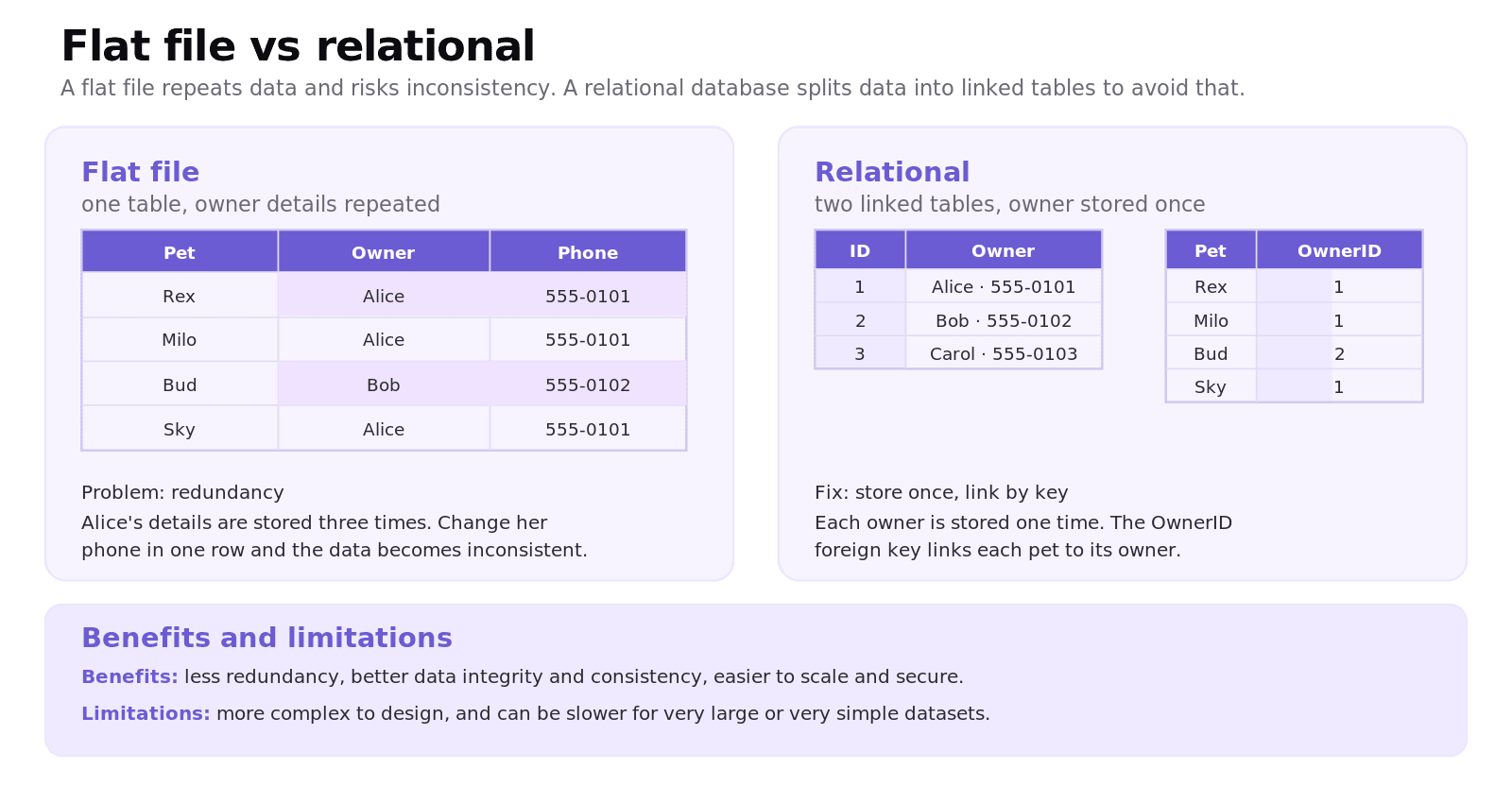
If a vet kept pets and owners in one table, an owner with three pets would have their name and phone number stored three times. That repetition is data redundancy, and it causes two problems: it wastes space, and it risks data inconsistency. Update the owner's phone number in one row and forget the others, and the database now holds conflicting values. A relational database fixes this by storing each owner once in its own table and linking the pets to it.
What are the key features of a relational database?
The IB expects you to use the correct terms.
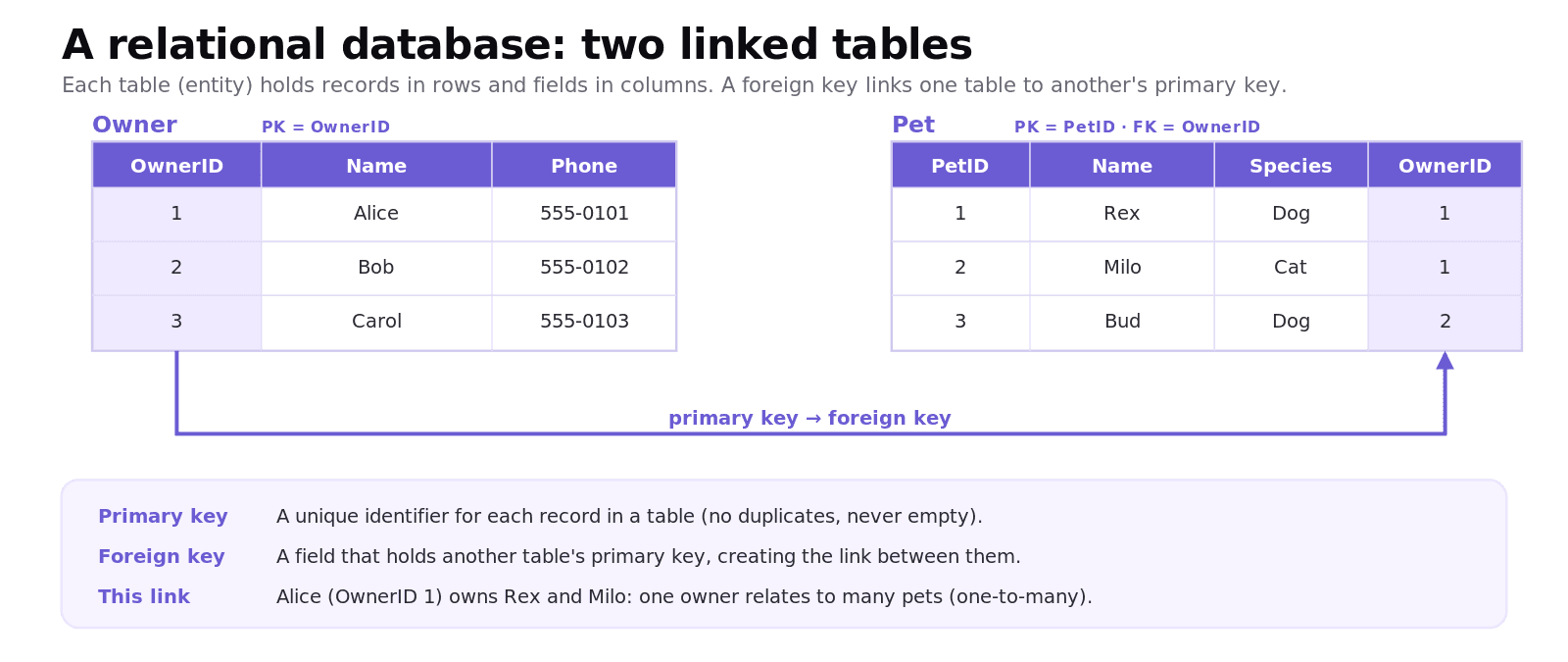
An entity is a table, storing data about one type of thing (an Owner table, a Pet table). A field (or attribute) is a column, such as Name or Phone. A record (or tuple) is a row, holding all the data for one instance. A primary key is a field that uniquely identifies each record in a table; it must be unique and can never be empty. A foreign key is a field in one table that holds the primary key of another table, which is what creates the link between them.
Worked example: splitting a flat file into tables
Take a flat file of pets where each row repeats the owner's details. To make it relational:
Create an Owner table with
OwnerIDas the primary key, plus Name and Phone, storing each owner once.Create a Pet table with
PetIDas its primary key, plus Name and Species, and addOwnerIDas a foreign key.Now Alice is stored once. Both her pets simply carry her
OwnerID, so updating her phone number means changing one cell, not three.
What are relationships and cardinality?
A relationship is the link between two tables, and cardinality describes how many records on each side take part.
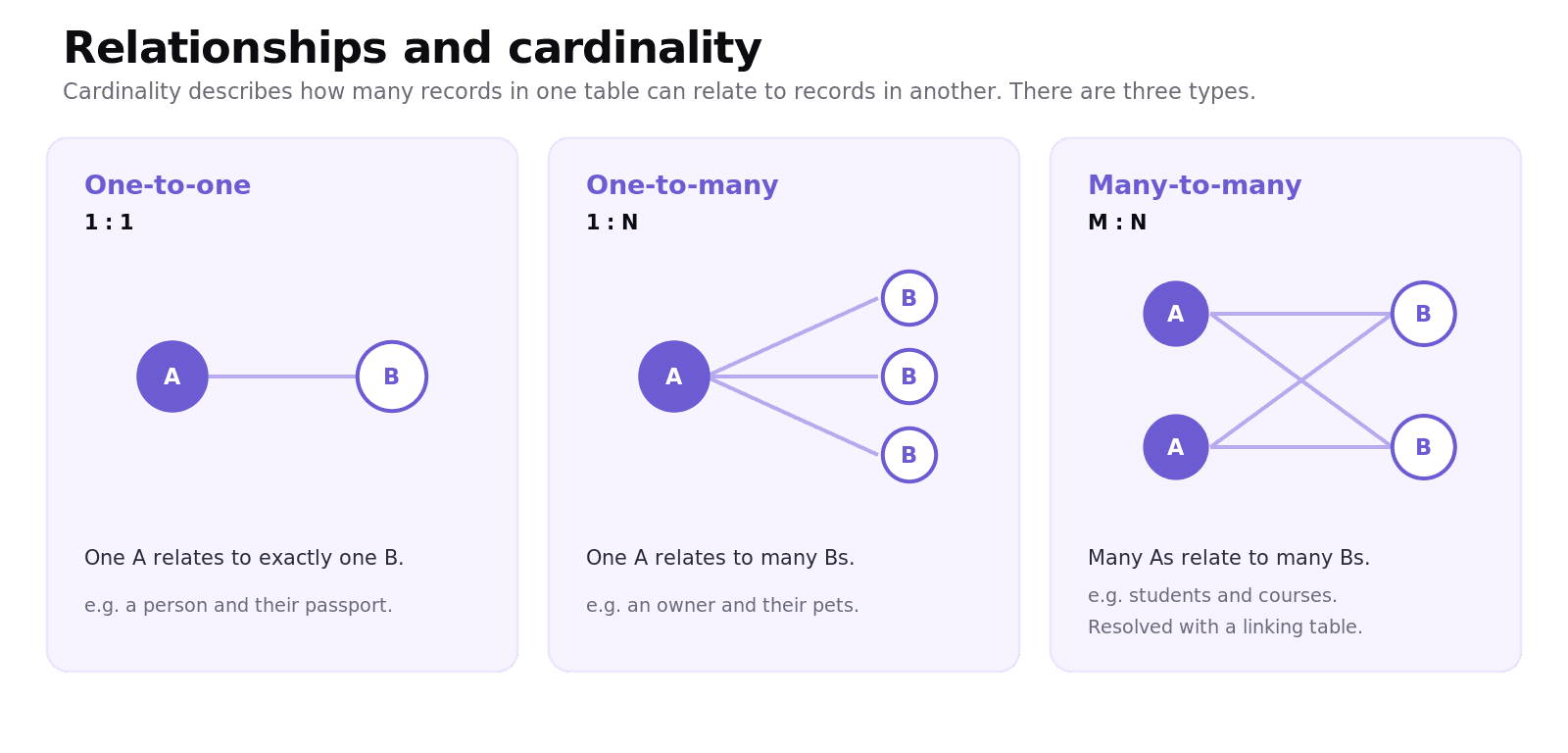
A one-to-one (1:1) relationship links one record to exactly one other, such as a person and their passport. A one-to-many (1:N) relationship links one record to many, such as one owner to many pets; this is the most common type. A many-to-many (M:N) relationship links many to many, such as students and courses, and in a relational database it is resolved by adding a linking table in between.
What are the benefits and limitations of a relational database?
The benefits are why relational databases dominate: much less data redundancy, stronger data integrity and consistency (a fact is stored once), easier scaling, and better security because access can be controlled per table. The structure also makes powerful queries across linked tables possible.
The limitations are worth a balanced answer in an exam: relational databases are more complex to design than a flat file, they can be slower for very large workloads or for extremely simple needs, and they require more upfront planning. For a tiny, one-off list, a flat file may genuinely be the better tool.
Common exam mistakes for IB CS A3.1
Confusing a primary key with a foreign key. The primary key identifies a record; the foreign key links to another table's primary key.
Saying a primary key can be duplicated or left empty. It must be unique and never null.
Mixing up the terms: an entity is a table, a field is a column, a record is a row.
Confusing a flat file with a relational database. A flat file is a single table; relational uses several linked tables.
Claiming relational is always better. Note its limitations: complexity and design effort.
Getting cardinality wrong, especially forgetting that many-to-many needs a linking table.
Quick recap of A3.1
A relational database stores data in several linked tables instead of one flat file, cutting redundancy.
An entity is a table, a field is a column, and a record is a row.
A primary key uniquely identifies a record; a foreign key links to another table's primary key.
Cardinality is one-to-one, one-to-many, or many-to-many (the last needs a linking table).
Benefits: less redundancy, better integrity and consistency, scalability. Limitations: complexity and design effort.
Frequently asked questions
What is a primary key?
A primary key is a field that uniquely identifies each record in a table. It must be unique for every record and can never be empty, which is what lets the database reliably find and link individual records.
What is a foreign key?
A foreign key is a field in one table that holds the primary key of another table. It creates the relationship between the two tables, for example an OwnerID in a Pet table that points back to the matching owner in the Owner table.
What is the difference between a flat file and a relational database?
A flat file stores all the data in a single table, which forces it to repeat information and risks inconsistency. A relational database splits the data into several linked tables, storing each fact once and connecting tables with keys.
What is data redundancy?
Data redundancy is the unnecessary repetition of the same data in a database, such as storing an owner's phone number on every one of their pet's rows. It wastes space and can lead to inconsistency if some copies are updated and others are not.
What is cardinality in a database?
Cardinality describes how many records in one table relate to records in another. The three types are one-to-one, one-to-many, and many-to-many, with many-to-many usually resolved by adding a linking table.
What are the benefits of a relational database?
A relational database reduces data redundancy, improves data integrity and consistency by storing each fact once, scales well, and allows fine-grained security and powerful queries across linked tables. The trade-off is that it is more complex to design than a flat file.
Looking for a printable summary? Grab the A3.1 Shuttle Learning revision sheet, a three-page knowledge organiser covering everything above.
Looking for an IB Computer Science tutor?
Hi, I'm Yuness, the tutor behind Shuttle Learning. I work one to one with IB Computer Science students at SL and HL, and I deliberately take on only a handful each year so every student gets my full attention. Most go on to earn the 6s and 7s they were aiming for, in the final exams and the IA alike.
If you would like that kind of support, book a free 15-minute call and tell me what you are stuck on. You can press BOOK A LESSON .