Network Security (IB CS A2.4): A Complete Guide
IB Computer Science A2.4 explained: firewalls, common threats, countermeasures, and encryption (symmetric vs asymmetric) with digital certificates. Exam tips.
Networks make sharing easy, which is exactly why they are targets. Topic A2.4 is about the threats networks face and the layered defences that hold them off, with encryption at the centre. It is one of the most exam-friendly topics because the questions reward clear, structured explanations.
This guide covers every A2.4 understanding: firewalls, common vulnerabilities, countermeasures, and encryption with digital certificates.
What does IB CS topic A2.4 cover?
A2.4 has four understandings: how effective firewalls are at protecting a network, common network vulnerabilities, common countermeasures, and the process of encryption and digital certificates. The thread running through all four is defence in depth: no single measure is enough, so you combine several.
What is a firewall and how effective is it?
A firewall is hardware or software that monitors traffic and filters it against a set of rules, blocking anything unauthorised. A basic firewall filters by IP address and port in the packet headers, while modern next-generation (layer 7) firewalls can inspect the packet contents to catch more sophisticated attacks.
Firewalls are effective as a first line of defence, but only up to a point. A misconfigured firewall can block legitimate traffic or leave gaps, and a firewall cannot stop threats that come through allowed channels, like a user clicking a phishing link or installing malware. Related to firewalls, NAT (Network Address Translation) adds a layer of protection by hiding internal private IP addresses behind one public address, a technique called IP masquerading.
What are common network threats?
The IB expects you to recognise and describe the main categories of attack.
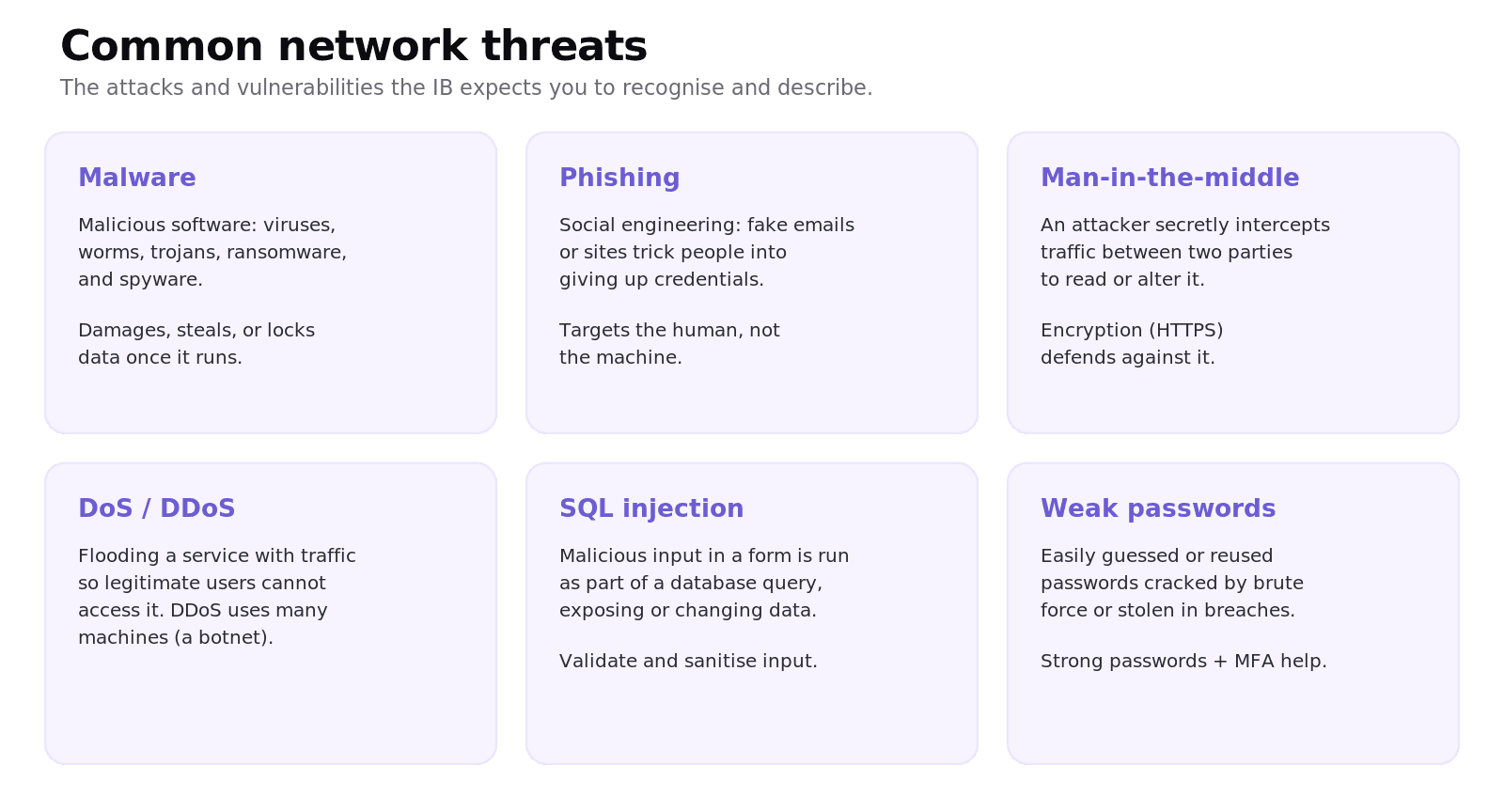
Malware is malicious software, including viruses, worms, trojans, ransomware, and spyware. Phishing is a form of social engineering that tricks people into handing over credentials through fake emails or websites. A man-in-the-middle (MitM) attack secretly intercepts traffic between two parties to read or change it. A denial-of-service (DoS) attack floods a service so legitimate users cannot reach it, and a distributed version (DDoS) uses many machines at once, often a botnet. SQL injection slips malicious input into a form so it runs as part of a database query. And weak passwords can be guessed, brute-forced, or stolen in a breach.
What countermeasures protect a network?
Defences are layered so that if one fails, others still stand.
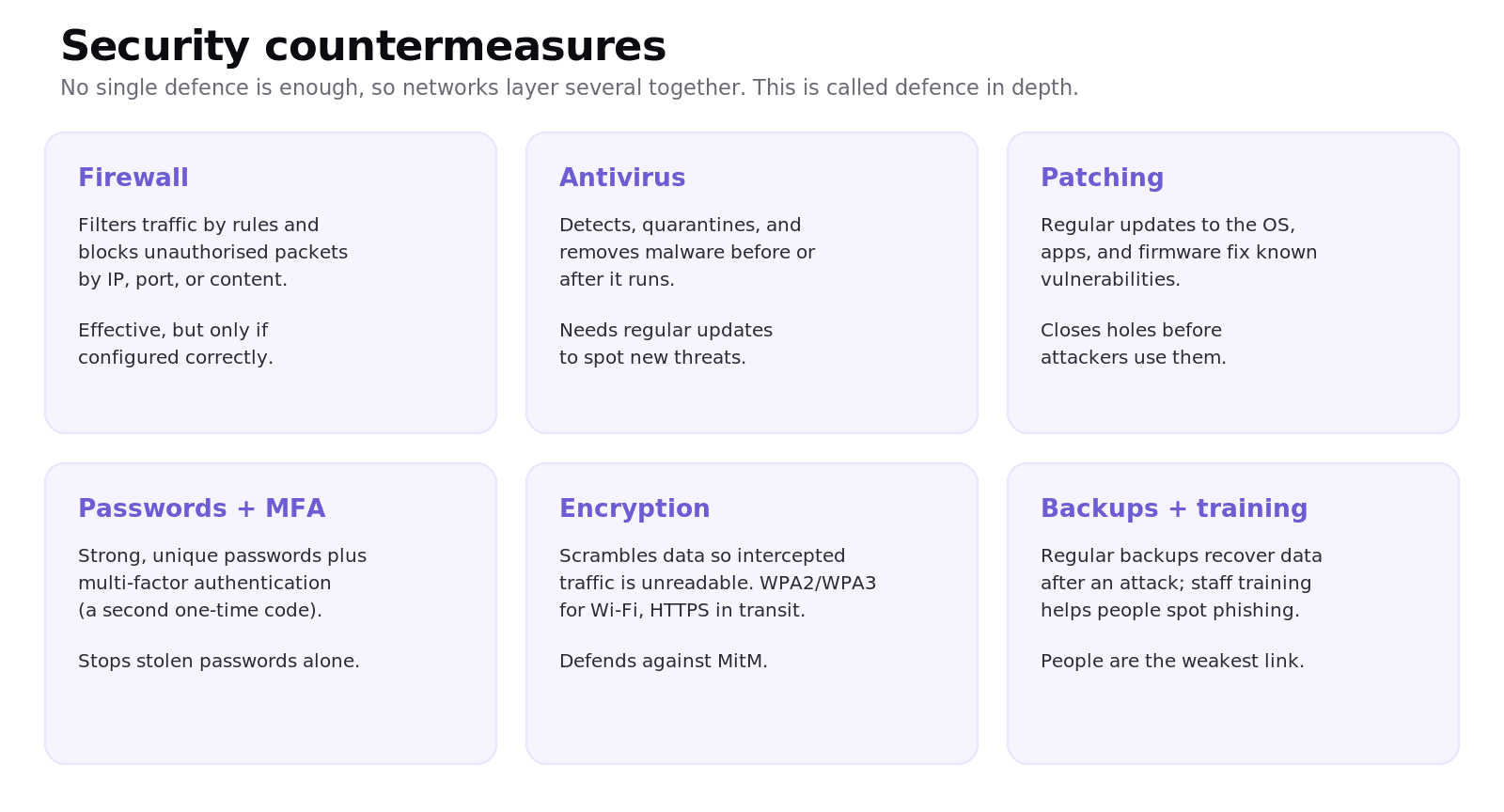
A firewall filters traffic; antivirus software detects and removes malware; patching keeps the OS and applications updated to close known vulnerabilities. Strong, unique passwords combined with multi-factor authentication (MFA) stop a stolen password from being enough on its own. Encryption (WPA2 or WPA3 for Wi-Fi, HTTPS in transit) keeps intercepted data unreadable. Finally, regular backups let an organisation recover after an attack, and staff training helps people spot phishing, since people are often the weakest link.
How does encryption work?
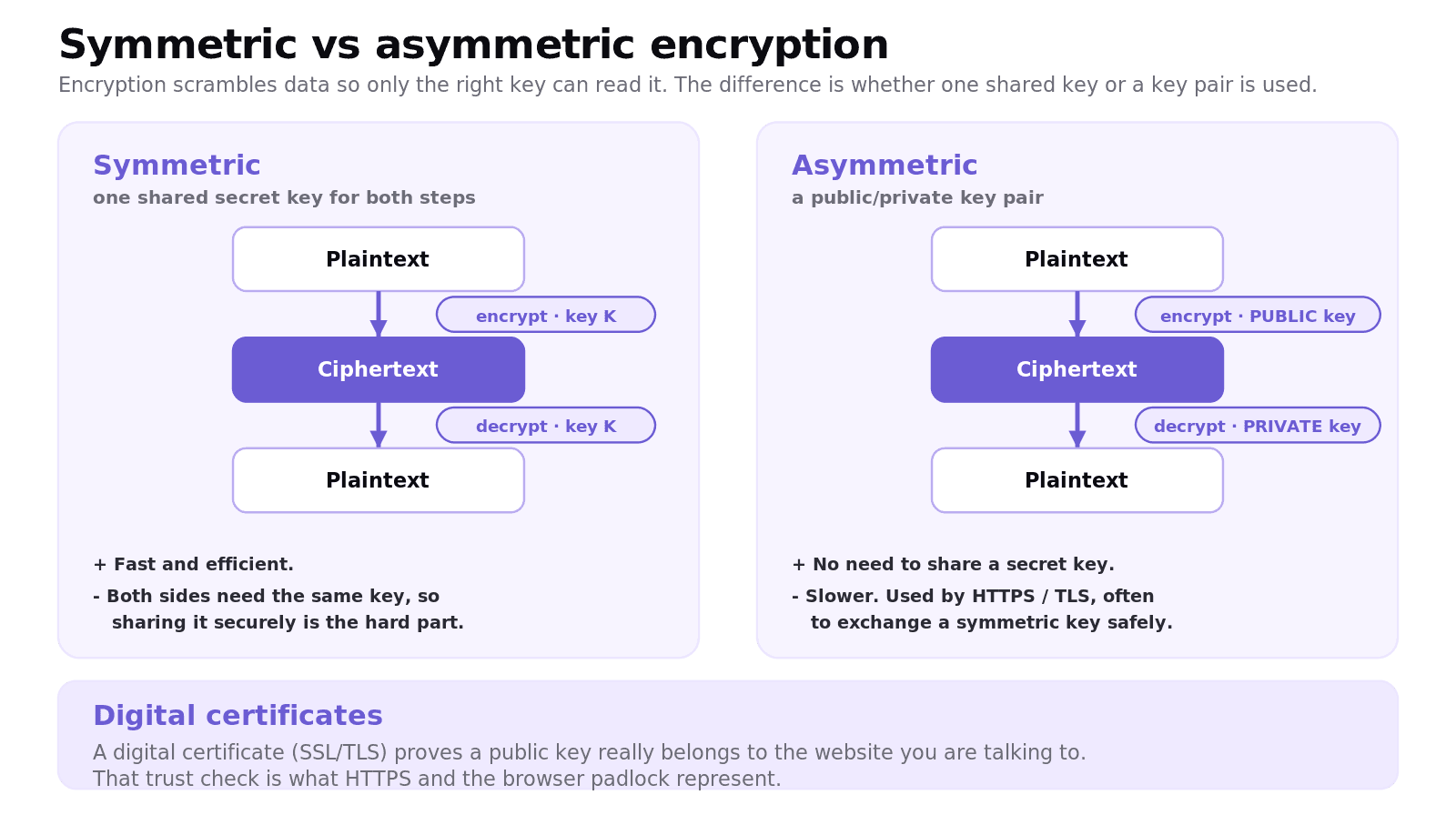
Encryption scrambles data into ciphertext so that only someone with the right key can turn it back into plaintext. There are two types.
Symmetric encryption uses one shared secret key for both encrypting and decrypting. It is fast, but both sides need the same key, so sharing that key securely is the hard part. Asymmetric encryption uses a key pair: a public key that anyone can use to encrypt, and a matching private key that only the owner holds to decrypt. It solves the key-sharing problem but is slower, so in practice it is often used to exchange a symmetric key securely, after which the faster symmetric encryption takes over.
Worked example: logging in over HTTPS
When you log in to a site over HTTPS:
Your browser checks the site's digital certificate to confirm its public key really belongs to that site.
Asymmetric encryption is used to safely agree a shared symmetric session key.
That symmetric key then encrypts the rest of the session, including your password, so a man-in-the-middle only sees ciphertext.
This is why the padlock and HTTPS matter: they show the connection is encrypted and the server's identity has been verified.
What are digital certificates?
A digital certificate is issued by a trusted authority and proves that a particular public key really belongs to a particular website. Without it, an attacker could hand you their own public key and impersonate the site. The certificate is what your browser checks behind the scenes when it shows the padlock, and it is the foundation of the trust in SSL/TLS and HTTPS.
Common exam mistakes for IB CS A2.4
Claiming a firewall stops every attack. It does not stop phishing, malware via allowed channels, or anything if it is misconfigured.
Confusing symmetric and asymmetric encryption. Symmetric uses one shared key; asymmetric uses a public/private pair.
Saying the public key decrypts the message. The private key decrypts what the public key encrypted.
Confusing DoS and DDoS. DDoS is distributed across many machines.
Confusing a virus and a worm. A worm spreads by itself across a network; a virus needs a host file and user action.
Thinking HTTPS makes a site completely safe. It encrypts data in transit and verifies identity, but does not protect against everything.
Quick recap of A2.4
A firewall filters traffic by rules; effective but not a complete defence, and NAT hides internal addresses.
Common threats: malware, phishing/social engineering, man-in-the-middle, DoS/DDoS, SQL injection, weak passwords.
Countermeasures layer up: firewall, antivirus, patching, strong passwords + MFA, encryption, backups, and training.
Symmetric encryption uses one shared key; asymmetric uses a public/private key pair.
A digital certificate proves a public key belongs to the real site, which is the basis of HTTPS.
Frequently asked questions
How does a firewall work?
A firewall monitors network traffic and filters it against a set of rules, blocking anything unauthorised. Basic firewalls filter by IP address and port in the packet headers, while next-generation firewalls can also inspect the contents of packets to catch more advanced threats.
What is the difference between symmetric and asymmetric encryption?
Symmetric encryption uses a single shared secret key to both encrypt and decrypt, which is fast but requires sharing the key securely. Asymmetric encryption uses a public key to encrypt and a separate private key to decrypt, which solves the key-sharing problem but is slower, so it is often used to exchange a symmetric key.
What is the difference between a DoS and a DDoS attack?
A denial-of-service (DoS) attack floods a service with traffic from one source so legitimate users cannot access it. A distributed denial-of-service (DDoS) attack does the same thing from many machines at once, often a botnet, which makes it much harder to block.
What is phishing?
Phishing is a social engineering attack that tricks people into revealing sensitive information, such as passwords, through fake emails or websites that look legitimate. It targets the human rather than the technology, which is why staff training is an important countermeasure.
What is a digital certificate?
A digital certificate is issued by a trusted authority and proves that a public key genuinely belongs to a particular website. Browsers check it to verify a site's identity before establishing an encrypted HTTPS connection, which is what the padlock represents.
What is the difference between a virus and a worm?
A virus attaches itself to a host file and needs a user to run it before it can spread. A worm is self-replicating and spreads across a network on its own without needing a host file or user action, which makes it spread faster.
Looking for a printable summary? Grab the A2.4 Shuttle Learning revision sheet, a three-page knowledge organiser covering everything above.
Looking for an IB Computer Science tutor?
Hi, I'm Yuness, the tutor behind Shuttle Learning. I work one to one with IB Computer Science students at SL and HL, and I deliberately take on only a handful each year so every student gets my full attention. Most go on to earn the 6s and 7s they were aiming for, in the final exams and the IA alike.
If you would like that kind of support, book a free 15-minute call and tell me what you are stuck on. You can press BOOK A LESSON .