Network Fundamentals (IB CS A2.1): A Complete Guide
IB Computer Science A2.1 explained: network types, network devices, transport and application protocols, and the four-layer TCP/IP model. Examples and exam tips.

Every message you send, page you load, and file you share crosses a network, usually several at once. Topic A2.1 is where the IB Computer Science syllabus opens up the internet and shows you the machinery underneath. Get the layers and the vocabulary straight here and the rest of Theme A2 falls into place.
This guide covers every A2.1 understanding: what networks are for, the types you need to know, the devices that run them, the key protocols, and the four-layer TCP/IP model.
What does IB CS topic A2.1 cover?
A2.1 has five understandings: the purpose and characteristics of networks, the purpose, benefits, and limitations of the main network types, the function of network devices, the protocols used at the transport and application layers, and the function of the TCP/IP model. Together they answer one question: how does data get reliably from one device to another?
What is a computer network and why do we use them?
A network is two or more devices connected so they can communicate and share resources. That sharing is the whole point: files, printers, an internet connection, and processing power can all be pooled instead of duplicated on every machine.
Networks are described by characteristics such as bandwidth (how much data can flow per second), latency (the delay before data arrives), and reliability. A good network maximises bandwidth and reliability while keeping latency low, and it must also handle security and scale as more devices join.
What are the main types of network?
Networks are classified mostly by the geographic area they cover, from the space around one person to the whole planet.
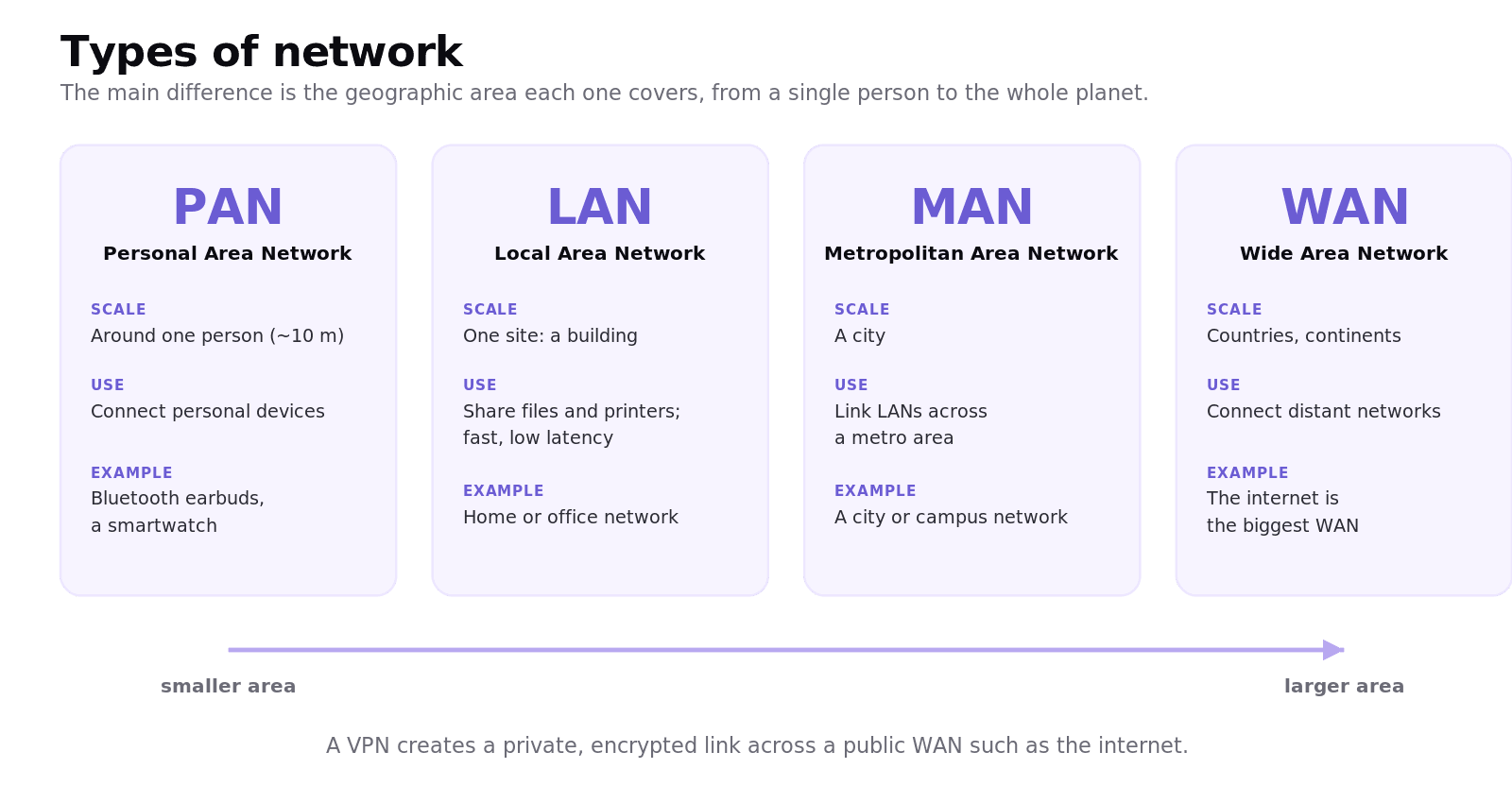
A Personal Area Network (PAN) connects devices around one person, like Bluetooth earbuds to a phone. A Local Area Network (LAN) covers a single site such as a home, office, or school, and offers high data rates and low latency. A Metropolitan Area Network (MAN) spans a city, linking LANs across a metro area. A Wide Area Network (WAN) reaches across cities, countries, and continents, and the internet is the largest WAN of all. A Virtual Private Network (VPN) runs a private, encrypted connection across a public WAN, giving remote users secure access. The benefit of larger networks is reach; the limitations are higher latency, higher cost, and greater security exposure.
What do network devices do?
Different devices move data at different points, and a useful exam habit is to name the TCP/IP layer each one works at.
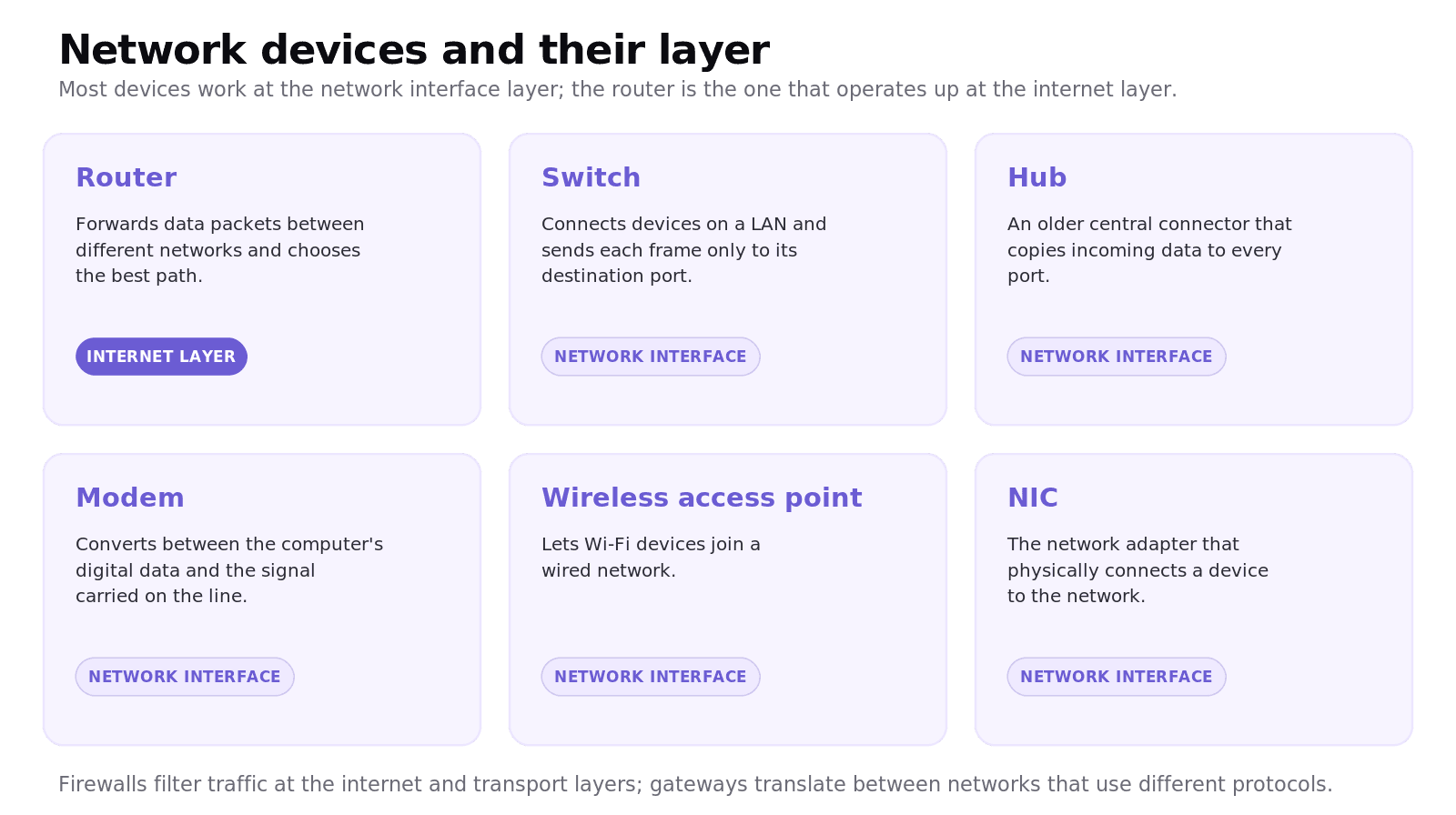
A router forwards data packets between different networks and chooses the best path, operating at the internet layer. A switch connects devices within a LAN and sends each frame only to its destination port. A hub is an older central connector that copies incoming data to every port, which is wasteful. A modem converts between the computer's digital data and the signal carried on the line. A wireless access point lets Wi-Fi devices join a wired network, and a NIC (network interface card) is the adapter that physically connects a device. Firewalls filter traffic by inspecting packets, and gateways translate between networks that use different protocols.
What are the key network protocols?
A protocol is an agreed set of rules for how devices communicate. The IB groups the ones you need by where they sit in the TCP/IP model.
At the transport layer, TCP (Transmission Control Protocol) guarantees orderly, error-free delivery using sequencing, checksums, acknowledgements, and retransmission, while UDP (User Datagram Protocol) is faster but does not guarantee delivery, which suits live video and games. At the application layer, HTTP and HTTPS carry web pages (HTTPS is the encrypted version), SMTP carries email, DNS translates domain names into IP addresses, and DHCP automatically assigns IP addresses to devices. Underneath them all, IP (Internet Protocol) at the internet layer addresses and routes every packet.
What is the TCP/IP model?
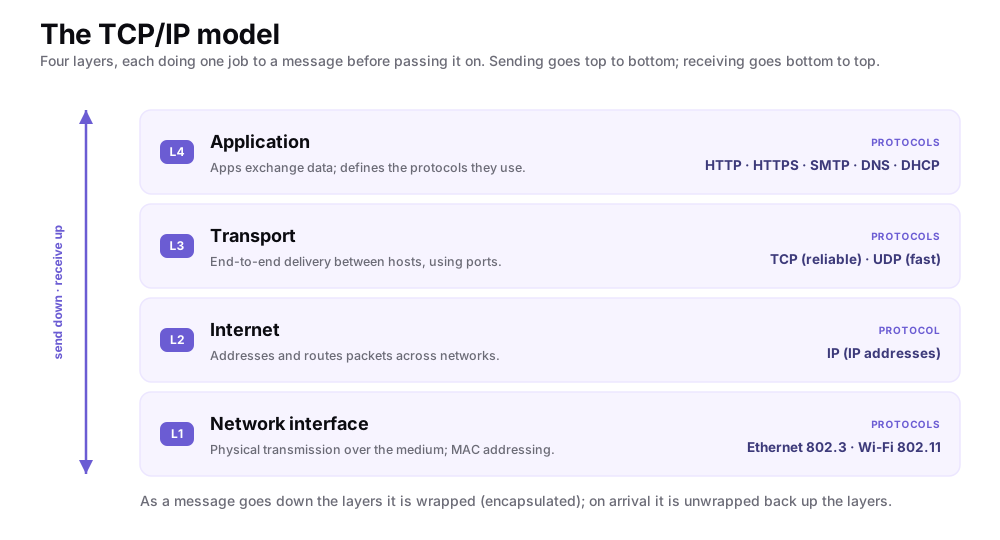
Because networks are so complex, we use a layered model to make sense of them. The TCP/IP model has four layers, each performing one job on a message before passing it to the next.
The application layer is where programs exchange data and use protocols like HTTP and DNS. The transport layer provides end-to-end delivery between hosts using TCP or UDP and port numbers. The internet layer handles addressing and routing of packets with IP. The network interface layer deals with the physical transmission of bits over the medium, including MAC addressing and standards like Ethernet (802.3) and Wi-Fi (802.11).
Worked example: loading a web page
When you visit a website, the message travels down the sender's layers and up the receiver's:
Application. Your browser forms an HTTP request, after DNS has resolved the domain name to an IP address.
Transport. TCP splits the request into segments, numbers them, and prepares to guarantee delivery.
Internet. IP wraps each segment in a packet addressed to the server and routers forward it across networks.
Network interface. The packet becomes electrical, light, or radio signals on the physical medium.
At the server, the same layers run in reverse, unwrapping the message until the web server reads the HTTP request and sends the page back the same way. This wrapping on the way down and unwrapping on the way up is called encapsulation.
Common exam mistakes for IB CS A2.1
Confusing TCP and UDP. TCP is reliable and ordered; UDP is fast but does not guarantee delivery.
Confusing a switch with a hub. A switch sends a frame only to its target port; a hub copies it to every port.
Confusing a router with a switch. A router connects different networks; a switch connects devices within one LAN.
Saying the TCP/IP model has seven layers. That is the OSI model; TCP/IP has four.
Mixing up an IP address (internet layer) with a MAC address (network interface layer).
Treating HTTP and HTTPS as identical. HTTPS is encrypted; HTTP is not.
Quick recap of A2.1
A network connects devices to share resources, judged on bandwidth, latency, and reliability.
Network types are classified by area: PAN, LAN, MAN, WAN, with a VPN running securely over a public WAN.
Devices: routers route between networks (internet layer); switches, hubs, modems, access points, and NICs work at the network interface layer.
Protocols: TCP and UDP at transport; HTTP, HTTPS, SMTP, DNS, DHCP at application; IP at the internet layer.
The TCP/IP model has four layers: application, transport, internet, and network interface.
Frequently asked questions
What is the difference between a LAN and a WAN?
A LAN (Local Area Network) covers a single site such as a home, office, or school and offers high speed and low latency. A WAN (Wide Area Network) spans large distances across cities or countries, connecting many smaller networks, and the internet is the largest example.
What is the difference between TCP and UDP?
TCP is reliable: it sequences data, checks for errors, and retransmits anything lost, so it guarantees orderly delivery. UDP is faster but does not guarantee delivery or order, which makes it suitable for live video, voice, and gaming where speed matters more than perfection.
What is the difference between a router and a switch?
A router forwards packets between different networks and chooses the best path, operating at the internet layer. A switch connects devices within a single LAN and sends each frame only to its destination port, operating at the network interface layer.
How many layers does the TCP/IP model have?
The TCP/IP model has four layers: application, transport, internet, and network interface. This is different from the OSI model, which has seven layers.
What is the difference between an IP address and a MAC address?
An IP address identifies a device on a network at the internet layer and is used for routing across networks. A MAC address is a hardware address fixed to the network adapter and is used at the network interface layer for delivery within a local network.
What is the difference between HTTP and HTTPS?
HTTP and HTTPS are both application-layer protocols for transferring web pages, but HTTPS encrypts the data in transit so it cannot be read or tampered with. HTTP sends data in plain text, which is why secure sites use HTTPS.
Looking for a printable summary? Grab the A2.1 Shuttle Learning revision sheet, a three-page knowledge organiser covering everything above.
Looking for an IB Computer Science tutor?
Hi, I'm Yuness, the tutor behind Shuttle Learning. I work one to one with IB Computer Science students at SL and HL, and I deliberately take on only a handful each year so every student gets my full attention. Most go on to earn the 6s and 7s they were aiming for, in the final exams and the IA alike.
If you would like that kind of support, book a free 15-minute call and tell me what you are stuck on. You can press BOOK A LESSON .