Translation: Compilers and Interpreters (IB CS A1.4): HL Guide
IB Computer Science A1.4 (HL) explained: how translation works, compilers vs interpreters, the stages of translation, and how to evaluate which to use.
A CPU only understands machine code, but nobody writes machine code by hand. Something has to bridge the gap between the Python or C you write and the binary the processor runs, and that something is a translator. Topic A1.4 is HL only, and it has one job: evaluate how compilers and interpreters do that translation.
This guide explains both translators, walks through the stages they share, and shows how to write the evaluation that A1.4 exam questions ask for.
What does IB CS topic A1.4 cover? (HL only)
A1.4 has a single syllabus understanding: evaluate the translation processes of interpreters and compilers. The whole subtopic is HL only, so SL students can skip it. You need to explain how each translator works, compare their trade-offs, and justify which one suits a given situation.
What is translation in computer science?
Translation is the process of converting source code written in a high-level language into machine code the processor can execute. A high-level language is readable by humans; machine code is the stream of binary instructions a specific CPU understands.
Because that gap is large, translation usually passes through an intermediate step like assembly language before reaching the final binary. The exact machine code depends on the processor's architecture, which is one reason a program compiled for one chip will not run on a different one.
What is a compiler?
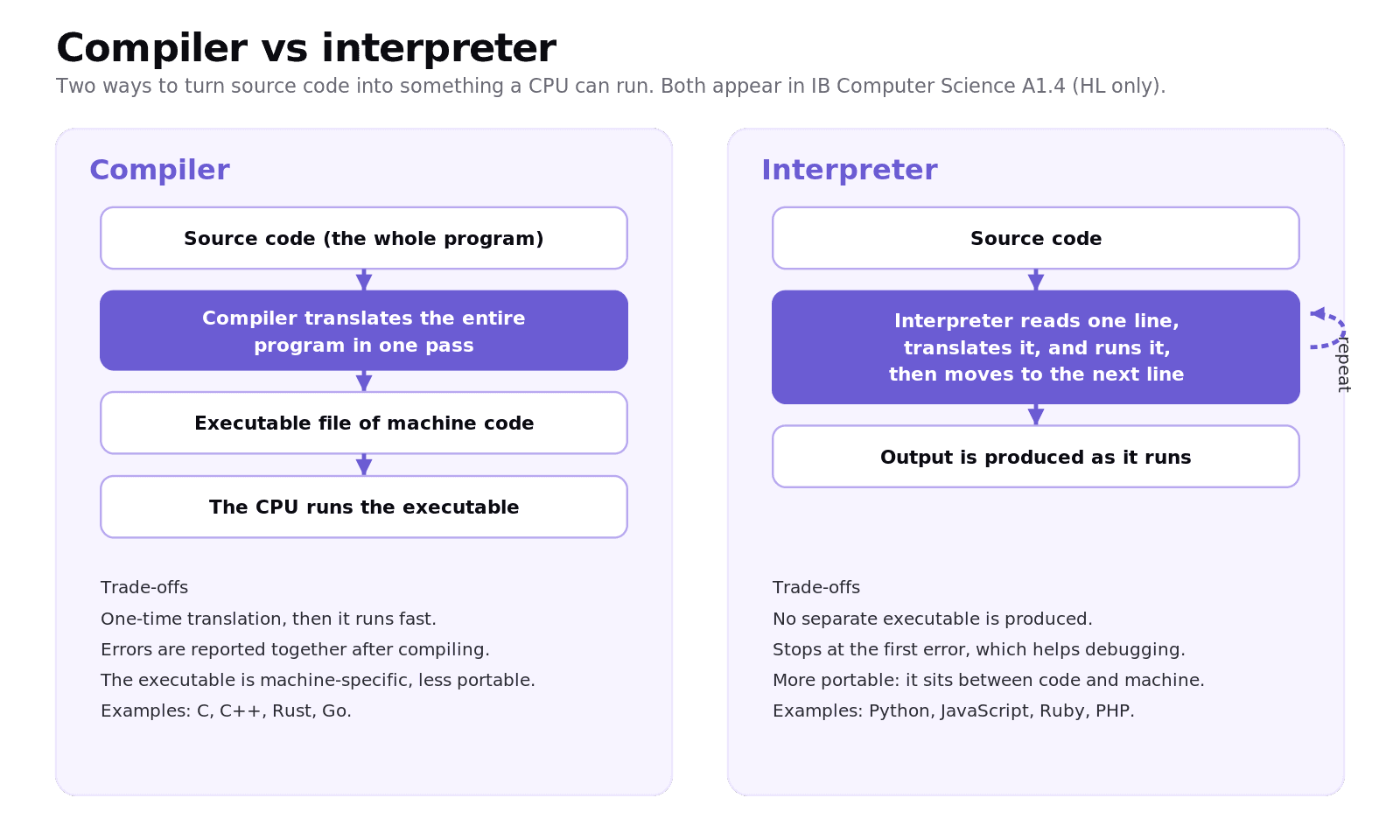
A compiler translates the entire program into machine code before it runs, producing a standalone file called a binary executable. Once that executable exists, you can run it again and again without translating the source again.
Because the whole program is analysed and optimised up front, compiled programs tend to run quickly. The cost is the compile step itself, and the fact that the executable is tied to a particular processor and operating system, which makes it less portable. Languages that are typically compiled include C, C++, Rust, and Go.
What is an interpreter?
An interpreter reads the source code one line at a time and translates and runs each line as the program executes, without producing a separate executable. The translation happens on the fly, every time the program runs.
This makes interpreters excellent for development and debugging: an interpreter stops at the first error it hits and reports it, so you fix problems as you go. Interpreted programs are usually more portable, because the interpreter sits between your code and the machine, but they tend to run slower because each line is translated during execution. Python, JavaScript, Ruby, and PHP are usually interpreted.
What is the difference between a compiler and an interpreter?
The cleanest way to remember it: a compiler translates everything once and hands you an executable, while an interpreter translates and runs line by line every time.
Feature | Compiler | Interpreter |
|---|---|---|
When translation happens | Once, before running | Continuously, while running |
Output | A standalone executable | No executable; runs source directly |
Run speed | Usually faster | Usually slower |
Error reporting | After a full pass of the program | Stops at the first error |
Portability | Lower (machine-specific binary) | Higher (interpreter bridges the gap) |
Typical use | Performance-critical software | Rapid development and scripting |
What are the stages of translation?
Both translators share most of the same analysis pipeline. A compiler then adds an optimisation pass and emits a standalone executable.
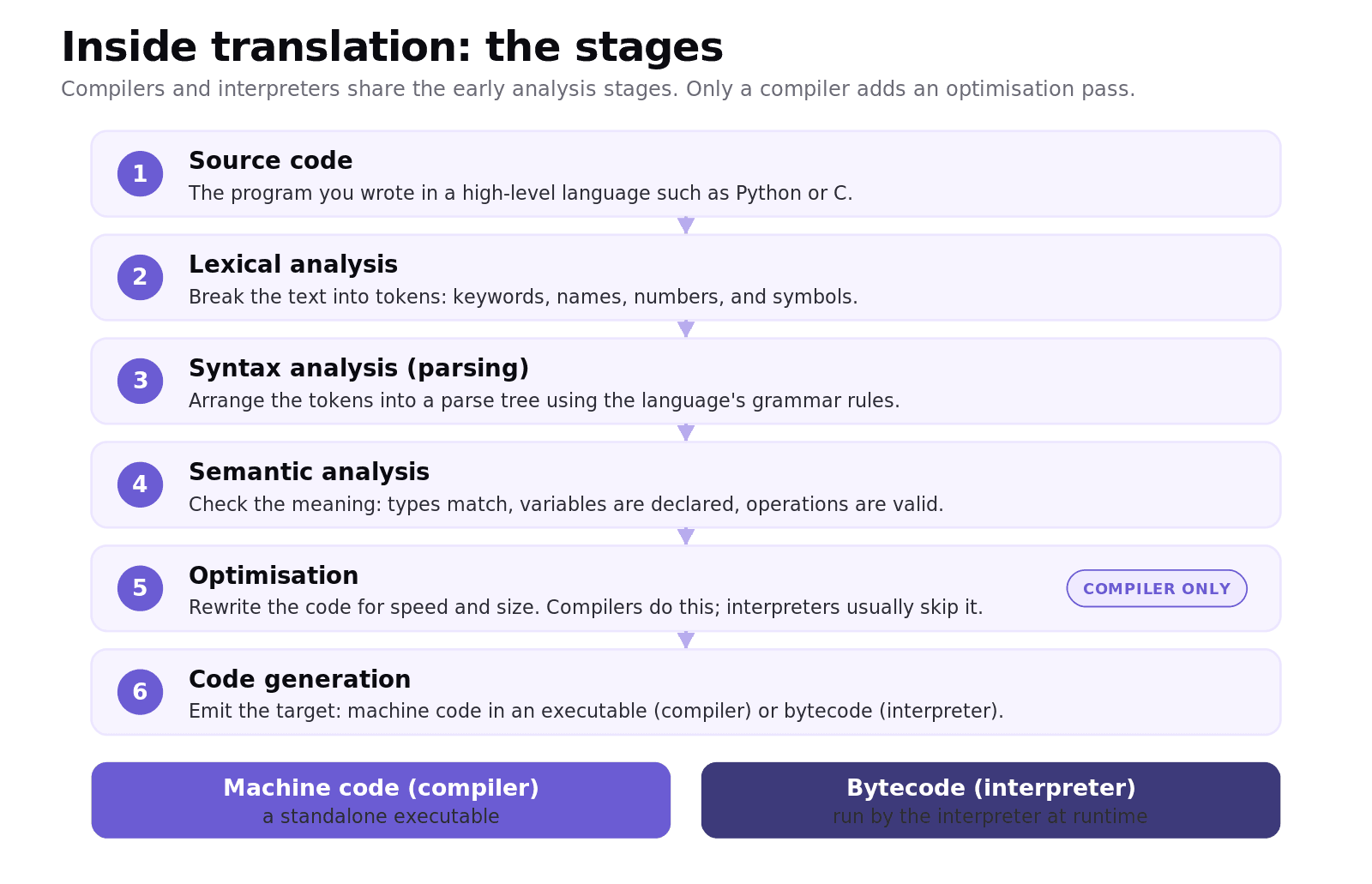
Lexical analysis breaks the source text into tokens such as keywords, names, numbers, and symbols. Syntax analysis, also called parsing, arranges those tokens into a parse tree according to the language's grammar. Semantic analysis checks the meaning: that types match, variables are declared, and operations are valid. A compiler then runs an optimisation pass to make the code faster and smaller, which interpreters usually skip. Finally, code generation emits the target, which is machine code for a compiler or bytecode for an interpreter. Bytecode is a compact, lower-level instruction set that the interpreter executes at runtime.
When should you use a compiler or an interpreter?
This is the evaluation A1.4 questions reward, so frame it around the project's needs.
Worked example: two projects, two choices
Imagine a data-science team prototyping a machine-learning model, and a studio building a high-performance game engine.
The data-science prototype changes constantly and needs fast iteration. An interpreted language like Python wins: the team can write, run, and test in seconds, and clear line-by-line errors speed up debugging. Raw execution speed matters less than development speed here.
The game engine must squeeze every millisecond out of the hardware. A compiled language like C++ or Rust wins: the one-time compile produces an optimised, fast executable, and the loss of portability is acceptable because the team targets known platforms.
The evaluation is not "compiled is better"; it is matching the translation process to whether the priority is execution speed or development speed and portability.
Common exam mistakes for IB CS A1.4
Saying compiled code is simply "faster" with no nuance. Compiled programs usually run faster, but they take longer to translate first, and interpreters give faster development.
Claiming a compiler stops at the first error. It is the interpreter that stops at the first error at runtime; a compiler reports errors after analysing the whole program.
Saying an interpreter produces an executable. It does not; it runs the source directly.
Confusing bytecode with machine code. Bytecode is run by the interpreter, not directly by the CPU.
Forgetting that A1.4 is HL only.
Quick recap of A1.4
Translation turns high-level source code into machine code the CPU can run.
A compiler translates the whole program first into an executable, which then runs fast but is less portable.
An interpreter translates and runs line by line, stops at the first error, and is more portable but slower.
Translation stages: lexical, syntax, and semantic analysis, then optimisation (compiler) and code generation.
To evaluate, match the translator to the project: execution speed versus development speed and portability.
Frequently asked questions
What is the difference between a compiler and an interpreter?
A compiler translates the entire program into a machine-code executable before it runs, so it runs fast but is tied to one platform. An interpreter translates and runs the source line by line each time, which is slower but more portable and stops at the first error for easier debugging.
Is Python compiled or interpreted?
Python is usually described as interpreted: you run the source directly and it executes line by line. Behind the scenes the interpreter first compiles your code to bytecode, which it then executes, but there is no standalone machine-code executable like a compiled language produces.
Which is faster, a compiler or an interpreter?
Compiled programs usually run faster because the code is translated and optimised once, ahead of time. Interpreted programs usually run slower because each line is translated while the program runs, although they often make development faster.
What is bytecode?
Bytecode is a compact, lower-level instruction set designed to be executed efficiently by an interpreter. It is not machine code, so the CPU does not run it directly; the interpreter reads the bytecode and carries out the instructions.
Why is A1.4 HL only in IB Computer Science?
A1.4 Translation is one of the higher-level extensions of Theme A. Its single understanding, evaluating the translation processes of interpreters and compilers, is assessed only at HL, so SL students are not examined on it.
Looking for a printable summary? Grab the A1.4 Shuttle Learning revision sheet, a two-page knowledge organiser covering everything above.
Looking for an IB Computer Science tutor?
Hi, I'm Yuness, the tutor behind Shuttle Learning. I work one to one with IB Computer Science students at SL and HL, and I deliberately take on only a handful each year so every student gets my full attention. Most go on to earn the 6s and 7s they were aiming for, in the final exams and the IA alike.
If you would like that kind of support, book a free 15-minute call and tell me what you are stuck on. You can press BOOK A LESSON .