Computer Hardware and Operation (IB CS A1.1): A Complete Guide
IB Computer Science A1.1 explained: CPU, fetch–decode–execute, memory hierarchy, storage, compression, and cloud — with worked examples and exam tips.

Every program you have ever run, from the IB code editor to your favourite game, ends up as a stream of tiny instructions that a chip has to fetch, understand, and act on. Topic A1.1 is the foundation of the whole IB Computer Science syllabus. Get it solid, and the rest of A1 (plus a good chunk of B2) becomes far less intimidating.
This guide walks through every syllabus understanding in A1.1, gives worked examples, and flags the slips that quietly lose marks in Paper 1.
What does IB CS topic A1.1 cover?
A1.1 has nine syllabus understandings: the main CPU components, the role of the GPU, how CPUs and GPUs differ, the purposes of the different types of primary memory, the fetch–decode–execute cycle, pipelining in multi-core architectures (HL only), internal and external secondary storage, the concept of compression, and the types of cloud computing service. In one line: how a computer thinks, remembers, stores, shrinks, and rents.
What are the main components of the CPU?
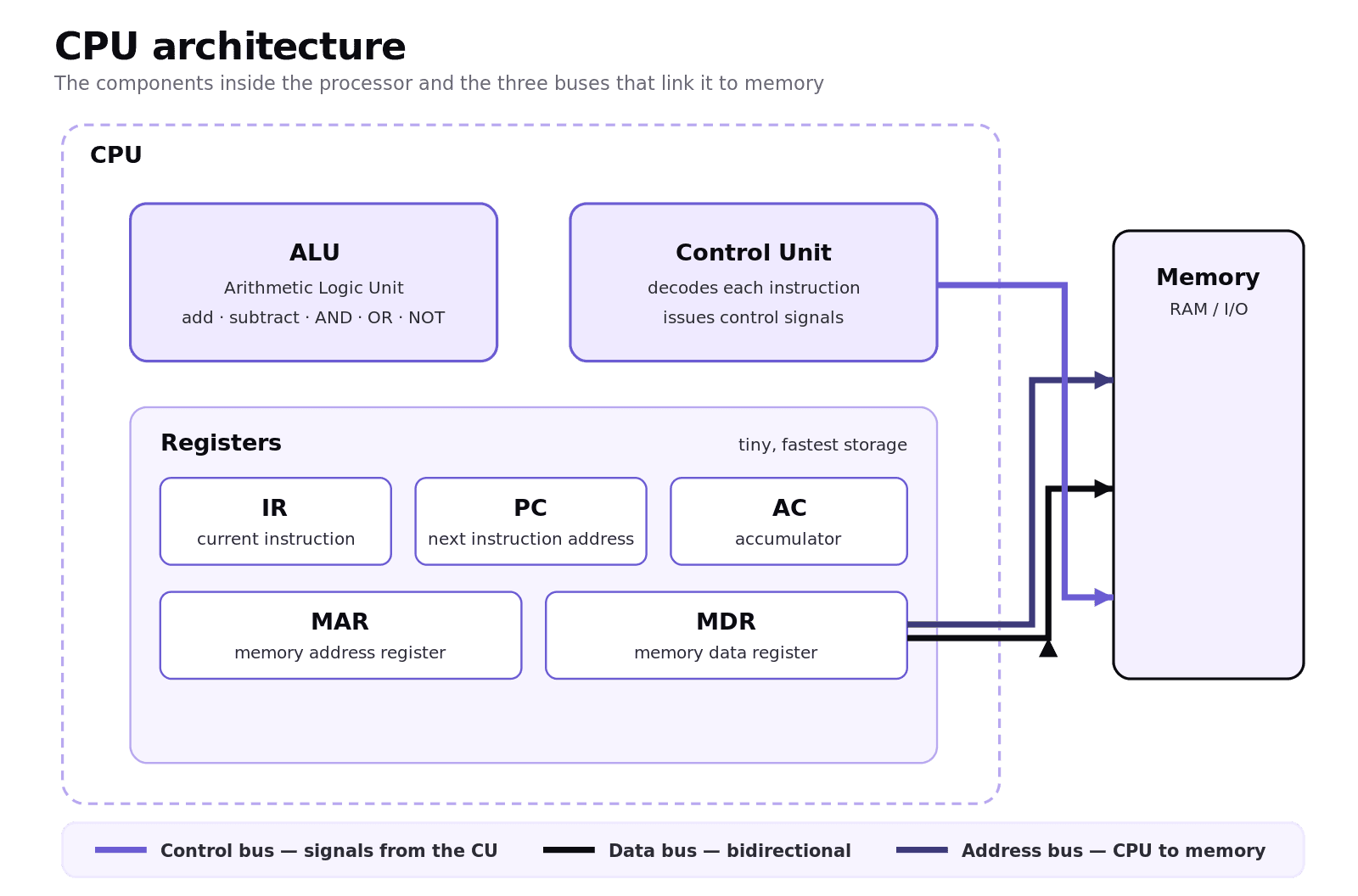
The central processing unit has three parts you must be able to name and explain.
The Arithmetic Logic Unit (ALU) is the calculator. It carries out arithmetic such as addition and subtraction, and logical operations such as AND, OR, and NOT.
The Control Unit (CU) is the conductor. It reads each instruction, decodes the opcode to work out what it means, and sends control signals that tell the rest of the CPU what to do and when.
Registers are tiny, blisteringly fast storage cells inside the CPU. The five to know by name are the Instruction Register (IR), holding the current instruction; the Program Counter (PC), holding the address of the next instruction; the Memory Address Register (MAR), holding the address the CPU is about to read from or write to; the Memory Data Register (MDR), holding the data travelling to or from memory; and the Accumulator (AC), holding intermediate ALU results.
The CPU talks to the rest of the system over three buses. The control bus carries timing and control signals from the CU. The data bus carries the actual data and is bidirectional. The address bus carries memory addresses outward from the CPU.
What is the difference between a CPU and a GPU?
A CPU has a handful of powerful cores built for sequential, decision-heavy work. A GPU has thousands of much simpler cores built to apply the same operation to many data points at once, a pattern called SIMD (single instruction, multiple data).
In exam shorthand: CPUs are optimised for low latency, GPUs for high throughput. A CPU wins on branching logic, running the operating system, and handling input. A GPU wins on graphics rendering, scientific simulation, and modern machine learning. The two cooperate: the CPU hands a block of parallel work to the GPU and carries on with general tasks meanwhile.
How does the fetch–decode–execute cycle work?
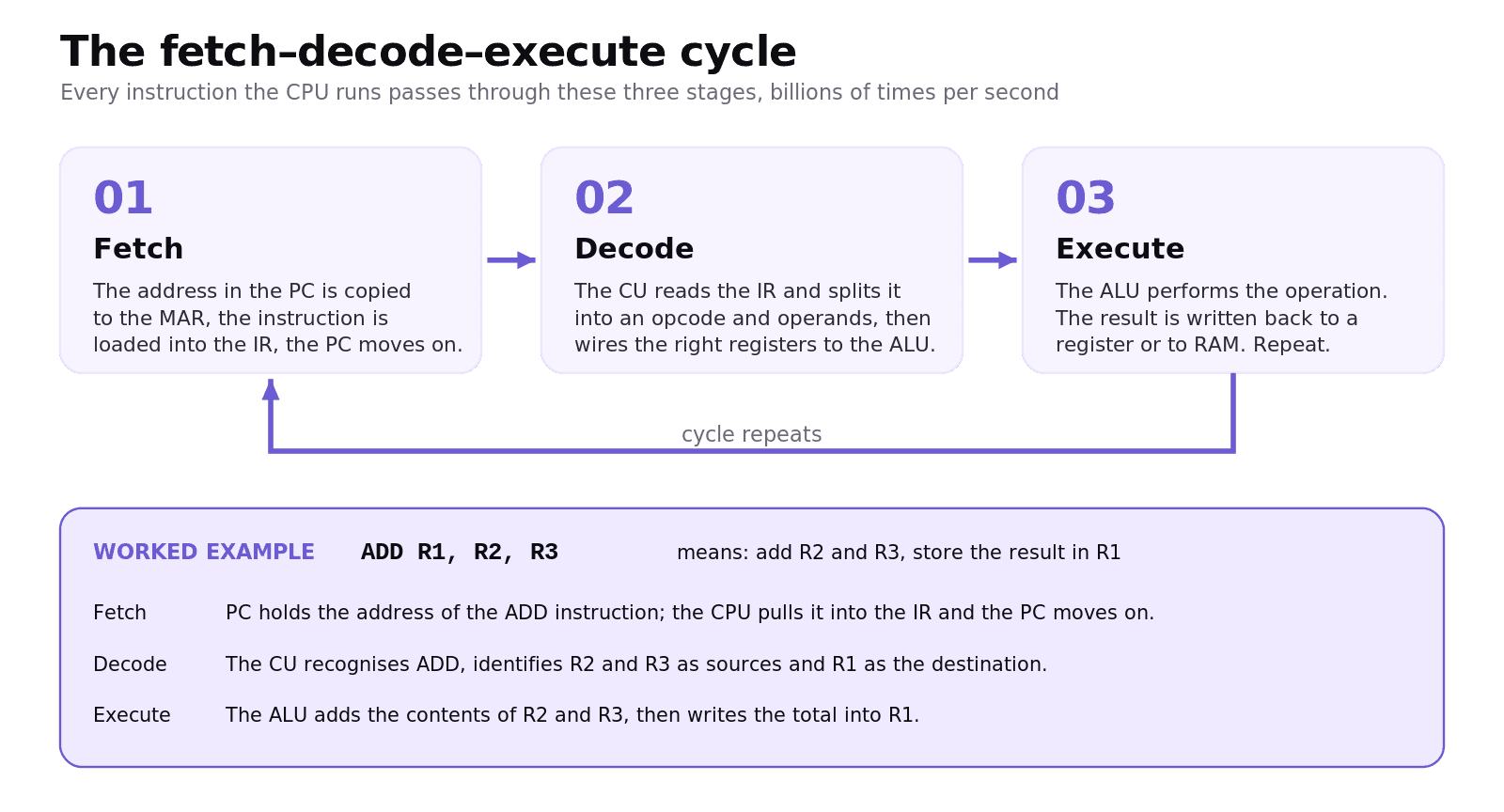
Every instruction the CPU runs passes through three phases that repeat billions of times each second.
Fetch. The PC holds the address of the next instruction. That address is copied into the MAR, the instruction is loaded from memory into the IR via the MDR, and the PC is incremented to point at the following instruction.
Decode. The CU inspects the instruction in the IR, splits it into its opcode (what to do) and operands (what to do it with), and wires the right registers into the ALU.
Execute. The ALU, or the memory unit, performs the operation. The result is written back to a register or to RAM, and the cycle begins again.
Worked example: ADD R1, R2, R3
The instruction ADD R1, R2, R3 means "take the values in R2 and R3, add them, and store the result in R1." Through the cycle:
Fetch. The PC holds the address of the ADD instruction. The CPU pulls that instruction into the IR. The PC moves on.
Decode. The CU recognises ADD, identifies R2 and R3 as the sources, and R1 as the destination.
Execute. The ALU adds the contents of R2 and R3, then writes the result into R1.
How does pipelining improve performance? (HL only)
A single-core CPU usually finishes one instruction before starting the next. Pipelining is the laundry-day trick: while one load is in the dryer, the next can already be in the washer. So while instruction 1 is executing, instruction 2 can be decoding and instruction 3 can already be fetching.
Pipelining does not make any single instruction faster. It overlaps the stages to lift overall throughput. Multi-core processors push this further by putting several independent pipelines on one chip. Because cores often share L3 cache and RAM, they need cache coherency so that two cores never act on stale copies of the same data.
What is the memory hierarchy?
Primary memory is what the CPU can reach directly. It forms a clear hierarchy, fastest and smallest at the top, slower and larger toward the bottom.
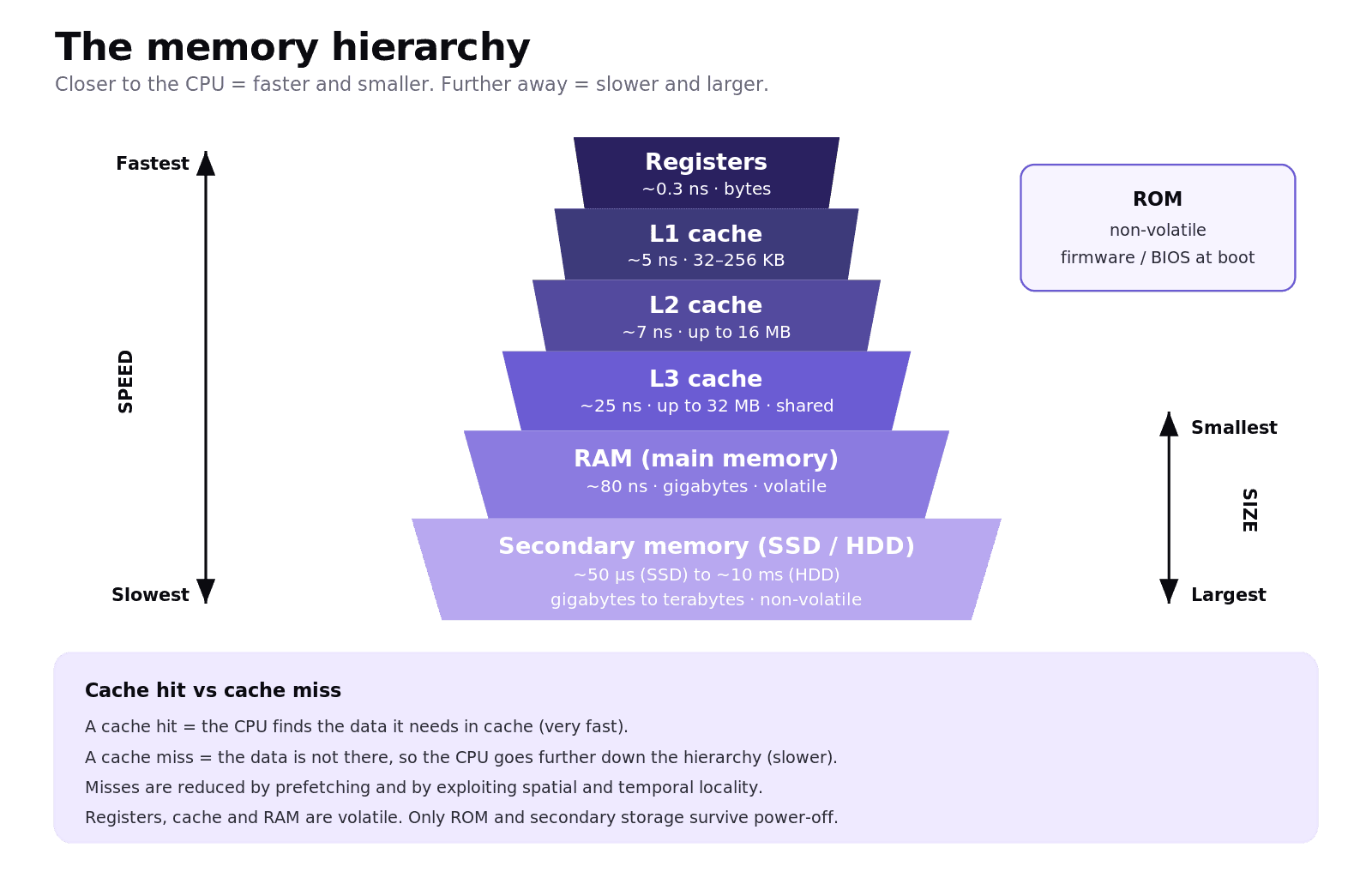
Registers: on the CPU itself, around 0.3 ns access, just bytes of storage. Volatile.
L1 cache: per core, around 5 ns, 32–256 KB. Often split into separate data and instruction caches. Volatile.
L2 cache: per core or per cluster, around 7 ns, up to 16 MB. Volatile.
L3 cache: shared across all cores, around 25 ns, up to 32 MB. Volatile.
RAM: the main workbench, around 80 ns, gigabytes. Holds the running OS, open apps, and active data. Volatile.
ROM: non-volatile. Holds the firmware and BIOS used at boot.
The CPU checks registers first, then L1, L2, L3, and finally RAM. A cache hit means the data was found in cache (very fast). A cache miss means the CPU must go further out (slower). Modern CPUs cut misses through prefetching and by exploiting spatial locality (data near recently used data is likely to be used soon) and temporal locality (recently used data is likely to be used again soon).
What's the difference between primary and secondary memory?
Primary memory is fast and mostly volatile. It loses everything on power-off, and the CPU reaches it directly. Registers, cache, and RAM are primary; ROM is the non-volatile exception.
Secondary memory is slower, larger, and non-volatile. It keeps your files when the power is off, and the CPU cannot work on it directly: data must be loaded into RAM first.
HDD: spinning magnetic platters. Cheap and roomy, but slower (around 100–200 MB/s) because of moving parts.
SSD: NAND flash with no moving parts. Faster (up to around 7,000 MB/s) and pricier per GB.
eMMC: flash soldered onto a board, common in budget mobile devices.
Optical: pits and lands on a disc, read by laser. Archival use.
USB / SD: portable NAND flash.
NAS: network-attached storage, often configured with RAID for redundancy.
What is data compression and what are the two types?
Compression shrinks a file so it needs less storage and less bandwidth to send. There are two families, and you should be able to compare them.
Lossless compression removes redundancy, and the decompressed file is identical to the original. ZIP, PNG, FLAC, and run-length encoding are lossless. Use it for text, archives, and source masters.
Lossy compression discards perceptual detail the eye or ear is unlikely to notice. The file is smaller, but the original cannot be perfectly rebuilt. JPEG, MP3, and MPEG are lossy. Use it for streaming and media at scale.
Run-length encoding (RLE) is the simplest IB example: AAAAA becomes 5A. Transform coding, used by JPEG and MP3, shifts data into the frequency domain with a Discrete Cosine Transform so the least important frequencies can be dropped or quantised.
What are SaaS, PaaS, and IaaS?
Cloud services come in three classic models, and the trade-off is always the same: as you give up control, you gain convenience.
Software as a Service (SaaS): ready-to-use software in a browser. Gmail, Google Docs, Notion. You bring the data; the provider runs everything else.
Platform as a Service (PaaS): a hosted environment for building, deploying, and running your own applications. The provider manages the operating system, runtime, databases, and scaling.
Infrastructure as a Service (IaaS): raw virtualised servers, storage, and networking. AWS EC2 and Azure VMs are the classic examples. You install the OS and pay for what you provision.
The control order is IaaS > PaaS > SaaS, and convenience runs the opposite way.
Common exam mistakes for IB CS A1.1
Confusing the Program Counter with the Instruction Register. The PC holds the next address; the IR holds the current instruction.
Mixing up the MAR and the MDR. The MAR carries addresses; the MDR carries data.
Calling cache non-volatile. Every cache level (L1, L2, L3) loses its contents when power is removed.
Saying GPUs are simply faster than CPUs. They are faster on parallel tasks; CPUs still win on sequential and branching work.
Describing lossless compression as removing "unnecessary" data. It removes redundancy, not detail.
Forgetting that ROM is non-volatile and survives power-off.
Quick recap of A1.1
The CPU contains the ALU, the CU, and registers (IR, PC, MAR, MDR, AC), linked to the rest of the system by the control, data, and address buses.
Every instruction is fetched, decoded, and executed. Pipelining and multi-core designs let those cycles overlap.
Primary memory is fast and volatile (registers → cache → RAM), with ROM as the non-volatile exception. Secondary memory (HDD, SSD, eMMC, optical, USB, NAS) is slower and non-volatile.
Lossless compression is reversible; lossy is not.
Cloud computing comes in three models, SaaS, PaaS, and IaaS, trading control for convenience.
Frequently asked questions
What is the role of the program counter in the fetch–decode–execute cycle?
The Program Counter holds the memory address of the next instruction to be executed. At the start of each cycle its value is copied into the MAR so the CPU can fetch that instruction, and then the PC is incremented to point at the instruction after it.
Is cache memory volatile or non-volatile?
All three levels of CPU cache (L1, L2, and L3) are volatile. They lose their contents when power is removed. ROM is the only common non-volatile memory in the primary memory hierarchy.
Why are GPUs better than CPUs for machine learning?
GPUs have thousands of simpler cores designed for SIMD (single instruction, multiple data) workloads. Machine learning training is dominated by matrix multiplications, which break down naturally into thousands of independent multiplications that a GPU can run in parallel.
Is JPEG lossless or lossy compression?
JPEG is lossy. It uses transform coding (the Discrete Cosine Transform) to convert image data into the frequency domain, then discards or quantises the higher frequencies the eye is least sensitive to. PNG is the common lossless image format.
What is the difference between SaaS, PaaS, and IaaS?
SaaS delivers ready software via a browser (Gmail, Google Docs). PaaS provides a hosted environment for your own apps with managed databases, runtimes, and scaling. IaaS rents raw virtualised servers, storage, and networking such as AWS EC2 and Azure VMs. Control rises as you move from SaaS to IaaS; convenience falls.
What is the difference between pipelining and multi-core processing?
Pipelining overlaps the stages (fetch, decode, execute) of different instructions on a single core to raise throughput. Multi-core processing uses several physical cores in one chip to run truly independent instruction streams in parallel. Modern processors combine both: each core has its own pipeline.
Looking for a printable summary? Grab the A1.1 Shuttle Learning revision sheet, a three-page knowledge organiser covering everything above.
Work with me
Looking for an IB Computer Science tutor?
Hi, I'm Yuness, the tutor behind Shuttle Learning. I work one to one with IB Computer Science students at SL and HL, and I deliberately take on only a handful each year so every student gets my full attention. Most go on to earn the 6s and 7s they were aiming for, in the final exams and the IA alike.
If you would like that kind of support, book a free 15-minute call and tell me what you are stuck on. You can press BOOK A LESSON .